

CheatEnabler
Add various cheat functions while disabling abnormal determinants / 添加一些作弊功能,同时屏蔽异常检测


 Мод для Dyson Sphere Program
от starfi5h
Enhance the function of dyson sphere editor. Feature: Hotkeys, symmetric tool, grid alignment changing. 画球辅助-增加自订热键、对称笔刷、轨道修改等功能。
SphereEditorTools — мод для Dyson Sphere Program (Дайсон Сфер Програм) от автора starfi5h. Enhance the function of dyson sphere editor. Feature: Hotkeys, symmetric tool, grid alignment changing. 画球辅助-增加自订热键、对称笔刷、轨道修改等功能。
Его скачали 43 тыс. раз: это 45-е место среди модов Dyson Sphere Program в нашем каталоге, редкость — «редкий» (топ-50% по скачиваниям). Мод давно не обновлялся — проверьте совместимость с текущей версией игры, актуальная версия — 2.2.5.
Для работы ему нужны: BepInEx.
2 шт · нажмите, чтобы открыть
Текст автора на языке оригинала
A QoL mod aims to improve dyson sphere editing experience.
When the building plan toolbox is displayed, you can use the hotkeys to switch between different tools. All hotkeys used in this mod are customizable in configuration, key name can be found in Unity manual - InputManager.
You can now build or remove multiple entities at once! Symmetric tool can be toggle with tab. There are two types of symmetry in the tool: Mirror symmetry: When it is activated (hotkey m), it will create corresponding reflections on the other side of the equator. Rotational symmetry: Numpad [+]/[-] to increase/decrease the number of brushes on the same latitude, ranging from 1 to 90. To multiple selection, hold ctrl and click 3 times to include the original object. To keep selecting, hold Ctrl and click on other objects.
Anchor Mode: When enabled, the selected layer rotation will stop, the grid orientation will be changed immediately when the orbit is modified and the position of structures will remain unchanged. It can fix the grid misalignment problem. Angular speed: Change the angular speed of selected layer. Input empty string will reset the orbit angular speed.
When mask is enabled in the GUI window, a black mask will appear in the background. You can also use hotkey h to hide dyson swarm and the star.
Via r2modman, or manual download the file and put SphereEditorTools.dll in BepInEx/plugins folder.
Run the game one time to generate .cfg file. Restart the game to make the changes take effect. Manual download .cfg file loaction: BepInEx\config\com.starfi5h.plugin.SphereEditorTools.cfg If you're using r2modman, go to Config editor to change the cfg file.
Default — Description
EnableToolboxHotkey — true — Switch between build plan tools with hotkeys.
EnableDisplayOptions — true — Enable display control of star and black mask.
EnableSymmetryTool — true — Enable mirror and rotation symmetry of building tools.
EnableToolboxHotkey — true — Enable dyson sphere layer orbit modifiy tool.
Default — Description
EnableGUI — true — Display a toolbox window.
WindowPosition — 300, 250 — Position of the window. Format: x,y
WindowSize — 240, 200 — Size of the window. Format: width,height
Default — Description
Toolbox
KeySelect — space — Inspect
KeyNode — q — Build Node
KeyFrameGeo — w — Build Frame(Geodesic)
KeyFrameEuler — e — Build Frame(Euler)
KeyShell — r — Build Shell
KeyGrid — g — Toggle Grid
Visibility
KeyHideMode — h — Toggle mask & star hide mode
Symmetry Tool
KeySymmetryTool — tab — Toggle symmetry tool
KeyMirroring — m — Toggle mirroring mode
KeyRotationInc — [+] — Increase the degree of rotational symmetry
KeyRotationDec — [-] — Decrease the degree of rotational symmetry
增加戴森球编辑器的功能,改善画球的游戏体验。
当工具箱显示时,可以用热键来切换不同的建造工具。其他功能也可以用热键操控。 这个MOD用到的热键都可以在设置中自定义,键名可以在Unity手册 - Input Manager中找到。
启用后,可以用热键tab開關,开启时能同时用多个笔刷建造或拆除。 镜像对称以赤道面對稱,开启时(m)会在赤道另一侧半球产生对应的笔刷。 旋转对称以自转轴对称,数值表示在同一个纬线上有多少个笔刷,范围在1-120(数字键盘[+][-]增减)。
锚定节点:启用后,所选层停止旋转,修改轨道时将会立即改变网格位置,节点位置保持不变。可以修复网格错位问题。 角速度:改变所选层的角速度。输入空字符串将重置轨道的角速度。
在操作窗口中启用遮罩后,会出现一个黑色遮罩并挡住戴森球体的背部部分。 热键h可以切换恒星和遮罩的显示状态。
通过管理器r2modman,或者手动下载文件并将SphereEditorTools.dll放入BepInEx/plugins文件夹。
.cfg文件需要先运行过游戏一次才会出现,修改后要重启游戏才会生效。 管理器安装: 左边选项Config editor -> 找到starfi5h.plugin.SphereEditorTools -> Edit Config 手动安装: 更改BepInEx\config\com.starfi5h.plugin.SphereEditorTools.cfg文件
默认 — 描述
EnableToolboxHotkey — true — 启用工具箱热键
EnableDisplayOptions — true — 启用显示控制(恒星/黑色遮罩)
EnableSymmetryTool — true — 启用对称建造工具(镜像/旋转)
EnableOrbitTool — true — 启用壳层轨道工具
Default — Description
EnableGUI — true — 启用图形操作窗口
WindowPosition — 300, 250 — 窗口的位置 格式: x,y
WindowSize — 240, 200 — 窗口的大小 格式: 宽度,高度
默认 — 描述
工具箱
KeySelect — space — 查看
KeyNode — q — 修建节点
Описание длинное — здесь его начало. Читать целиком на странице автора
В r2modman ставится автоматически
Файл скачивается с официального сервера Thunderstore, без перезаливов и сторонних установщиков
Подробная инструкция для Dyson Sphere ProgramВставьте значок в описание на Thunderstore, в README или в Discord — русскоязычные игроки сразу попадут на страницу с переводом и инструкцией.

[](https://modka.app/dyson-sphere-program/starfi5h-sphereeditortools/)<a href="https://modka.app/dyson-sphere-program/starfi5h-sphereeditortools/"><img src="https://modka.app/badge.png" alt="Описание на русском — Модка" height="44"></a>[url=https://modka.app/dyson-sphere-program/starfi5h-sphereeditortools/]Описание на русском — Модка[/url]Скачайте менеджер модов r2modman (или Gale) и выберите в нём игру Dyson Sphere Program. Создайте профиль — так моды не смешаются с чистой версией игры. Найдите «SphereEditorTools» во вкладке Online и нажмите Download — BepInEx и все зависимости подтянутся сами. Нажмите «Start modded» — игра запустится с модами. Чтобы сыграть без модов, запустите игру как обычно из Steam — r2modman не трогает чистую версию игры.
Файл скачивается с официального сервера Thunderstore, куда его загрузил starfi5h. Мы не перезаливаем и не изменяем моды.
Установите вместе с ним: BepInEx. В менеджере модов зависимости подтягиваются автоматически.
1 октября 2025, актуальная версия — 2.2.5. Это больше года назад: перед установкой проверьте, работает ли мод на текущей версии игры.
Add various cheat functions while disabling abnormal determinants / 添加一些作弊功能,同时屏蔽异常检测

Улучшение производительности при рендеринге Dyson Spheres

Мод Dyson Sphere, который делает EM Rail Ejectors умнее
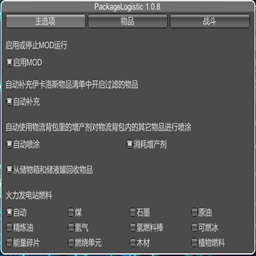
通过物流背包提供物品收发能力。Provides the ability to send and receive items through deliveryPackage

Set game speed by pause/resume/speedup button or hotkey. Autosave in background. 游戏速度控制(0x-10x)。Pause热键战术暂停。(可选)在後台自動存档

Улучшает систему Blueprint с изменениями QoL, новыми функциями, такими как силовая паста, чертежи фундамента и многое другое