



BulletTime
Set game speed by pause/resume/speedup button or hotkey. Autosave in background. 游戏速度控制(0x-10x)。Pause热键战术暂停。(可选)在後台自動存档


 Мод для Dyson Sphere Program
от kremnev8
Улучшает систему Blueprint с изменениями QoL, новыми функциями, такими как силовая паста, чертежи фундамента и многое другое
BlueprintTweaks — мод для Dyson Sphere Program (Дайсон Сфер Програм) от автора kremnev8. Улучшает систему Blueprint с изменениями QoL, новыми функциями, такими как силовая паста, чертежи фундамента и многое другое
Его скачали 171 тыс. раз: это 16-е место среди модов Dyson Sphere Program в нашем каталоге, редкость — «эпический» (топ-20% по скачиваниям). Мод обновлялся в последние полгода, актуальная версия — 1.6.13.
Для работы ему нужны: BepInEx, NebulaMultiplayerModApi, LDBTool, CommonAPI.
2 шт · нажмите, чтобы открыть
Текст автора на языке оригинала
This mod improves Blueprint system with QoL changes, new features like force pasting, foundation blueprints and more.
List of features:
Interface changes:
J keyShift key to keep description and iconsChange your blueprint on the fly:
Features:
Ctrl + T/G to toggleCtrl + B in desired initial position.compatible with vanilla strings.Shift + T/G to toggle mirror in LaTitude/LonGitude axis.Ctrl+Z to undo the most recent action. Use Shift+Z to redo last undone action. When new action is performed redo history is cleared. When player leaves current planet undo history is cleared. Undo is compatible with Nebula, however please make backups and report any issues encountered.Axis lock supports: Blueprint, Construction and Reform modes
Grid snapping supports: Blueprint and Construction modes
All Keybinds are rebindable
All features can be disabled in config file located at Dyson Sphere Program/BepInEx/config/. By default everything is enabled.
This mod is fully compatible with Galactic Scale 2
This mod is fully compatible with Nebula Multiplayer Mod
Important Note: Nebula Multiplayer mod itself is NOT required. I only need its API plugin, which is separate.
More features might come in the future. If you have any feature you would like to see added, message me on Discord
Blueprint tweaks features a small API that allows other mods to save data within blueprints.
To use this API within your mod:
ICustomBlueprintDataSerializer interface in a classThen add following code to your mod awake call:
BlueprintTweaksPlugin.RegisterCustomBlueprintDataSerializer("my_amazing_mod:bp_serializer");Now your ICustomBlueprintDataSerializer methods will be executed when appropriate.
Feel free to contact me via Discord (Kremnev8#3756) for any feedback, bug-reports or suggestions.
Simply open the mod manager (if you don't have it install it here), select Blueprint Tweaks by kremnev8, then Download.
If prompted to download with dependencies, select Yes.
Then just click Start modded, and the game will run with the mod installed.
Install BepInEx from here
Install LDBTool from here
Install CommonAPI from here
Install NebulaMultiplayerModApi from here
Unzip folder patchers into Dyson Sphere Program/BepInEx/patchers/BlueprintTweaks/ (Create folder named BlueprintTweaks)
Unzip folder plugins into Dyson Sphere Program/BepInEx/plugins/BlueprintTweaks/. (Create folder named BlueprintTweaks)
В r2modman ставится автоматически
Файл скачивается с официального сервера Thunderstore, без перезаливов и сторонних установщиков
Подробная инструкция для Dyson Sphere ProgramВставьте значок в описание на Thunderstore, в README или в Discord — русскоязычные игроки сразу попадут на страницу с переводом и инструкцией.

[](https://modka.app/dyson-sphere-program/kremnev8-blueprinttweaks/)<a href="https://modka.app/dyson-sphere-program/kremnev8-blueprinttweaks/"><img src="https://modka.app/badge.png" alt="Описание на русском — Модка" height="44"></a>[url=https://modka.app/dyson-sphere-program/kremnev8-blueprinttweaks/]Описание на русском — Модка[/url]Скачайте менеджер модов r2modman (или Gale) и выберите в нём игру Dyson Sphere Program. Создайте профиль — так моды не смешаются с чистой версией игры. Найдите «BlueprintTweaks» во вкладке Online и нажмите Download — BepInEx и все зависимости подтянутся сами. Нажмите «Start modded» — игра запустится с модами. Чтобы сыграть без модов, запустите игру как обычно из Steam — r2modman не трогает чистую версию игры.
Файл скачивается с официального сервера Thunderstore, куда его загрузил kremnev8. Мы не перезаливаем и не изменяем моды.
Установите вместе с ним: BepInEx, NebulaMultiplayerModApi, LDBTool, CommonAPI. В менеджере модов зависимости подтягиваются автоматически.
21 июня 2026, актуальная версия — 1.6.13. Дата берётся с официальной страницы мода при каждом обновлении каталога.
Set game speed by pause/resume/speedup button or hotkey. Autosave in background. 游戏速度控制(0x-10x)。Pause热键战术暂停。(可选)在後台自動存档

Calculate the factory quantity and material requirements, and generate blueprint for the production line based on the target product. 根据目标产物,自动计算整个生产线所需的各种原料和工厂数,或生成蓝图。
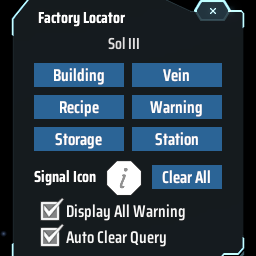
Find the positions of specified machines by type/recipe/content and ping on map. Ctrl + F to open the search window. 工厂定位:寻找星球上的产线/矿脉/箱子内物品的位置

Показывает скорость производства и потребления товаров в производственных окнах.
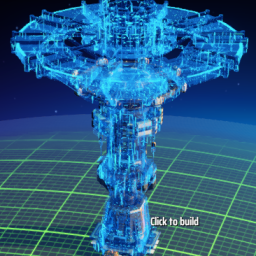
Reduce lag when placing building. Allow directly replace PLS with ILS, and show allowed range. Import blueprint from clipboard directly when Ctrl+V. (Optional)Build ghost/hologram when lack of items. 优化建筑工具:替换升级物流塔,提示塔间距,优化蓝图UI,(可选)建设虚影,(可选)减少物流塔建造卡顿
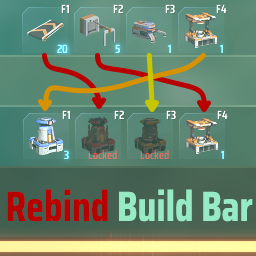
Возобновите контроль над своим баром! Этот мод позволяет переделать любые элементы Build Bar по вашему желанию.