

GenesisBook
构建真实宇宙,撰写创世之书。新矿物,新材料,新配方,新科技,新机制。Construct Real Universe. Then leave a GenesisBook. New vein, new material, new recipe, new technology, new structure.


 Мод для Dyson Sphere Program
от Shad0wlife
Показывает скорость производства и потребления товаров в производственных окнах.
AssemblerUI — мод для Dyson Sphere Program (Дайсон Сфер Програм) от автора Shad0wlife. Показывает скорость производства и потребления товаров в производственных окнах.
Его скачали 61,7 тыс. раз: это 37-е место среди модов Dyson Sphere Program в нашем каталоге, редкость — «редкий» (топ-50% по скачиваниям). Мод обновлялся в течение года, актуальная версия — 3.0.0.
Для работы ему нужны: BepInEx.
Текст автора на языке оригинала
A Dyson Sphere Program Mod to enhance the Assembler (and Miner) UI Window.
It shows the production speeds of the produced items below the corresponding output slots in the window, as well as the consumption speed of the input items above the input slots. This way, you can plan your factory setup more easily without having to calculate your in- and outputs yourself.
The speed info for both input and output can be disabled, should you prefer not showing one of them. Or both of them - even though I don't understand why you would install this mod in the first place then...
You can also decide whether you want to display the speed with which the device currently creates or consumes resources, or if you want to display the recipe speed for the device without impact of power and full or empty slots.
Speeds can also be configured to show in an items/s scale instead of items/min, and can be configured to use 0 to 3 decimal places.
В r2modman ставится автоматически
1 в каталоге
构建真实宇宙,撰写创世之书。新矿物,新材料,新配方,新科技,新机制。Construct Real Universe. Then leave a GenesisBook. New vein, new material, new recipe, new technology, new structure.
Файл скачивается с официального сервера Thunderstore, без перезаливов и сторонних установщиков
Подробная инструкция для Dyson Sphere ProgramВставьте значок в описание на Thunderstore, в README или в Discord — русскоязычные игроки сразу попадут на страницу с переводом и инструкцией.

[](https://modka.app/dyson-sphere-program/shad0wlife-assemblerui/)<a href="https://modka.app/dyson-sphere-program/shad0wlife-assemblerui/"><img src="https://modka.app/badge.png" alt="Описание на русском — Модка" height="44"></a>[url=https://modka.app/dyson-sphere-program/shad0wlife-assemblerui/]Описание на русском — Модка[/url]Скачайте менеджер модов r2modman (или Gale) и выберите в нём игру Dyson Sphere Program. Создайте профиль — так моды не смешаются с чистой версией игры. Найдите «AssemblerUI» во вкладке Online и нажмите Download — BepInEx и все зависимости подтянутся сами. Нажмите «Start modded» — игра запустится с модами. Чтобы сыграть без модов, запустите игру как обычно из Steam — r2modman не трогает чистую версию игры.
Файл скачивается с официального сервера Thunderstore, куда его загрузил Shad0wlife. Мы не перезаливаем и не изменяем моды.
Установите вместе с ним: BepInEx. В менеджере модов зависимости подтягиваются автоматически.
7 февраля 2026, актуальная версия — 3.0.0. Дата берётся с официальной страницы мода при каждом обновлении каталога.
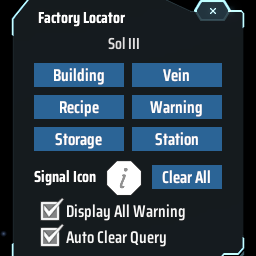
Find the positions of specified machines by type/recipe/content and ping on map. Ctrl + F to open the search window. 工厂定位:寻找星球上的产线/矿脉/箱子内物品的位置

Set game speed by pause/resume/speedup button or hotkey. Autosave in background. 游戏速度控制(0x-10x)。Pause热键战术暂停。(可选)在後台自動存档

Улучшает систему Blueprint с изменениями QoL, новыми функциями, такими как силовая паста, чертежи фундамента и многое другое

Менеджер трафика логистической станции
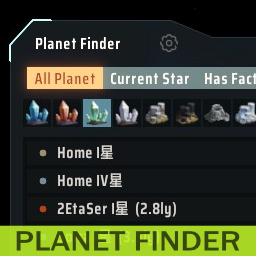
Предоставляет окно для поиска планет

Adds QoL features to statistics panel. Extra ui scale options. 统计面板UI增强: 以星系名排序,过滤星球名称,热键切换,导航按钮,字体大小