
MinerInfo
Shows maximum miner output per second for all miners on a vein. Filter details by clicking on vein icons. 显示矿脉上矿机最大产量。点选矿脉图示以筛选节点

 Мод для Dyson Sphere Program
от hetima
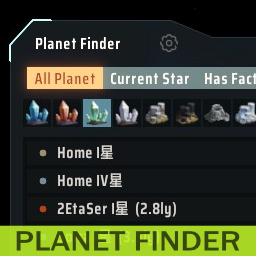
Предоставляет окно для поиска планет
PlanetFinder — мод для Dyson Sphere Program (Дайсон Сфер Програм) от автора hetima. Предоставляет окно для поиска планет
Его скачали 68,1 тыс. раз: это 32-е место среди модов Dyson Sphere Program в нашем каталоге, редкость — «редкий» (топ-50% по скачиваниям). Мод обновлялся в последний месяц, актуальная версия — 1.3.2.
Дополнительных модов для работы не требует.
1 шт · нажмите, чтобы открыть
Текст автора на языке оригинала
Mod for Dyson Sphere Program. Needs BepInEx.
This mod adds a window that lists the planets and allows you to search by criteria.
It can be opened from the button that will be added to the panel at the bottom left of the game screen and the bottom right of the star map. It can also be opened with a shortcut (default LCtrl+F). Whether the button is shown or not, and the shortcut can be customized by clicking on the gear icon at the top of the main window.
The scope of the list can be narrowed down by "all star system", "all planets", "current star system", "planets where facilities are being built", "favorited" and "recently visited planets". From there, you can further filter by planet name and which resources are present. Resources can be multi-selected by shift-clicking, narrowing down the list of planets that have all the resources.
The display area shows the name of the planet, distance from the current star system, and the actual number of selected resources and approximate number of chunks of veins. A planet icon is shown in front of the name. Hovering the icon or the name shows the planet or star type. For the selected resource the list can show how much has already been mined. A gas resource shows its extraction speed. The power status can also be displayed and switched to resource information by pressing the Tab key. If the electricity supply-demand ratio exceeds 90%, an orange display warns. Clicking the magnifying glass button displays the planet in the starmap view. Right-clicking a row brings up a panel offering various functions.
Information on all planets cannot be retrieved immediately after loading. Information acquisition begins when the game started. This will take some time. Progress will be displayed as the window title until all information has been calculated. Starting with game version 0.10.32.25779, this work is no longer necessary and is available immediately (or performed only once), since the information is stored in the save data.
Favorite feature adds/removes the "★" character directly to the planet name. Manually adding or removing the "★" character will affect this.
惑星を一覧表示し、条件を指定して検索できるウィンドウを追加するmodです。
ゲーム画面左下のパネルと星図ビューの右下に追加されるボタンから開くことができます。ショートカットでも開くことができます(デフォルトLCtrl+F)。ボタンを表示するかどうか、ショートカットのカスタマイズはメインウィンドウ上部の歯車アイコンから変更できます。
一覧表示する範囲を「すべての星系」「すべての惑星」「現在の星系」「施設を建てている惑星」「お気に入り」「最近訪れた惑星」で絞り込みます。そこから更に惑星の名前や資源でフィルタできます。 資源はシフトクリックすると複数選択することができ、すべての資源が揃った惑星を絞り込みます。
検索結果表示部分には惑星の名前、現在の星系からの距離、選択した資源の実数とおおまかな鉱脈の数が表示されます。惑星名の前には惑星のアイコンが表示されます。アイコンまたは名前にカーソルを合わせると、惑星や恒星の種類が表示されます。選択した資源は、すでに採掘した量も表示できます。ガス資源は採取速度を表示します。電力の状態も表示でき、Tabキーを押すことで資源の情報と切り替わります。電力需給率が90%を超えていたらオレンジ色の表示で警告します。 虫眼鏡のボタンをクリックするとその惑星を星図ビューで表示します。 リストを右クリックすると様々な機能を提供するパネルを表示します。
ロード直後はすべての惑星の情報を取得することができません。ゲーム開始時から情報取得を始めます。これにはしばらく時間がかかります。全情報の算出が完了するまでウィンドウタイトルに進捗が表示されます。ゲームバージョン 0.10.32.25779 以降はセーブデータに情報が保存されるため、この作業はなくなり即座に利用できるようになります(あるいは1回だけ実行されます)。
「お気に入り」機能は惑星名に「★」文字を直接付加します。手動で「★」文字を付加・削除すると「お気に入り」機能に影響します。
Previous Changelog
[TL] or [GAS].Описание длинное — здесь его начало. Читать целиком на странице автора
Файл скачивается с официального сервера Thunderstore, без перезаливов и сторонних установщиков
Подробная инструкция для Dyson Sphere ProgramВставьте значок в описание на Thunderstore, в README или в Discord — русскоязычные игроки сразу попадут на страницу с переводом и инструкцией.

[](https://modka.app/dyson-sphere-program/hetima-planetfinder/)<a href="https://modka.app/dyson-sphere-program/hetima-planetfinder/"><img src="https://modka.app/badge.png" alt="Описание на русском — Модка" height="44"></a>[url=https://modka.app/dyson-sphere-program/hetima-planetfinder/]Описание на русском — Модка[/url]Скачайте менеджер модов r2modman (или Gale) и выберите в нём игру Dyson Sphere Program. Создайте профиль — так моды не смешаются с чистой версией игры. Найдите «PlanetFinder» во вкладке Online и нажмите Download — BepInEx и все зависимости подтянутся сами. Нажмите «Start modded» — игра запустится с модами. Чтобы сыграть без модов, запустите игру как обычно из Steam — r2modman не трогает чистую версию игры.
Файл скачивается с официального сервера Thunderstore, куда его загрузил hetima. Мы не перезаливаем и не изменяем моды.
4 ноября 2026, актуальная версия — 1.3.2. Дата берётся с официальной страницы мода при каждом обновлении каталога.
Shows maximum miner output per second for all miners on a vein. Filter details by clicking on vein icons. 显示矿脉上矿机最大产量。点选矿脉图示以筛选节点

Add various cheat functions while disabling abnormal determinants / 添加一些作弊功能,同时屏蔽异常检测
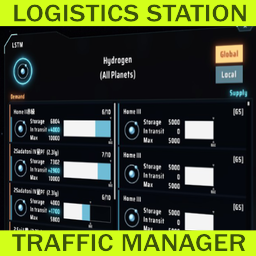
Менеджер трафика логистической станции
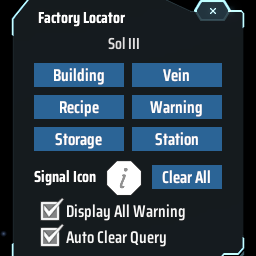
Find the positions of specified machines by type/recipe/content and ping on map. Ctrl + F to open the search window. 工厂定位:寻找星球上的产线/矿脉/箱子内物品的位置

Показывает скорость производства и потребления товаров в производственных окнах.

Adds QoL features to statistics panel. Extra ui scale options. 统计面板UI增强: 以星系名排序,过滤星球名称,热键切换,导航按钮,字体大小