
DSPStationInfo
Shows the contents of the station Without opening the window. This don't affect achievements or milestones. ウィンドウを開かずにステーションの内容を表示します。実績やマイルストーンには影響しません。

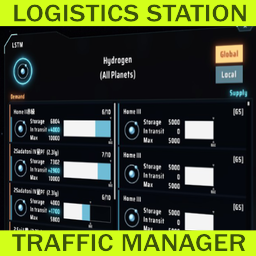
 Мод для Dyson Sphere Program
от hetima
Менеджер трафика логистической станции
LSTM — мод для Dyson Sphere Program (Дайсон Сфер Програм) от автора hetima. Менеджер трафика логистической станции
Его скачали 83,3 тыс. раз: это 25-е место среди модов Dyson Sphere Program в нашем каталоге, редкость — «эпический» (топ-20% по скачиваниям). Мод давно не обновлялся — проверьте совместимость с текущей версией игры, актуальная версия — 0.9.5.
Дополнительных модов для работы не требует.
3 шт · нажмите, чтобы открыть
Текст автора на языке оригинала
Mod for Dyson Sphere Program. Needs BepInEx.
Lists the supply and demand balance of the Logistics Station by item and by planet.
How to open a window
When opening with the keyboard shortcut, if the item information is found under the mouse pointer, it is used as a item filter (e.g. Inventory, Storage, Replicator, Statistics Panel and much places where item icon is displayed).
Main Window
Icon Info
Displays transport logs from game startup (up to 10,000 entries). To use it, you must turn it on in the config window and restart the game.
The log window can be opened from the "LOG" button in the main window or from the menu that appears by right-clicking. Shortcuts can also be set, but they are not present in the settings window and must be edited directly in the config file. Right-clicking on a row brings up a panel where you can refine filters and view them in the starmap.
LSTM has some settings depend on BepInEx (file name is com.hetima.dsp.LSTM.cfg). Most settings can be edited in the config window (from gear icon at the top of the main window).
Key — Type — Default — Description
mainWindowHotkey — shortcut — LCtrl+T — Hotkey to open/close LSTM window
showMaterialPicker — bool — true — Add Material Picker for quick item switching to LSTM window
indicatesWarperSign — bool — false — true: show sign on the list if station has warper
reactClosePanelKeyE — bool — true — true: close window when close panel key(E) is pressed
actAsStandardPanel — bool — true — true: close with other panels by esc key. false: one more esc needed
showStationInfo — bool — false — Show station contents and empty slot count as icon. Also affected by in-game building icon display *setting
showStationInfoOnlyInPlanetView — bool — false — showStationInfo is only displayed in planet view
showStatInStatisticsWindow — bool — true — Add station stat to statistics panel
showButtonInStationWindow — bool — true — Add open LSTM button to Station Window
showButtonInStatisticsWindow — bool — false — Add open LSTM button to statistics panel
showButtonInStarmap — bool — true — Add open LSTM button to detail panel on starmap
setConstructionPointToGround — bool — false — true: set the construction point of stations to ground level instead of top of the tower (currently disabled)
enableNaviToEverywhere — bool — false — double-click (left and/or right click) on Planet View to display navigation to anywhere
suppressOpenInventory — bool — false — Suppress open inventory when opening station window
enableTrafficLog — bool — false — Enable traffic log window (needs restart game)
hideStoragedSlot — bool — true — hide storaged slot in list view
Hidden settings The following settings cannot be edited from config window. You need to edit the file directly.
Key — Type — Default — Description
switchDisplayModeHotkey — shortcut — Tab — Hotkey to switch between planet name and station name on LSTM window
dropSorterKeyEracesNavi — bool — false — clear navi line when "Remove Copied Sorter Previews" shortcut is pressed
logWindowHotkey — shortcut — none — Hotkey to open/close Traffic Log window
trafficLogDisplayMax — int — 2000 — Maximum rows that can be displayed in Traffic Log window. min=100 max=9999
stationInfoIconSize — float — 10.0 — Station Info icon size. min=5.0 max=15.0. default is 10.0f
輸送ステーションの状況をアイテムごとや惑星ごとに一覧表示して需給バランスを確認できます。
ウィンドウの開き方
キーボードショートカットで開くときに、マウスポインタ上にアイテム情報を見つけたらそのアイテムでフィルタ表示します(インベントリ、ストレージ、合成機、統計パネル、その他のアイコンが表示されている場所)
Previous Changelog
TrafficLogic and One-time Demand for 0.10.30.22292setConstructionPointToGround is disabled###
Описание длинное — здесь его начало. Читать целиком на странице автора
Файл скачивается с официального сервера Thunderstore, без перезаливов и сторонних установщиков
Подробная инструкция для Dyson Sphere ProgramВставьте значок в описание на Thunderstore, в README или в Discord — русскоязычные игроки сразу попадут на страницу с переводом и инструкцией.

[](https://modka.app/dyson-sphere-program/hetima-lstm/)<a href="https://modka.app/dyson-sphere-program/hetima-lstm/"><img src="https://modka.app/badge.png" alt="Описание на русском — Модка" height="44"></a>[url=https://modka.app/dyson-sphere-program/hetima-lstm/]Описание на русском — Модка[/url]Скачайте менеджер модов r2modman (или Gale) и выберите в нём игру Dyson Sphere Program. Создайте профиль — так моды не смешаются с чистой версией игры. Найдите «LSTM» во вкладке Online и нажмите Download — BepInEx и все зависимости подтянутся сами. Нажмите «Start modded» — игра запустится с модами. Чтобы сыграть без модов, запустите игру как обычно из Steam — r2modman не трогает чистую версию игры.
Файл скачивается с официального сервера Thunderstore, куда его загрузил hetima. Мы не перезаливаем и не изменяем моды.
1 октября 2025, актуальная версия — 0.9.5. Это больше года назад: перед установкой проверьте, работает ли мод на текущей версии игры.
Shows the contents of the station Without opening the window. This don't affect achievements or milestones. ウィンドウを開かずにステーションの内容を表示します。実績やマイルストーンには影響しません。

Allows you to view exact resource and interstellar logistics infomation of all planets and star systems. The load has been reduced.This doesn't affect achievements or milestones. 全ての惑星と星系の正確な資源情報、惑星の星間輸送情報を見ることができます。実績やマイルストーンには影響しません。

Let replicator and build tools use items in logistic slots. Tweak slots count and stacksize. Right click on hotbar to craft building. 手搓和建造可以直接使用物流背包的物品,配置文件可改物流背包容量及背包堆叠倍率

Add various cheat functions while disabling abnormal determinants / 添加一些作弊功能,同时屏蔽异常检测
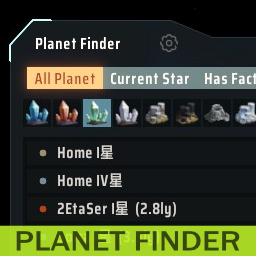
Предоставляет окно для поиска планет
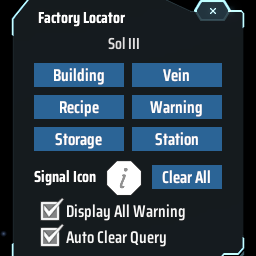
Find the positions of specified machines by type/recipe/content and ping on map. Ctrl + F to open the search window. 工厂定位:寻找星球上的产线/矿脉/箱子内物品的位置