

NebulaMultiplayerMod
С этим модом вы сможете играть со своими друзьями в одной игре! Теперь поддерживает боевой режим в игровой версии 0.10.35

 Мод для Dyson Sphere Program
от starfi5h
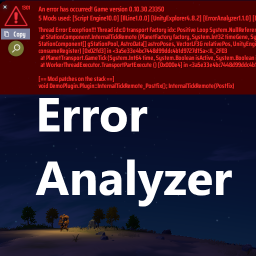
Add buttons to close or copy the error message. Enhance error message to helps identify possible problematic mod, or guide to corrupted machines. 错误分析:增加可以关闭或复制错误讯息的按钮。辅助找出可能报错的mod或建筑
ErrorAnalyzer — мод для Dyson Sphere Program (Дайсон Сфер Програм) от автора starfi5h. Add buttons to close or copy the error message. Enhance error message to helps identify possible problematic mod, or guide to corrupted machines. 错误分析:增加可以关闭或复制错误讯息的按钮。辅助找出可能报错的mod或建筑
Его скачали 89,1 тыс. раз: это 24-е место среди модов Dyson Sphere Program в нашем каталоге, редкость — «эпический» (топ-20% по скачиваниям). Мод обновлялся в течение года, актуальная версия — 1.3.3.
Для работы ему нужны: BepInEx.
1 шт · нажмите, чтобы открыть
Текст автора на языке оригинала
A diagnostic tool for Dyson Sphere Program that enhances error reporting and helps identify possible problematic mods.
When an error occurs, you'll see an enhanced error message with:
The error dialog will show "possible candidates" for problematic mods. This isn't always conclusive, but provides a good starting point for troubleshooting. Try:
If an entity (factory machines, belt, etc.) is identified as part of the running error:
To report errors to mod developers:
Below is an example of the error message that can be copied to your clipboard:
Error report: Game version 0.10.32.25783 with 10 mods used.
possible candidates: [ErrorAnalyzer1.3.0][ErrorTester1.0.0]
IndexOutOfRangeException: Index was outside the bounds of the array.
StationComponent.DetermineDispatch (float shipSailSpeed, float shipWarpSpeed, int shipCarries, int priorityIndex, StationComponent[] gStationPool, FactoryProductionStat[] factoryStatPool, PlanetFactory[] factories, GalaxyData galaxy, TrafficStatistics tstat); (IL_0DB2)
GalacticTransport.GameTick (long time); (IL_00FD)
GameData.GameTick (long time); (IL_01DC)
GameMain.FixedUpdate (); (IL_017B)
[== Mods on stack trace ==]: [ErrorAnalyzer]
void ErrorAnalyzer.Testing.Plugin::DetermineDispatch_Postfix(); DetermineDispatch(Postfix)
Explanation:
StationComponent.DetermineDispatch function.ErrorAnalyzer.Testing.Plugin::DetermineDispatch_Postfix() is harmony postfix to StationComponent.DetermineDispatch, which is likely the cause of the error.Notes:
Re-intialize planet in UXAssist. If they still not work then you'll have to roll back to the previous normal save.The config file is BepInEx\config\aaa.dsp.plugin.ErrorAnalyzer.cfg, which can be found in mod manager's Config editor.
## Settings file was created by plugin ErrorAnalyzer
## Plugin GUID: aaa.dsp.plugin.ErrorAnalyzer

[DEBUG Mode]

## Enable DEBUG mode to track the entity when starting up the game
# Setting type: Boolean
# Default value: false
Enable = false

[Message]

## Show all mod patches on the stacktrace (By default it will not list GameData.Gametick() and below methods)
# Setting type: Boolean
# Default value: false
Show All Patches = false

## Dump Harmony patches of all mods when the game load in BepInEx\LogOutput.log
# Setting type: Boolean
# Default value: false
Dump All Patches = false
When the DEBUG tracking mode is on, the navigate button will change color. In this mode, it will track the entity that throws errors and move the player to the location when it is on the same planet. Errors in the following methods will be handled too in this mode to let the player dismantle the corrupted building: CargoTraffic.SetBeltState, CargoContainer.RemoveCargo, CargoTraffic.PickupBeltItems
错误分析器mod一款适用于戴森球计划的诊断工具,可增强错误报告并帮助识别可能有问题的模组。
Описание длинное — здесь его начало. Читать целиком на странице автора
В r2modman ставится автоматически
4 в каталоге
С этим модом вы сможете играть со своими друзьями в одной игре! Теперь поддерживает боевой режим в игровой версии 0.10.35

构建真实宇宙,撰写创世之书。新矿物,新材料,新配方,新科技,新机制。Construct Real Universe. Then leave a GenesisBook. New vein, new material, new recipe, new technology, new structure.
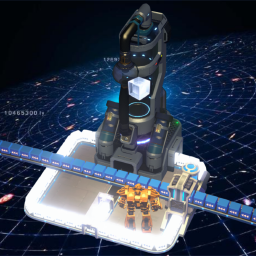
万物皆可分馏,尽情享受分馏的乐趣吧!Everything can be fractionated, have fun with fractionation!

构建星环,探索宇宙。Constructing the Orbital Ring, Exploring the Universe.
Файл скачивается с официального сервера Thunderstore, без перезаливов и сторонних установщиков
Подробная инструкция для Dyson Sphere ProgramВставьте значок в описание на Thunderstore, в README или в Discord — русскоязычные игроки сразу попадут на страницу с переводом и инструкцией.

[](https://modka.app/dyson-sphere-program/starfi5h-erroranalyzer/)<a href="https://modka.app/dyson-sphere-program/starfi5h-erroranalyzer/"><img src="https://modka.app/badge.png" alt="Описание на русском — Модка" height="44"></a>[url=https://modka.app/dyson-sphere-program/starfi5h-erroranalyzer/]Описание на русском — Модка[/url]Скачайте менеджер модов r2modman (или Gale) и выберите в нём игру Dyson Sphere Program. Создайте профиль — так моды не смешаются с чистой версией игры. Найдите «ErrorAnalyzer» во вкладке Online и нажмите Download — BepInEx и все зависимости подтянутся сами. Нажмите «Start modded» — игра запустится с модами. Чтобы сыграть без модов, запустите игру как обычно из Steam — r2modman не трогает чистую версию игры.
Файл скачивается с официального сервера Thunderstore, куда его загрузил starfi5h. Мы не перезаливаем и не изменяем моды.
Установите вместе с ним: BepInEx. В менеджере модов зависимости подтягиваются автоматически.
23 октября 2025, актуальная версия — 1.3.3. Это больше года назад: перед установкой проверьте, работает ли мод на текущей версии игры.
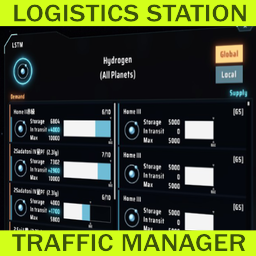
Менеджер трафика логистической станции
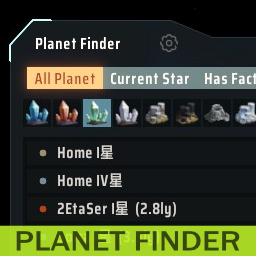
Предоставляет окно для поиска планет
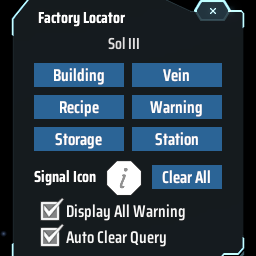
Find the positions of specified machines by type/recipe/content and ping on map. Ctrl + F to open the search window. 工厂定位:寻找星球上的产线/矿脉/箱子内物品的位置

Показывает скорость производства и потребления товаров в производственных окнах.

Adds QoL features to statistics panel. Extra ui scale options. 统计面板UI增强: 以星系名排序,过滤星球名称,热键切换,导航按钮,字体大小

Shows the contents of the station Without opening the window. This don't affect achievements or milestones. ウィンドウを開かずにステーションの内容を表示します。実績やマイルストーンには影響しません。