

NebulaCompatibilityAssist
Extension to hotfix Nebula multiplayer mod and improve compatibility with other mods. 联机补丁 - 修复联机mod与其它mod的兼容性与同步


 Мод для Dyson Sphere Program
от nebula
С этим модом вы сможете играть со своими друзьями в одной игре! Теперь поддерживает боевой режим в игровой версии 0.10.35
NebulaMultiplayerMod — мод для Dyson Sphere Program (Дайсон Сфер Програм) от автора nebula. С этим модом вы сможете играть со своими друзьями в одной игре! Теперь поддерживает боевой режим в игровой версии 0.10.35
Его скачали 295,8 тыс. раз: это 11-е место среди модов Dyson Sphere Program в нашем каталоге, редкость — «эпический» (топ-20% по скачиваниям). Мод обновлялся в последние полгода, актуальная версия — 0.9.24.
Для работы ему нужны: IlLine, BepInEx, ErrorAnalyzer, NebulaMultiplayerModApi, NebulaCompatibilityAssist, BulletTime.
Текст автора на языке оригинала
An open-source, multiplayer mod for the game Dyson Sphere Program.
Note: This is the bleeding edge build, for the more stable build see below. You can use this one if you want to try out the latest development builds, which may contain bugs and unfinished features.
You will also need some extra steps to get this installed, see 2nd point in "How can I play this mod?".
Please join our Discord Server and ask your question in the support channel. The mod often becomes incompatible after game updates. A temporary version rollback may be needed. Some mods are not compatible with multiplayer. Check the NebulaCompatibilityAssist mod page to learn more.
Please do keep in mind that this mod is still in development to keep up with game changes, it may still contain bugs.
The chat window can opened/closed using Alt + Backtick (configurable in Settings - Multiplayer - Chat). Also in settings is an option to disable the chat window from automatically opening when a message is received. Type /help to view all commands, or view Chat Commands wiki page for more info.
The mod supports running the server in non-GPU environment. Check the wiki page to learn how to setup and the command-line arguments.
Major refactors will happen while the project grows or game updates. Join the Discord Server if you want to see to latest state of our development. Check Wiki for overview of features.
The multiplayer mod now supports Dark Fog combat mode in the latest game version (0.10.35.x). Most of the battle aspects are sync, only few features are still work in progress.
List of peace mode syncing features (click to expand)
List of combat mode syncing features (click to expand)
Описание длинное — здесь его начало. Читать целиком на странице автора
В r2modman ставится автоматически
1 в каталоге
Extension to hotfix Nebula multiplayer mod and improve compatibility with other mods. 联机补丁 - 修复联机mod与其它mod的兼容性与同步
Файл скачивается с официального сервера Thunderstore, без перезаливов и сторонних установщиков
Подробная инструкция для Dyson Sphere ProgramВставьте значок в описание на Thunderstore, в README или в Discord — русскоязычные игроки сразу попадут на страницу с переводом и инструкцией.

[](https://modka.app/dyson-sphere-program/nebula-nebulamultiplayermod/)<a href="https://modka.app/dyson-sphere-program/nebula-nebulamultiplayermod/"><img src="https://modka.app/badge.png" alt="Описание на русском — Модка" height="44"></a>[url=https://modka.app/dyson-sphere-program/nebula-nebulamultiplayermod/]Описание на русском — Модка[/url]Скачайте менеджер модов r2modman (или Gale) и выберите в нём игру Dyson Sphere Program. Создайте профиль — так моды не смешаются с чистой версией игры. Найдите «NebulaMultiplayerMod» во вкладке Online и нажмите Download — BepInEx и все зависимости подтянутся сами. Нажмите «Start modded» — игра запустится с модами. Чтобы сыграть без модов, запустите игру как обычно из Steam — r2modman не трогает чистую версию игры.
Файл скачивается с официального сервера Thunderstore, куда его загрузил nebula. Мы не перезаливаем и не изменяем моды.
Установите вместе с ним: IlLine, BepInEx, ErrorAnalyzer, NebulaMultiplayerModApi, NebulaCompatibilityAssist, BulletTime. В менеджере модов зависимости подтягиваются автоматически.
14 октября 2026, актуальная версия — 0.9.24. Дата берётся с официальной страницы мода при каждом обновлении каталога.

Set game speed by pause/resume/speedup button or hotkey. Autosave in background. 游戏速度控制(0x-10x)。Pause热键战术暂停。(可选)在後台自動存档

Улучшает систему Blueprint с изменениями QoL, новыми функциями, такими как силовая паста, чертежи фундамента и многое другое
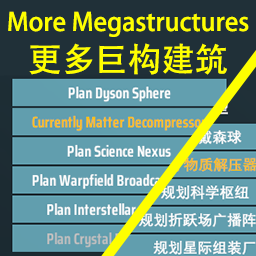
Add 6 new mega structures: Matter Decompressor, Science Nexus, Warpfield Broadcast Array, Interstellar Assembly, Crystal Reconstructor, and Star Cannon. 新增了六种巨构建筑:物质解压器,科学枢纽,折跃场广播阵列,星际组装厂,晶体重构器和恒星炮。
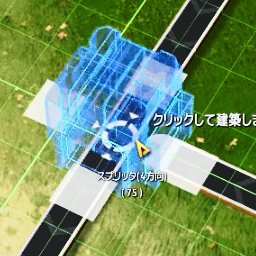
Сплиттер (и Piler) может быть размещен перекрытия конвейерных лент и должным образом соединен.
Extension to hotfix Nebula multiplayer mod and improve compatibility with other mods. 联机补丁 - 修复联机mod与其它mod的兼容性与同步

Let replicator and build tools use items in logistic slots. Tweak slots count and stacksize. Right click on hotbar to craft building. 手搓和建造可以直接使用物流背包的物品,配置文件可改物流背包容量及背包堆叠倍率