

BulletTime
Set game speed by pause/resume/speedup button or hotkey. Autosave in background. 游戏速度控制(0x-10x)。Pause热键战术暂停。(可选)在後台自動存档


 Мод для Dyson Sphere Program
от starfi5h
Silence user-specified sounds. View and toggle each audio in settings. 静音器:消除指定音效
AutoMute — мод для Dyson Sphere Program (Дайсон Сфер Програм) от автора starfi5h. Silence user-specified sounds. View and toggle each audio in settings. 静音器:消除指定音效
Его скачали 9,1 тыс. раз: это 143-е место среди модов Dyson Sphere Program в нашем каталоге, редкость — «обычный» (нижняя половина по скачиваниям). Мод обновлялся в течение года, актуальная версия — 1.3.2.
Для работы ему нужны: BepInEx.
1 шт · нажмите, чтобы открыть
Текст автора на языке оригинала
Via r2modman, or manually download the file and put AutoMute.dll in BepInEx/plugins folder.
Run the game one time to generate starfi5h.plugin.AutoMute.cfg file. After changing .cfg file, go to in-game settings and click 'Apply' to apply the new config.
Mute Building Ids - The item IDs of building to mute, separated by white spaces.For example, to mute Ray receiver and Artificial star, key in 2208 2210. Reload the planet to take effect.
MuteList - The list of audio name to mute, separated by white spaces. Check mod page wiki for available names.For example, to mute flight mode system broadcast, key in vc-broadcast-4 vc-broadcast-5
Enable UI - Enable mod UI in audio settings page.In Settings - Audio page, there is a mod UI to play and toggle each audio. The upper input field can filter the drop-down list of the audio.
.cfg文件需要先运行过游戏一次才会出现,修改后要点击游戏内'应用设置'的按钮才会生效。 管理器安装: 左边选项Config editor -> 找到starfi5h.plugin.AutoMute -> Edit Config 手动安装: 更改BepInEx\config\starfi5h.plugin.AutoMute.cfg文件
Mute Building Ids 输入物品ID即可静音该建筑。以逗号分隔。(需重新载入星球)MuteList 消除指定的音讯。输入:音效名称, 以空白分隔(名称可以在mod页面wiki查询)Enable UI - 在音频设置页面启用模组用户界面。Enable UIMuteListAll trademarks, copyright, and resources related to Dyson Sphere Project itself, remain the property of Gamera Game and Youthcat Studio as applicable according to the license agreement distributed with Dyson Sphere Program.
Mute icons created by SumberRejeki - Flaticon
В r2modman ставится автоматически
Файл скачивается с официального сервера Thunderstore, без перезаливов и сторонних установщиков
Подробная инструкция для Dyson Sphere ProgramВставьте значок в описание на Thunderstore, в README или в Discord — русскоязычные игроки сразу попадут на страницу с переводом и инструкцией.

[](https://modka.app/dyson-sphere-program/starfi5h-automute/)<a href="https://modka.app/dyson-sphere-program/starfi5h-automute/"><img src="https://modka.app/badge.png" alt="Описание на русском — Модка" height="44"></a>[url=https://modka.app/dyson-sphere-program/starfi5h-automute/]Описание на русском — Модка[/url]Скачайте менеджер модов r2modman (или Gale) и выберите в нём игру Dyson Sphere Program. Создайте профиль — так моды не смешаются с чистой версией игры. Найдите «AutoMute» во вкладке Online и нажмите Download — BepInEx и все зависимости подтянутся сами. Нажмите «Start modded» — игра запустится с модами. Чтобы сыграть без модов, запустите игру как обычно из Steam — r2modman не трогает чистую версию игры.
Файл скачивается с официального сервера Thunderstore, куда его загрузил starfi5h. Мы не перезаливаем и не изменяем моды.
Установите вместе с ним: BepInEx. В менеджере модов зависимости подтягиваются автоматически.
29 января 2026, актуальная версия — 1.3.2. Дата берётся с официальной страницы мода при каждом обновлении каталога.
Set game speed by pause/resume/speedup button or hotkey. Autosave in background. 游戏速度控制(0x-10x)。Pause热键战术暂停。(可选)在後台自動存档

Улучшает систему Blueprint с изменениями QoL, новыми функциями, такими как силовая паста, чертежи фундамента и многое другое

Let replicator and build tools use items in logistic slots. Tweak slots count and stacksize. Right click on hotbar to craft building. 手搓和建造可以直接使用物流背包的物品,配置文件可改物流背包容量及背包堆叠倍率

Add various cheat functions while disabling abnormal determinants / 添加一些作弊功能,同时屏蔽异常检测
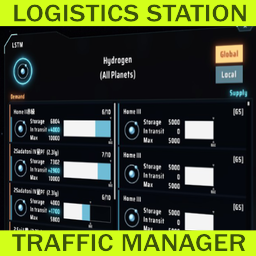
Менеджер трафика логистической станции

ダイソンスフィアプログラムを日本語化し、フォントも変更します。This change all strings to Japanese and change fonts.