
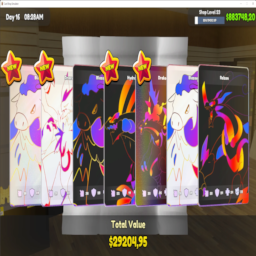
Open CardPack Customiser
This Mod Let Set The Chance to Get Card From Opening packs

 Мод для TCG Card Shop Simulator
от CORE_API_TEAM
An easy way to let user configure how a plugin behaves without the need to make your own GUI. [RUN BEPINEX ALONE ONCE BEFORE INSTALLING]
Configuration Manager — мод для TCG Card Shop Simulator (ТЦГ Кард Шоп Симулятор) от автора CORE_API_TEAM. An easy way to let user configure how a plugin behaves without the need to make your own GUI. [RUN BEPINEX ALONE ONCE BEFORE INSTALLING]
Его скачали 16,3 тыс. раз: это 8-е место среди модов TCG Card Shop Simulator в нашем каталоге, редкость — «редкий» (топ-50% по скачиваниям). Мод давно не обновлялся — проверьте совместимость с текущей версией игры, актуальная версия — 18.3.2.
Для работы ему нужны: BepInExPack.
Текст автора на языке оригинала
An easy way to let user configure how a plugin behaves without the need to make your own GUI. The user can change any of the settings you expose, even keyboard shortcuts.
The configuration manager can be accessed in-game by pressing the hotkey (by default F1). Hover over the setting names to see their descriptions, if any.
There are two versions of this plugin, for BepInEx 5 (version 5.4.20 or newer, mono only) and BepInEx 6 (nightly build 664 or newer, IL2CPP only).
Note: The .xml file include in the release zip is useful for plugin developers when referencing ConfigurationManager.dll in your plugin, it will provide descriptions for types and methods to your IDE. Users can ignore it.
ConfigurationManager will automatically display all settings from your plugin's Config. All metadata (e.g. description, value range) will be used by ConfigurationManager to display the settings to the user.
In most cases you don't have to reference ConfigurationManager.dll or do anything special with your settings. Simply make sure to add as much metadata as possible (doing so will help all users, even if they use the config files directly). Always add descriptive section and key names, descriptions, and acceptable value lists or ranges (wherever applicable).
Specify AcceptableValueRange when creating your setting. If the range is 0f - 1f or 0 - 100 the slider will be shown as % (this can be overridden below).
CaptureWidth = Config.Bind("Section", "Key", 1, new ConfigDescription("Description", new AcceptableValueRange(0, 100)));Specify AcceptableValueList when creating your setting. If you use an enum you don't need to specify AcceptableValueList, all of the enum values will be shown. If you want to hide some values, you will have to use the attribute.
Note: You can add System.ComponentModel.DescriptionAttribute to your enum's items to override their displayed names. For example:
public enum MyEnum
{
    // Entry1 will be shown in the combo box as Entry1
    Entry1,
    [Description("Entry2 will be shown in the combo box as this string")]
    Entry2
}Add a setting of type KeyboardShortcut. Use the value of this setting to check for inputs (recommend using IsDown) inside of your Update method.
The KeyboardShortcut class supports modifier keys - Shift, Control and Alt. They are properly handled, preventing common problems like K+Shift+Control triggering K+Shift when it shouldn't have.
private ConfigEntry ShowCounter { get; set; }

public Constructor()
{
    ShowCounter = Config.Bind("Hotkeys", "Show FPS counter", new KeyboardShortcut(KeyCode.U, KeyCode.LeftShift));
}

private void Update()
{
    if (ShowCounter.Value.IsDown())
    {
        // Handle the key press
    }
}You can change how a setting is shown inside the configuration manager window by passing an instance of a special class as a tag of the setting. The special class code can be downloaded here. Simply download the .cs file and drag it into your project.
Here's an example of overriding order of settings and marking one of the settings as advanced:
// Override IsAdvanced and Order
Config.Bind("X", "1", 1, new ConfigDescription("", null, new ConfigurationManagerAttributes { IsAdvanced = true, Order = 3 }));
// Override only Order, IsAdvanced stays as the default value assigned by ConfigManager
Config.Bind("X", "2", 2, new ConfigDescription("", null, new ConfigurationManagerAttributes { Order = 1 }));
Config.Bind("X", "3", 3, new ConfigDescription("", null, new ConfigurationManagerAttributes { Order = 2 }));If you are using a setting type that is not supported by ConfigurationManager, you can add a drawer Action for it. The Action will be executed inside OnGUI, use GUILayout to draw your setting as shown in the example below.
To use a custom seting drawer for an individual setting, use the CustomDrawer field in the attribute class. See above for more info on the attribute class.
void Start()
{
    // Add the drawer as a tag to this setting.
    Config.Bind("Section", "Key", "Some value"
        new ConfigDescription("Desc", null, new ConfigurationManagerAttributes{ CustomDrawer = MyDrawer });
}

static void MyDrawer(BepInEx.Configuration.ConfigEntryBase entry)
{
    // Make sure to use GUILayout.ExpandWidth(true) to use all available space
    GUILayout.Label(entry.BoxedValue, GUILayout.ExpandWidth(true));
}You can specify a drawer for all settings of a setting type. Do this by using `ConfigurationManage
Описание длинное — здесь его начало. Читать целиком на странице автора
В r2modman ставится автоматически
2 в каталоге
This Mod Let Set The Chance to Get Card From Opening packs

A mod for TCG Card Shop Simulator that makes the pack opening machines return high-value packs to the player, configurable to different thresholds and card types.
Файл скачивается с официального сервера Thunderstore, без перезаливов и сторонних установщиков
Подробная инструкция для TCG Card Shop SimulatorВставьте значок в описание на Thunderstore, в README или в Discord — русскоязычные игроки сразу попадут на страницу с переводом и инструкцией.

[](https://modka.app/tcg-card-shop-simulator/core-api-team-configuration-manager/)<a href="https://modka.app/tcg-card-shop-simulator/core-api-team-configuration-manager/"><img src="https://modka.app/badge.png" alt="Описание на русском — Модка" height="44"></a>[url=https://modka.app/tcg-card-shop-simulator/core-api-team-configuration-manager/]Описание на русском — Модка[/url]Скачайте менеджер модов r2modman (или Gale) и выберите в нём игру TCG Card Shop Simulator. Создайте профиль — так моды не смешаются с чистой версией игры. Найдите «Configuration Manager» во вкладке Online и нажмите Download — BepInEx и все зависимости подтянутся сами. Нажмите «Start modded» — игра запустится с модами. Чтобы сыграть без модов, запустите игру как обычно из Steam — r2modman не трогает чистую версию игры.
Файл скачивается с официального сервера Thunderstore, куда его загрузил CORE_API_TEAM. Мы не перезаливаем и не изменяем моды.
Установите вместе с ним: BepInExPack. В менеджере модов зависимости подтягиваются автоматически.
22 апреля 2025, актуальная версия — 18.3.2. Это больше года назад: перед установкой проверьте, работает ли мод на текущей версии игры.

Runtime texture, sprite, and mesh override toolkit for TCG Card Shop Simulator with live watchers, card metadata editing, and debug dumps.

A really simple mod that just lets you put cards back into the binder after taking them out.
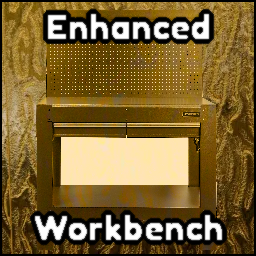
From the creator of EnhancedQOL. Enhanced Workbench adds an auto boxing system to the workbench. Any bulk boxes you make can be made and sent directly to a box to be boxed up.
A simplistic mod that adds the ability to sort your binder by element, rarity, and border type.

A mod that flips the cards on the play table to be faced upward.

A package of quality of life mods for the game.