Начните вводить название — например, MoreHead, Sodium или PEAK

Pocket Photo Studio — иконка
Обложка The Sims 4Мод для The Sims 4

Pocket Photo Studio

от GreenAmber

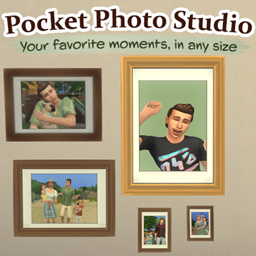
Capture your Sims' favorite moments! Create family, expressive and historical photos, take snapshots and make copies of your favorite photographs.

  • Обычный
  • 31,1 тыс. скачиваний
  • Версия GreenAmber_Poc…
  • Обновлён 7 ноября 2026
  • Геймплей
  • Утилиты

О моде Pocket Photo Studio

Pocket Photo Studio — мод для The Sims 4 (Симс 4) от автора GreenAmber. Capture your Sims' favorite moments! Create family, expressive and historical photos, take snapshots and make copies of your favorite photographs.

Его скачали 31,1 тыс. раз: это 16-е место среди модов The Sims 4 в нашем каталоге, редкость — «обычный» (нижняя половина по скачиваниям). Мод обновлялся в последний месяц, актуальная версия — GreenAmber_PocketPhotoStudio_1.1.1.zip.

Дополнительных модов для работы не требует.

Скриншоты

5 шт · нажмите, чтобы открыть

Полное описание Pocket Photo Studio

Текст автора на языке оригинала

Pocket Photo Studio

Created by Green Amber

Every Sim has a story worth remembering.

From family portraits and childhood memories to spontaneous everyday moments, Pocket Photo Studio makes it easier to capture and keep your favorite memories.

Create group photos or revisit your Sims' past.

All from your Sim's phone - or with a simple click on a Sim or photo.

Features

Group & Family Photos

Bring your Sims together for memorable photographs.

  • Photograph up to 8 Sims or pets together.
  • Create family portraits, couple photos or pictures with friends and pets.
  • Choose from Solid Colors, locations under Worlds, and themed backgrounds.
  • Select an outfit category for everyone in the photo.
  • Create Landscape or Portrait photos in different sizes.

Expressive Photos

Try different expressions to capture your Sims' personalities.

  • Photograph one or two human Sims, from Teen to Elder.
  • Choose from different expressions and moods.
  • Create multiple pose variations.
  • Perfect for romantic portraits, playful pictures and expressive memories.

Historical Photos

Ever wondered what your Sims looked like when they were younger?

  • Create imagined photographs of your Sims at younger life stages, all the way down to Infant where supported.
  • Include multiple Sims and explore their shared past.
  • Everyone ages backwards together to the same point in their shared past.
  • Your actual Sims remain completely unchanged.

Create the childhood and family memories you never had the chance to photograph!

Historical Expressive Photos

Add expressions to memories from the past.

  • Create expressive historical portraits of one or two human Sims.
  • Choose expressions, backgrounds and outfits.
  • Everyone must be Teen or older at the selected historical time.
  • Your actual Sims remain completely unchanged.

Take Snapshots

See your Sim doing something funny, cute or worth remembering? Capture the moment before it's gone!

  • Click a Sim or supported animal and select Take Snapshot…
  • Choose Short, Medium or Long distance and one of five camera heights.
  • Capture Sims in their current surroundings and poses.
  • Adjust the camera before taking your photo.
  • No need for another Sim to take the photo, and no photography animation to interrupt the moment.

Create Photo Copies & Save Images

Love a photo but wish it were a different size? Or want to save a copy to your computer?

  • Create Small, Medium or Large copies without changing the original.
  • Save supported photographs as image files on your computer.
  • Use both options directly from your Sim's inventory or from a placed photo.
  • Works with compatible photos from the regular Sims 4 camera too.

Make It Your Own

  • Use Quick Photo when you want something simple, or Custom Photo for more control.
  • Browse backgrounds through Solid Colors, Worlds and Themes.
  • Choose outfit categories, photo formats and multiple variations.

How to Use

Open Pocket Photo Studio on your Sim's phone and choose:

  • Group Photos… - Quick or Custom group portraits.
  • Expressive Photos… - Quick or Custom expressive portraits.
  • Historical Photos… - Group, Expressive or Repeat Historical Photo.
  • Pocket Photo Studio Settings… - Adjust photo naming.

Finished photos appear in your active Sim's inventory.

Installation

Requires The Sims 4 Base Game. No DLC required.

  • Close The Sims 4.
  • Download and extract GreenAmber_PocketPhotoStudio_.zip.
  • Place the extracted GreenAmber_PocketPhotoStudio_ folder directly inside your The Sims 4 Mods folder:

Documents/Electronic Arts/The Sims 4/Mods

  • Keep all three required files together inside that folder:
  • PocketPhotoStudio.package
  • PocketPhotoStudio_Textures.package
  • PocketPhotoStudio.ts4script
  • Open Game Options → Other and enable:
  • Enable Custom Content and Mods
  • Script Mods Allowed
  • Apply the changes and restart the game.

Updating

Close The Sims 4.

Replace these three files in your existing Pocket Photo Studio folder with the new versions:

  • PocketPhotoStudio.package
  • PocketPhotoStudio_Textures.package
  • PocketPhotoStudio.ts4script

Keep your existing settings, history and imported content. Keep all of the mod's .json files when updating.

Make sure only one version of Pocket Photo Studio is installed.

The included README.txt has installation, import and removal instructions.

Good to Know

  • Historical Photos creates imagined younger appearances without changing your actual Sims or their ages.
  • Photo copying and image exporting support compatible photo types; some photo effects are not supported.

Как установить Pocket Photo Studio

Файл скачивается с официального сервера CurseForge, без перезаливов и сторонних установщиков

Подробная инструкция для The Sims 4
  1. Скачайте «Pocket Photo Studio» кнопкой «Скачать» — файл придёт с официального сервера CurseForge.
  2. Откройте папку Документы\Electronic Arts\The Sims 4\Mods. Если её нет — один раз запустите игру, и она появится.
  3. Если скачался архив .zip или .rar — распакуйте его и перенесите файлы .package и .ts4script в папку Mods.
  4. Файлы .package можно раскладывать по подпапкам, а .ts4script — не глубже одной папки внутри Mods, иначе игра их не увидит.
  5. В игре откройте «Параметры игры» → «Другое», включите пользовательский контент и моды, а также моды-скрипты, и перезапустите игру.
Вы автор мода? Поставьте ссылку на русское описание

Вставьте значок в описание на CurseForge, в README или в Discord — русскоязычные игроки сразу попадут на страницу с переводом и инструкцией.

Описание на русском — Модка
Markdown[![Описание на русском — Модка](https://modka.app/badge.png)](https://modka.app/sims-4/pocket-photo-studio/)
HTML<a href="https://modka.app/sims-4/pocket-photo-studio/"><img src="https://modka.app/badge.png" alt="Описание на русском — Модка" height="44"></a>
Steam (BBCode)[url=https://modka.app/sims-4/pocket-photo-studio/]Описание на русском — Модка[/url]

Частые вопросы о Pocket Photo Studio

Как установить Pocket Photo Studio?

Скачайте «Pocket Photo Studio» кнопкой «Скачать» — файл придёт с официального сервера CurseForge. Откройте папку Документы\Electronic Arts\The Sims 4\Mods. Если её нет — один раз запустите игру, и она появится. Если скачался архив .zip или .rar — распакуйте его и перенесите файлы .package и .ts4script в папку Mods. Файлы .package можно раскладывать по подпапкам, а .ts4script — не глубже одной папки внутри Mods, иначе игра их не увидит. В игре откройте «Параметры игры» → «Другое», включите пользовательский контент и моды, а также моды-скрипты, и перезапустите игру.

Безопасен ли Pocket Photo Studio?

Файл скачивается с официального сервера CurseForge, куда его загрузил GreenAmber. Мы не перезаливаем и не изменяем моды.

Когда Pocket Photo Studio обновлялся последний раз?

7 ноября 2026, актуальная версия — GreenAmber_PocketPhotoStudio_1.1.1.zip. Дата берётся с официальной страницы мода при каждом обновлении каталога.

Похожие моды

Все моды на The Sims 4
MC Command Center — иконка

MC Command Center

Allow many different gameplay elements to be changed in Sims 4

Легендарный14,8 млнГеймплей

Smart Core Script — иконка

Smart Core Script

Powerful script library for many of my mods!

Эпический4,8 млнУтилиты

Cookbook S&S 12.11 — иконка

Cookbook S&S 12.11

Cookbook is required to work with custom recipes from S&S

Легендарный7,6 млнГеймплей

XML Injector — иконка

XML Injector

XML Injector is a mod library to allow mods to add interactions without creating scripts.
Эпический7,5 млнУтилиты

No Dragging Furniture — иконка

No Dragging Furniture

Simply locks furniture in place during gameplay to prevent accidental dragging, compatible with all packs and CC.

Обычный4,5 тыс.Исправления