

MC Command Center
Разрешить изменение различных элементов геймплея в Sims 4

 Мод для The Sims 4
от AveryPing
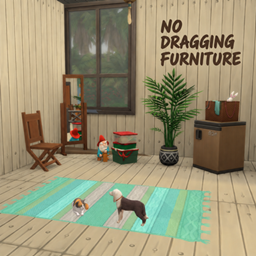
Просто запирает мебель на месте во время игры, чтобы предотвратить случайное перетаскивание, совместимое со всеми пакетами и CC.
No Dragging Furniture — мод для The Sims 4 (Симс 4) от автора AveryPing. Просто запирает мебель на месте во время игры, чтобы предотвратить случайное перетаскивание, совместимое со всеми пакетами и CC.
Его скачали 4,5 тыс. раз: это 22-е место среди модов The Sims 4 в нашем каталоге, редкость — «обычный» (нижняя половина по скачиваниям). Мод обновлялся в последний месяц, актуальная версия — [AP]No_Dragging_Furniture_v1.1.zip.
Дополнительных модов для работы не требует.
Текст автора на языке оригинала
v1.1 Update: cookbooks and pet beds are also included, with dragging restrictions enabled by default. This includes CC objects that use the corresponding tags.
What is this?
I originally made this little mod because I would sometimes try to click a Sim or an object and end up dragging a rug instead. It was a small annoyance, but it kept interrupting my gameplay, so I wrote a script to help with it.
With this update, No Dragging Rugs has been renamed to No Dragging Furniture. It still helps prevent accidental rug dragging, and you can now use a configuration file to choose which object categories it should handle. The new name better reflects that expanded scope.
This update requires Lot 51 Core Library. If you already use the mod, please keep this new requirement in mind when updating.
How does it work?
This is a lightweight script. Once the lot has finished loading, it checks the objects on the lot and disables Live Drag for those matching your settings.
Previously, a newly placed rug could remain draggable until you reloaded the lot or used the manual command. The mod now checks again when you exit Build/Buy Mode, applying your settings to newly placed matching objects as well. You no longer need to travel away and back just for that.
The updated mod also uses notifications from Lot 51 Core to run these checks, reducing the need for it to hook into the same lot-loading methods as other script mods.
Which objects have been added?
Alongside rugs, this update adds categories such as dining chairs, dresser mirrors, plants, and sculptures. I chose these categories and their default settings based on community feedback I found and my own gameplay experience, focusing on objects that can be easy to drag accidentally or that I would prefer to keep in place.
Object category CFG option Live Drag restriction by default
Rugs rugs Yes (enabled)
Dining chairs dining_chairs Yes (enabled)
Dresser mirrors mirror_dresser Yes (enabled)
Selected plant category no_autonomy_plants Yes (enabled)
Art sculpture category art_sculpture Yes (enabled)
Additional sculpture category no_autonomy_sculpture Yes (enabled)
Mini fridges mini_fridges Yes (enabled)
Robotics workstations robotics_tables Yes (enabled)
Wedding arches wedding_arches Yes (enabled)
Cookbooks cookbooks Yes (enabled)
Pet beds pet_beds Yes (enabled)
Decoration boxes decoration_boxes No (disabled)
Yarn baskets yarn_baskets No (disabled)
“Enabled” means the dragging restriction is enabled. In the CFG file, Yes disables Live Drag for that category, while No leaves it available. Decoration boxes and yarn baskets have settings too, but remain draggable by default. You can adjust these options to suit how you play.
Objects are identified by their game tags. Categories such as plants and sculptures apply only to objects with the matching tags, rather than every object with a similar appearance.
A note on settings Open the CFG file beside the .ts4script in a text editor to choose which categories should stay in place. Use Yes to prevent dragging or No to leave a category unrestricted. Settings are read again after the lot loads or when you exit Build/Buy Mode.
You can keep your existing CFG when updating. The mod automatically adds missing options without replacing your settings or comments. If no matching CFG is found when the mod first loads, it creates a default file.
The filename must begin with [AP]No_Dragging_Furniture and end with .cfg, so names such as [AP]No_Dragging_Furniture_v1.1.cfg are supported. Please keep only the CFG you intend to use. If the original [AP]No_Dragging_Furniture.cfg is present, it takes priority. Otherwise, multiple matching files are treated as a configuration error.
Changing a category to No does not immediately restore dragging for objects already restricted during the current session. Reload the lot to apply the change to freshly loaded objects.
A log file is created only if an error occurs. If you need to report a problem, please include that file if one is available.
Installation
.ts4script and .cfg files together in the same folder within Mods..ts4script file no more than one subfolder deep.I hope this update helps prevent a few accidental drags and makes handling newly placed furniture a little easier!
I hope this little tool makes your gameplay smoother!
🍵 Enjoyed AveryPing's Sims 4 mods?
👉 Click here to treat me to a cup of nice tea! 🍵
這是一個什麼模組?
我做這個小模組,是因為自己玩遊戲時,常常想點選小人或物品,卻不小心把地毯拖走了。雖然不是什麼大問題,但真的很影響遊戲體驗,所以寫了這個腳本來處理它。
這次更新後,原本的*No Dragging Rugs*更名為*No Dragging Furniture*。除了原本防止誤拖地毯的用途,也能透過設定檔指定要限制拖曳的物件類別,因此把名稱改得更符合現在的功能。
新版需要另外安裝Lot 51 Core Library。如果你原本已經在使用這個模組,更新時請留意這項新增需求。
運作方式
這是一個輕量的腳本。地段讀取完成後,它會掃描目前地段,關閉符合設定的物品在生活模式中的拖曳功能。
以前新放置的地毯可能暫時還能拖曳,需要重新載入地段或輸入指令處理。現在離開建築模式時就會再次檢查,新放置的符合設定物品也會一起
Описание длинное — здесь его начало. Читать целиком на странице автора
Файл скачивается с официального сервера CurseForge, без перезаливов и сторонних установщиков
Подробная инструкция для The Sims 4Вставьте значок в описание на CurseForge, в README или в Discord — русскоязычные игроки сразу попадут на страницу с переводом и инструкцией.

[](https://modka.app/sims-4/no-dragging-furniture/)<a href="https://modka.app/sims-4/no-dragging-furniture/"><img src="https://modka.app/badge.png" alt="Описание на русском — Модка" height="44"></a>[url=https://modka.app/sims-4/no-dragging-furniture/]Описание на русском — Модка[/url]Скачайте «No Dragging Furniture» кнопкой «Скачать» — файл придёт с официального сервера CurseForge. Откройте папку Документы\Electronic Arts\The Sims 4\Mods. Если её нет — один раз запустите игру, и она появится. Если скачался архив .zip или .rar — распакуйте его и перенесите файлы .package и .ts4script в папку Mods. Файлы .package можно раскладывать по подпапкам, а .ts4script — не глубже одной папки внутри Mods, иначе игра их не увидит. В игре откройте «Параметры игры» → «Другое», включите пользовательский контент и моды, а также моды-скрипты, и перезапустите игру.
Файл скачивается с официального сервера CurseForge, куда его загрузил AveryPing. Мы не перезаливаем и не изменяем моды.
18 октября 2026, актуальная версия — [AP]No_Dragging_Furniture_v1.1.zip. Дата берётся с официальной страницы мода при каждом обновлении каталога.
Разрешить изменение различных элементов геймплея в Sims 4

Мощная библиотека сценариев для многих моих модов!
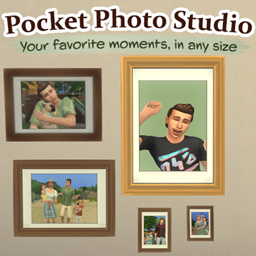
Захватите любимые моменты ваших симов! Создавайте семейные, выразительные и исторические фотографии, делайте снимки и делайте копии любимых фотографий.

Кулинарная книга необходима для работы с пользовательскими рецептами от S&S

XML Injector - это библиотека модов, позволяющая модам добавлять взаимодействия без создания скриптов.

Сетка для волос Skysims, uv, текстура для женских симов