
SimpleZoom
Гладкий настраиваемый зум для White Knuckle с улучшенным входом, управлением колесом и дополнительной четкостью фокусировки.


 Мод для White Knuckle
от notTamion
Мод White Knuckle, который стремится сделать пользовательский интерфейс более настраиваемым
InfoSkull — мод для White Knuckle (Вайт Накл) от автора notTamion. Мод White Knuckle, который стремится сделать пользовательский интерфейс более настраиваемым
Его скачали 5,2 тыс. раз: это 22-е место среди модов White Knuckle в нашем каталоге, редкость — «эпический» (топ-20% по скачиваниям). Мод обновлялся в течение года, актуальная версия — 2.1.2.
Это библиотека: сама по себе ничего не добавляет, но нужна другим модам.
Текст автора на языке оригинала
github | thunderstore\ InfoSkull is a White Knuckle mod that aims to make UI more customizable.
InfoSkull is leaderboard LEGAL, however certain configurations may void leaderboard legality. You will be notified in-game if your current configuration is not leaderboard legal.
To get started with InfoSkull you have multiple options to choose from.
A more in-dept guide for using mods can be found on the White Knuckle discord
InfoSkull is available on Thunderstore for easy installation and updates.
To manually install InfoSkull you first need to download BepInEx 5.x.x
Afterward download InfoSkull from either the Releases or Thunderstore and move the unpacked zip folder into the BepInEx/plugins folder
Now your file structure should look something like this
WhiteKnuckle
├── BepInEx
│   ├── plugins
│ │ ├── notTamion-InfoSkull-x.x.x (folder)InfoSkull can be configured by entering the in-game pause menu and pressing the Adjust UI button.
From here you can drag and drop UI elements to your liking.
To add e.g. add new elements or remove existing ones, hit the alt key and navigate through the menu options.
InfoSkull comes with a few built-in UI elements that can be used.
InfoSkull allows you to move around and optionally disable vanilla UI elements.
A simple text display that can be customized to show any text you want.
Format — Description — Leaderboard Legal
{level} — Current level name — ✅
{level_time} — Time spent in current level — ✅
{height} — Player vertical height — ✅
{best_level_time} — Best time achieved for current level — ✅
{climb_speed} — Player climb speed — ✅
{climb_distance} — Player climb distance — ✅
{best_climb_distance} — Best Player climb distance — ✅
{ascent_rate} — Player ascent rate (old) — ✅
{game_time} — Total game time — ✅
{clock} — System clock time — ✅
{left_stamina} — Left hand stamina — ❌
{right_stamina} — Right hand stamina — ❌
{mass_height} — Mass floor height — ❌
{mass_speed} — Mass floor speed — ❌
{mass_acc_mult} — Mass speed increase multiplier — ✅
{mass_distance} — Player distance to mass — ❌
{face_distance} — Player distance to face — ❌
{face_aggression} — Face aggression level — ❌
{score} — Your current run score — ✅
{high_score} — Previous run high score — ✅
{ascent} — Total height climbed (old) — ✅
{velocity} — Player velocity — ✅
{health} — Player Health — ❌
{extra_jumps} — Extra jumps remaining — ❌
{empty} — Empty output placeholder — ✅
To stylize the text display, you can use TMPro rich text tags.
Other mods can create custom InfoSkull UI elements by implementing them in their own mod and registering them with InfoSkull. Exact documentation for this is still pending, but you can look at the source code of the built-ins to get a rough idea.
If you want to contribute to InfoSkull, feel free to open an issue or a pull request (please contact me via discord or open an issue before starting work on larger changes).
If you need help with InfoSkull, you can contact me on Discord. My [at] is tamion.
Файл скачивается с официального сервера Thunderstore, без перезаливов и сторонних установщиков
Подробная инструкция для White KnuckleВставьте значок в описание на Thunderstore, в README или в Discord — русскоязычные игроки сразу попадут на страницу с переводом и инструкцией.

[](https://modka.app/white-knuckle/nottamion-infoskull/)<a href="https://modka.app/white-knuckle/nottamion-infoskull/"><img src="https://modka.app/badge.png" alt="Описание на русском — Модка" height="44"></a>[url=https://modka.app/white-knuckle/nottamion-infoskull/]Описание на русском — Модка[/url]Скачайте менеджер модов r2modman (или Gale) и выберите в нём игру White Knuckle. Создайте профиль — так моды не смешаются с чистой версией игры. Найдите «InfoSkull» во вкладке Online и нажмите Download — BepInEx и все зависимости подтянутся сами. Нажмите «Start modded» — игра запустится с модами. Чтобы сыграть без модов, запустите игру как обычно из Steam — r2modman не трогает чистую версию игры.
Файл скачивается с официального сервера Thunderstore, куда его загрузил notTamion. Мы не перезаливаем и не изменяем моды.
1 мая 2026, актуальная версия — 2.1.2. Дата берётся с официальной страницы мода при каждом обновлении каталога.
Гладкий настраиваемый зум для White Knuckle с улучшенным входом, управлением колесом и дополнительной четкостью фокусировки.

Обеспечивает доступ к закрытым областям, в то время как читы активны.

Решает проблемы, нелюбимые при проверке прогонов.
Исполнитель: Endless Мод белого кулака

Переделывает большинство аспектов RNG игры, чтобы обеспечить менее разочаровывающий, но все же случайный опыт
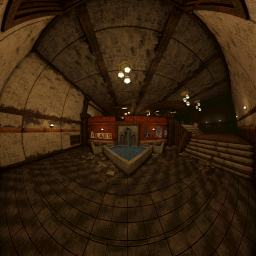
Позволяет для очень высокого FOV путем реализации новых проекций.