
SOTFEdit
Скачать игру Sons of the Forest
 Мод для Sons Of The Forest
от pineapple54
170+ функций администратора. Режим Бога, нерест предметов, полный набор ESP, телепорт, карта, MP-список.
AdminMenu — мод для Sons Of The Forest (Санс оф зе Форест) от автора pineapple54. 170+ функций администратора. Режим Бога, нерест предметов, полный набор ESP, телепорт, карта, MP-список.
Его скачали 5,9 тыс. раз: это 61-е место среди модов Sons Of The Forest в нашем каталоге, редкость — «обычный» (нижняя половина по скачиваниям). Мод обновлялся в последние полгода, актуальная версия — 2.0.7.
Для работы ему нужны: BepInExPack IL2CPP.
1 шт · нажмите, чтобы открыть
Текст автора на языке оригинала
Full cheat and admin menu with 170+ features across 14 tabs. God mode, infinite stamina, item spawner with every item in the game, full ESP suite (actors, animals, items, containers, collectibles, waypoints), teleport, interactive map, world editing, multiplayer player roster with goto/bring/kill, fully bindable hotkeys, and a lot more. Built on BepInEx 6 IL2CPP. Press Tab in game to open (rebindable).
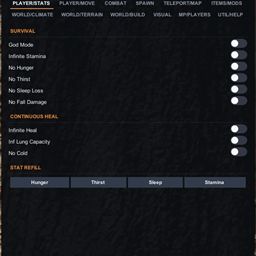
Player — God Mode, Infinite Stamina, No Hunger, No Thirst, No Sleep Loss, No Fall Damage, Infinite Heal, Infinite Lung Capacity, No Cold, Status Effects panel (apply/clear any in-game effect on yourself), one-click refill for all four vitals.
Movement — Walk, Run, Swim, Jump sliders, Speedy Run, NoClip with adjustable speed, Player Size (0.2x to 50x), No Gravity, Gravity slider, Jump Power slider, equip any of 5 armour sets.
Combat — Insta Kill, Infinite Ammo, Damage Multiplier slider, Super Strength with throw multiplier, One Hit Trees, Invisibility, Kill Aura with radius slider, Kill Cannibals, Burn Cannibals, Kill Animals, Freeze Actors, Fake Drown.
Spawn — Every item in the game, 9 category filters, drop in world toggle, Spawn at Cursor (drops the next item where you're looking), Add All Items, Give Chainsaw / Katana / Shotgun, Knight V, Hang Glider, Golf Cart, 57 quick-spawn NPCs with fallback pipeline that catches NPCs SOTF patches broke, free-form actor name input, Remove Kelvin, Remove Virginia, Animal Mult slider, Insane Animal Spawns, Creepy Attack Party.
Teleport — Live position readout, Goto Item by name, Look Teleport (RMB), interactive Map window with right-click teleport, live coordinates inside the map window, your saved waypoints drawn on the map, Waypoints panel with custom folders and RGB color picker.
Items — Infinite Items toggle so nothing in your bag is used up by eating, crafting or building. Lighter, Flashlight, Rebreather intensity sliders and no-drain toggles, Rope Gun infinite length, Knight V speed and jump force tweaks, Hang Glider speed and no-downforce, Rapid Fire for Shotgun, Pistol, Revolver, Rifle.
Weather — Lock Time of Day, Hour slider, Time Speed multiplier, Set Day field, quick TOD presets (Dawn / Noon / Dusk / Midnight), 4 seasons, quick weather presets (Clear / Rain / Storm), Wind slider, Sun intensity (HDRP aware), Sun RGB color, Hurricane Wind, Force Rainstorm.
Terrain — Freeze Lakes, No Lakes, No Ocean, No Waterfalls, Tree Regrow speed, Cut All Trees, Re-grow Trees, Spawn Falling Tree, Clear Bushes with radius, Remove Dead Bodies.
Build — Creative Mode, Instant Build, Infinite Build, Infinite Logs, Force Save, Clear All Structures (one click wipes every player-built structure), Kill All Enemies, Trigger Game Over.
Visual — Actor ESP, Animal ESP, Player ESP, Item ESP (color coded by item type), Container ESP (storages, loot crates, dropped bags), Collectible ESP (artifacts, POIs, GPS markers), Waypoint ESP, corner Radar, Show Dead toggle, Max Distance slider (50m to 1000m), Death Pin (auto waypoint at your last death), Center Crosshair, Cave Light, Free Camera, Capsule Mode, TAA Sharpness, TAA Anti-flicker, UI Scale slider, World Edit object grabber.
Multiplayer — Admin Pretend (client side console unlock), Steam Name Mask (local view), Save Mirror (copies MP world to SP slot), Players panel with each player's name, position, admin badge, plus Goto, Bring, Heal, Kill, Copy ID, and Open Steam Profile.
Achievements — Every achievement as a card with its real Steam name, description and unlock state, plus a completion bar across the top. Search by name or description, hide the ones you already have, unlock or reset any single one, or Unlock All / Lock All.
Keybinds — Rebind the menu open key in-game, plus bind any of ~50 toggles to any keyboard key. Search bar to filter, Set / Clear per row. Bound keys only fire while the menu is closed.
Util — Dump items to file, Fix Stuck Mouse, UI Scale, Reset All (one click wipes every toggle and slider back to default), Auto-save toggle.
Every toggle and slider saves automatically to BepInEx/config/pineapple54.adminmenu.cfg the moment you change it. Next launch or save load, your settings come back on their own. There's a toggle in Util to disable this if you'd rather start clean each session.
Install via r2modman or GaleModManager. BepInEx IL2CPP is pulled in as a dependency automatically.
Press Tab in game and the menu should open. If nothing happens, check BepInEx\LogOutput.log. You should see AdminMenu v2.0.7 loading and AdminMenu loaded. Press Tab in-game to toggle menu..
Open the menu, go to the Keybinds tab, and use the Open Menu row at the top: click Set and press
Описание длинное — здесь его начало. Читать целиком на странице автора
В r2modman ставится автоматически
Файл скачивается с официального сервера Thunderstore, без перезаливов и сторонних установщиков
Подробная инструкция для Sons Of The ForestВставьте значок в описание на Thunderstore, в README или в Discord — русскоязычные игроки сразу попадут на страницу с переводом и инструкцией.

[](https://modka.app/sons-of-the-forest/pineapple54-adminmenu/)<a href="https://modka.app/sons-of-the-forest/pineapple54-adminmenu/"><img src="https://modka.app/badge.png" alt="Описание на русском — Модка" height="44"></a>[url=https://modka.app/sons-of-the-forest/pineapple54-adminmenu/]Описание на русском — Модка[/url]Скачайте менеджер модов r2modman (или Gale) и выберите в нём игру Sons Of The Forest. Создайте профиль — так моды не смешаются с чистой версией игры. Найдите «AdminMenu» во вкладке Online и нажмите Download — BepInEx и все зависимости подтянутся сами. Нажмите «Start modded» — игра запустится с модами. Чтобы сыграть без модов, запустите игру как обычно из Steam — r2modman не трогает чистую версию игры.
Файл скачивается с официального сервера Thunderstore, куда его загрузил pineapple54. Мы не перезаливаем и не изменяем моды.
Установите вместе с ним: BepInExPack IL2CPP. В менеджере модов зависимости подтягиваются автоматически.
6 октября 2026, актуальная версия — 2.0.7. Дата берётся с официальной страницы мода при каждом обновлении каталога.
Скачать игру Sons of the Forest
Восстанавливает команды отладки, такие как addCharacter и goto

Бросьте то, что вы держите в руках, одним ключом (Alt + G по умолчанию): предмет в правой руке или бревна, доски и камни, которые вы носите. Работает в мультиплеере, только бросителю это нужно.
Включает консоль отладки.

Внутриигровой интерфейс для изучения, отладки и модификации игр Unity.

Используйте любую игровую структуру, которую вы можете найти в качестве пользовательского статического элемента, разместите ее где угодно :