


AdvancedShadowsOfDoubt
Новые Случаи, добавляет в геймплей и исправляет некоторые вещи.


 Мод для Shadows of Doubt
от TeamSpyraxi
Добавляет функциональность автоматического сохранения в игре.
Autosave — мод для Shadows of Doubt (Шэдоус оф Даут) от автора TeamSpyraxi. Добавляет функциональность автоматического сохранения в игре.
Его скачали 20,2 тыс. раз: это 23-е место среди модов Shadows of Doubt в нашем каталоге, редкость — «эпический» (топ-20% по скачиваниям). Мод давно не обновлялся — проверьте совместимость с текущей версией игры, актуальная версия — 0.1.1.
Для работы ему нужны: SODCommon.
Текст автора на языке оригинала
A BepInEx Bleeding Edge (v667) plugin for Shadows of Doubt.
This plugin adds in-game autosave functionality.
If you are using r2modman or Thunderstore Mod Manager for installation, simply download the mod from the Online tab.
Follow these steps:
This mod keeps track of the time since you last saved your game and saves automatically after a certain amount of time. Here are the basic settings, but you can change them:
Note: The setting controlling the max number of autosaves works off of the save name, so using "Autosave - AUTO {#}" will limit the number of autosaves across all of your characters to the setting.
Config settings include:
Name — Description
AutosaveDelay | The amount of time between autosaves in seconds. The minimum is 15 seconds. ShowWarnings | If true, warn of upcoming autosaves 5 seconds and 30 seconds beforehand. AvoidConsecutiveAfkAutosaves | If true, then do not start the next autosave timer if the player was AFK during an autosave. The timer will start when the player returns from being AFK. NumberOfAutosavesToKeep | The number of autosaves to keep. Old autosaves will be overwritten. UseLastSaveName | If true, autosaves will be named \"{current save name} - AUTO #\". Otherwise, autosaves will be named \"Autosave - AUTO #\" instead.
You can use r2modman or Thunderstore Mod Manager to easily change the plugin's config settings (via the Config Editor tab). You can also manually edit the config file in the BepInEx directory (I believe that changes you make will take effect while the game is running, but I'm not 100% positive about that).
If you have BepInExConfigManager installed, you can use the in-game menu to edit the config settings.
All code in this repo is distributed under the MIT License. Feel free to use, modify, and distribute as needed.
В r2modman ставится автоматически
1 в каталоге
Новые Случаи, добавляет в геймплей и исправляет некоторые вещи.
Файл скачивается с официального сервера Thunderstore, без перезаливов и сторонних установщиков
Подробная инструкция для Shadows of DoubtВставьте значок в описание на Thunderstore, в README или в Discord — русскоязычные игроки сразу попадут на страницу с переводом и инструкцией.

[](https://modka.app/shadows-of-doubt/teamspyraxi-autosave/)<a href="https://modka.app/shadows-of-doubt/teamspyraxi-autosave/"><img src="https://modka.app/badge.png" alt="Описание на русском — Модка" height="44"></a>[url=https://modka.app/shadows-of-doubt/teamspyraxi-autosave/]Описание на русском — Модка[/url]Скачайте менеджер модов r2modman (или Gale) и выберите в нём игру Shadows of Doubt. Создайте профиль — так моды не смешаются с чистой версией игры. Найдите «Autosave» во вкладке Online и нажмите Download — BepInEx и все зависимости подтянутся сами. Нажмите «Start modded» — игра запустится с модами. Чтобы сыграть без модов, запустите игру как обычно из Steam — r2modman не трогает чистую версию игры.
Файл скачивается с официального сервера Thunderstore, куда его загрузил TeamSpyraxi. Мы не перезаливаем и не изменяем моды.
Установите вместе с ним: SODCommon. В менеджере модов зависимости подтягиваются автоматически.
27 декабря 2023, актуальная версия — 0.1.1. Это больше года назад: перед установкой проверьте, работает ли мод на текущей версии игры.

Дает NPC слышимые голоса, когда они говорят в Shadows of Doubt.
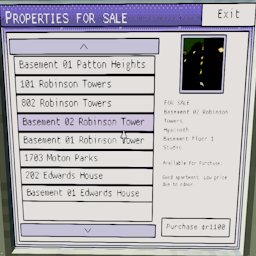
Добавляет новое приложение в хрусталь мэрии, в котором перечислены все доступные объекты недвижимости для продажи и позволяет купить их.

Показывает часы работы предприятий на их двери.
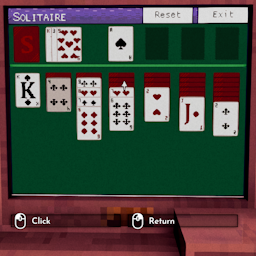
Добавляет приложение для пасьянса в жилые дома, добавляя что-то еще между случаями.

Простой мод, который ускоряет охлаждение убийства с помощью настраиваемой конфигурации
Новые Случаи, добавляет в геймплей и исправляет некоторые вещи.