

AdvancedShadowsOfDoubt
Новые Случаи, добавляет в геймплей и исправляет некоторые вещи.

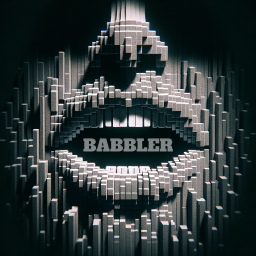
 Мод для Shadows of Doubt
от Arsonide
Дает NPC слышимые голоса, когда они говорят в Shadows of Doubt.
Babbler — мод для Shadows of Doubt (Шэдоус оф Даут) от автора Arsonide. Дает NPC слышимые голоса, когда они говорят в Shadows of Doubt.
Его скачали 40,8 тыс. раз: это 9-е место среди модов Shadows of Doubt в нашем каталоге, редкость — «эпический» (топ-20% по скачиваниям). Мод давно не обновлялся — проверьте совместимость с текущей версией игры, актуальная версия — 0.9.6.
Для работы ему нужны: SODCommon.
Текст автора на языке оригинала
This mod aims to make Shadows of Doubt more immersive by having NPCs you encounter speak and emote audibly, whether you are talking to them directly, over the phone, or just hearing them nearby. There are three modes of speech: Synthesis where they speak understandably using text to speech, Phonetic, where they speak in phonetic gibberish similar to the game "Animal Crossing", and Droning where they speak in repetitive gibberish similar to the game "Undertale". The default is Synthesis, because I believe it sounds better, but all three modes work, are set up with decent defaults so they are easy to activate, and are highly configurable. There are also "templates" that allow you to easily configure Babbler to sound like many games. I will outline how to activate and configure them in sections below.
In my effort to create an inclusive and immersive experience, I've implemented comprehensive gender identity options in this mod. While the default settings align with the unmodified settings of Shadows of Doubt, extensive configurability is provided, allowing players to tailor these aspects to their preferences. My goal is to represent everyone respectfully, ensuring a diverse and authentic experience for all. As always I welcome any player feedback.
If you are using r2modman or Thunderstore Mod Manager for installation, simply download the mod from the Online tab.
Follow these steps:
If you read anything in this document, read this section.
In r2modman you should see "Config editor" on the left, in the "Other" section. If you click on that and then open up BepInEx\config\AAAA_Babbler.cfg and click "Edit config", you will have many options available to you to configure Babbler to your liking. Just click "Save" when you are done.
If you do not see AAAA_Babbler.cfg in your options, click "Start modded" to launch the game, then close both the game and r2modman. When you launch r2modman again, the config file will be there.
Note that the mod caches a lot of things when it starts, so it's a good idea to modify these settings before you launch the game, not while the game is running.
Also note that the config starts with "AAAA". The reason for this is that it forces Babbler to initialize before other mods, which it needs to do.
Babbler has a setting that exists to simplify configuration - by modifying one setting you can have Babbler mimic a wide range of games and multimedia speech patterns. You do this by assigning Template in the General section. When it is assigned, the next time Babbler launches it will discard any other existing settings and configure many settings in Babbler for you. Template must be assigned to one of the following values to do this for you:
In case you missed it, assigning Template will DISCARD ANY OTHER CONFIGURATION OPTIONS the next time you launch the game. It's like loading a profile. After it loads that profile, it will reset back to "None", allowing you to further configure Babbler if you want to dive into the advanced settings below.
When you are done modifying the Template value remember to save by clicking "Save" on the top right. You'll also need to do this if you modify any other settings (which are listed below).
You will find a ton of other settings in the configuration panel to tweak how NPCs sound to your liking, they are categorized very well. We will go through each category below, and what the options in them do.
If you find the amount of option
Описание длинное — здесь его начало. Читать целиком на странице автора
В r2modman ставится автоматически
1 в каталоге
Новые Случаи, добавляет в геймплей и исправляет некоторые вещи.
Файл скачивается с официального сервера Thunderstore, без перезаливов и сторонних установщиков
Подробная инструкция для Shadows of DoubtВставьте значок в описание на Thunderstore, в README или в Discord — русскоязычные игроки сразу попадут на страницу с переводом и инструкцией.

[](https://modka.app/shadows-of-doubt/arsonide-babbler/)<a href="https://modka.app/shadows-of-doubt/arsonide-babbler/"><img src="https://modka.app/badge.png" alt="Описание на русском — Модка" height="44"></a>[url=https://modka.app/shadows-of-doubt/arsonide-babbler/]Описание на русском — Модка[/url]Скачайте менеджер модов r2modman (или Gale) и выберите в нём игру Shadows of Doubt. Создайте профиль — так моды не смешаются с чистой версией игры. Найдите «Babbler» во вкладке Online и нажмите Download — BepInEx и все зависимости подтянутся сами. Нажмите «Start modded» — игра запустится с модами. Чтобы сыграть без модов, запустите игру как обычно из Steam — r2modman не трогает чистую версию игры.
Файл скачивается с официального сервера Thunderstore, куда его загрузил Arsonide. Мы не перезаливаем и не изменяем моды.
Установите вместе с ним: SODCommon. В менеджере модов зависимости подтягиваются автоматически.
7 октября 2024, актуальная версия — 0.9.6. Это больше года назад: перед установкой проверьте, работает ли мод на текущей версии игры.
Новые Случаи, добавляет в геймплей и исправляет некоторые вещи.

Бросайте тела, бегите быстрее, прыгайте выше и носите до 18 предметов. Добавляет 20 новых синхронизирующих дисков, разделяет 37 ванильных ветвей дисков на отдельные диски, перебалансирует их и вращает запасы магазина.

Добавлено 11 внешних разговоров NPC с 67 диалоговыми линиями: аргументы в пользу аренды, сплетни на рабочем месте, беспокойные соседи и повседневная драма. Включает сильный язык.
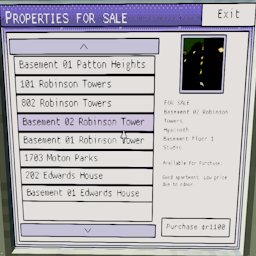
Добавляет новое приложение в хрусталь мэрии, в котором перечислены все доступные объекты недвижимости для продажи и позволяет купить их.

Показывает часы работы предприятий на их двери.
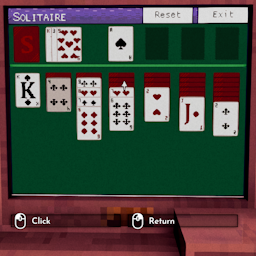
Добавляет приложение для пасьянса в жилые дома, добавляя что-то еще между случаями.