
Sm3gm Complete
Каждый мод Sm3gm в одной установке: пакет «Качество жизни» плюс синхронный диск и больше никаких хлопот.
 Мод для Shadows of Doubt
от Sm3gm
Контроллер и исправления кликов: нажмите на карту доски корпуса, чтобы открыть ее, удерживайте, чтобы переместить ее, карты полностью открываются на экране, Y (Triangle) открывает и закрывает меню. Одно нажатие за клик на клавиатурах, телефонах и лифтах, а также картографические полы по одному за раз.
ControllerFix — мод для Shadows of Doubt (Шэдоус оф Даут) от автора Sm3gm. Контроллер и исправления кликов: нажмите на карту доски корпуса, чтобы открыть ее, удерживайте, чтобы переместить ее, карты полностью открываются на экране, Y (Triangle) открывает и закрывает меню. Одно нажатие за клик на клавиатурах, телефонах и лифтах, а также картографические полы по одному за раз.
Его скачали 1,2 тыс. раз: это 115-е место среди модов Shadows of Doubt в нашем каталоге, редкость — «обычный» (нижняя половина по скачиваниям). Мод обновлялся в последний месяц, актуальная версия — 1.3.7.
Для работы ему нужны: BepInExPack IL2CPP.
4 шт · нажмите, чтобы открыть
Текст автора на языке оригинала
A BepInEx (mod loader) plugin for Shadows of Doubt. Fixes for playing with a controller, a trackpad or a mouse: one click is one press, case board cards open with a tap and move with a hold, opened cards stay on screen, Y (Triangle on PlayStation) opens and closes menus and closes cards on the case board, the map's floor buttons step one floor, and the cursor survives switching input.
Formerly Button Fix. Same mod and same settings, with a better name for what it has grown into.
If it saves you from retyping a door code, a like on its Thunderstore page is always appreciated. Donations are welcome too:
Part of the Quality of Life and Complete modpacks.
Buttons / YClosesMapAndNotes. On the case board an open menu still closes first, and Y closes the map before any card. The quick map you hold the D-pad for already closes when you let go, so Y leaves it alone.Works with mouse, trackpad and controller. Tested at 15 and 120 fps.
After one launch, edit BepInEx/config/sm3gm.sod.controllerfix.cfg with the game closed. Coming from Button Fix, your settings carry over.
Setting — Default — Meaning
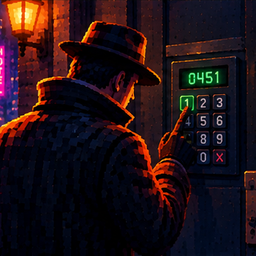
Buttons / OnePressPerClick — true — Keypads, phone keys, elevator buttons and the map's floor buttons take one press per click.
Buttons / ClickWindowSeconds — 0.6 — How long after a click the game may still press the key (the hand moves to it first).
Buttons / SelectUnderCursor — true — The button under the cursor becomes the selected one, so a controller click presses what you point at.
Buttons / YClosesMapAndNotes — false — With a controller, Y (Triangle) also closes the map and the notebook, like B (Circle).
CaseBoard / DragThreshold — 24 — How far (in pixels at 1080p) the cursor must move with the button held before a click becomes a drag. The game uses 10. 0 = leave the game's value.
CaseBoard / YClosesTopCard — true — On the case board with a controller, Y (Triangle) closes the card you opened last, one per press, and opens and closes a card's menu.
CaseBoard / TapOpensCard — true — With a controller, a tap anywhere on a card opens it and a hold moves it.
CaseBoard / PhotoOpensCard — true — The photo always opens the card and shows the hand cursor; the rest of the card moves it.
CaseBoard / OpenCardsOnScreen — true — Open cards are kept fully on the screen, below the top bar.
Phone / KeepViewOnPhone — true — On a phone call the view stays put when you switch between controller and keyboard.
Debug / LogBlocked — false — Write a line to the log for every repeated press that was stopped.
Use Thunderstore Mod Manager or r2modman and install as normal. BepInEx is installed automatically. If you have Button Fix, you can remove it; only one of the two runs anyway.
To install by hand:
Описание длинное — здесь его начало. Читать целиком на странице автора
В r2modman ставится автоматически
2 в каталоге
Каждый мод Sm3gm в одной установке: пакет «Качество жизни» плюс синхронный диск и больше никаких хлопот.

Каждый мод Sm3gm, который берет трение из детективной работы, а не проблемы (с дополнительными помощниками): одно быстрое меню, неограниченные случаи, читаемые заметки, устойчивый контроль и многое другое.
Файл скачивается с официального сервера Thunderstore, без перезаливов и сторонних установщиков
Подробная инструкция для Shadows of DoubtВставьте значок в описание на Thunderstore, в README или в Discord — русскоязычные игроки сразу попадут на страницу с переводом и инструкцией.

[](https://modka.app/shadows-of-doubt/sm3gm-controllerfix/)<a href="https://modka.app/shadows-of-doubt/sm3gm-controllerfix/"><img src="https://modka.app/badge.png" alt="Описание на русском — Модка" height="44"></a>[url=https://modka.app/shadows-of-doubt/sm3gm-controllerfix/]Описание на русском — Модка[/url]Скачайте менеджер модов r2modman (или Gale) и выберите в нём игру Shadows of Doubt. Создайте профиль — так моды не смешаются с чистой версией игры. Найдите «ControllerFix» во вкладке Online и нажмите Download — BepInEx и все зависимости подтянутся сами. Нажмите «Start modded» — игра запустится с модами. Чтобы сыграть без модов, запустите игру как обычно из Steam — r2modman не трогает чистую версию игры.
Файл скачивается с официального сервера Thunderstore, куда его загрузил Sm3gm. Мы не перезаливаем и не изменяем моды.
Установите вместе с ним: BepInExPack IL2CPP. В менеджере модов зависимости подтягиваются автоматически.
31 октября 2026, актуальная версия — 1.3.7. Дата берётся с официальной страницы мода при каждом обновлении каталога.

Дает NPC слышимые голоса, когда они говорят в Shadows of Doubt.

Новые Случаи, добавляет в геймплей и исправляет некоторые вещи.

Улучшение качества жизни

Бросайте тела, бегите быстрее, прыгайте выше и носите до 18 предметов. Добавляет 20 новых синхронизирующих дисков, разделяет 37 ванильных ветвей дисков на отдельные диски, перебалансирует их и вращает запасы магазина.

Размещайте удерживаемые предметы именно там, где вы хотите, с помощью управления движением и поворотом, возвращайте их на место вместо того, чтобы бросать их, фиксируйте подвесные потолочные огни и добавляйте большой набор дополнительных предметов в меню декора, включая рабочие защитные приспособления.

Добавлено 11 внешних разговоров NPC с 67 диалоговыми линиями: аргументы в пользу аренды, сплетни на рабочем месте, беспокойные соседи и повседневная драма. Включает сильный язык.