

Enhanced Graphical Visuals
Очаровывает визуальные эффекты Palworld, отключая несколько эффектов постобработки и позволяя нескольким и дополнительно увеличить внутреннее разрешение игры


 Мод для Palworld
от ThisIsZac
Pal Analyzer будет отображать информацию и статистику о диких приятелях, зависая над ними. Pal Analyzer использует существующий внутриигровой интерфейс, поэтому он выглядит так, как будто ему принадлежит!
Pal Analyzer — мод для Palworld (Палворлд) от автора ThisIsZac. Pal Analyzer будет отображать информацию и статистику о диких приятелях, зависая над ними. Pal Analyzer использует существующий внутриигровой интерфейс, поэтому он выглядит так, как будто ему принадлежит!
Его скачали 41,9 тыс. раз: это 40-е место среди модов Palworld в нашем каталоге, редкость — «эпический» (топ-20% по скачиваниям). Мод обновлялся в последние полгода, актуальная версия — Pal Analyzer v0.87 (XBOX APP).
Дополнительных модов для работы не требует.
3 шт · нажмите, чтобы открыть
Текст автора на языке оригинала
Pal Analyzer
Pal Analyzer displays a customizable tooltip above a Pal's head while hovering over the pal. It can be configured to display a plethora of information such as Health (and IV), Attack (and IV), Defense (and IV), Capture Count, # of Pals in Box, Active Skills, Passive Skills, Item Drops, and Work Suitability.
If you're having issues with the mod please find me on Discord. I'll do my best to help.
This mod does not need to be and should not be installed on your dedicated server. This is a client side only mod and it works in both single and multiplayer.
By default this mod will show you the pals information above their head ONLY while holding the LeftAlt key (for keyboard) or the Right Bumper (for gamepad). However, This can be changed via in-game configuration menu (Opened by pressing 'Shift + O' by default).**
By default the stats you can see within the analyze are progressively unlocked. If you haven't captured the Pal you are trying to analyze most of it's stats will show up as '???'. You will not be able to see all stats until you have captured at least 10 of that species of pal unless you configure different settings as described in the installation instructions.** This is to make it feel a little more like a vanilla game system.
The default unlocks are:
0 Captures - You can see stats like Attack and Defense 5 Captures - You unlock the ability to see active abilities 10 Captures - You unlock the ability to see passive abilities
All of these settings are configurable via the in-game configuration menu (Opened by pressing 'Shift + O' by default).
Mod Installation Instructions
Install UE4SS using the instructions below if you don't already have it
Navigate to your PalWorld game directory
Steam: Right click on game in Steam -> Manage -> Browse Local Files
Xbox App: Select Palworld, click the three dot button ( ... ) and click Manage from the dropdown. Then select the FILES tab and click BROWSE...
Navigate to the LogicMods folder in your PalWorld game directory:
...\Pal\Content\Paks\LogicMods
Download and extract the latest version of the mod.
Move the contents from the extracted mod folder to the LogicMods folder from above (...\Pal\Content\Paks\LogicMods). Be sure to only copy the contents of the folder and not the folder itself.
You're done! Launch the game and press 'Shift + O' on your keyboard to open the configuration options.
UE4SS Installation Instructions Download the latest version of UE4SS (UE4SS_v3.0.0.zip) and unzip
Navigate to your PalWorld game directory
Steam: Right click on game in Steam -> Manage -> Browse Local Files
Xbox App: Select Palworld, click the three dot button ( ... ) and click Manage from the dropdown. Then select the FILES tab and click BROWSE...
Navigate to the Win64 (Steam) or WinGDK (Xbox App) folder in your PalWorld game directory:
...\Pal\Binaries\Win64
or
...\Pal\Binaries\WinGDK
Move the contents of the unzipped UE4SS folder into the Win64 folder
Run the game once and then close it once you get to the main menu (this is so UE4SS can generate the LogicMods folder we are going to use)
UE4SS is now installed
Файл скачивается с официального сервера CurseForge, без перезаливов и сторонних установщиков
Подробная инструкция для PalworldВставьте значок в описание на CurseForge, в README или в Discord — русскоязычные игроки сразу попадут на страницу с переводом и инструкцией.

[](https://modka.app/palworld/pal-analyzer/)<a href="https://modka.app/palworld/pal-analyzer/"><img src="https://modka.app/badge.png" alt="Описание на русском — Модка" height="44"></a>[url=https://modka.app/palworld/pal-analyzer/]Описание на русском — Модка[/url]Скачайте «Pal Analyzer» кнопкой «Скачать» — файл придёт с CurseForge. Откройте папку игры (Steam: правой кнопкой по игре → «Управление» → «Просмотреть локальные файлы») и перейдите в Pal\Content\Paks\~mods. Если папки ~mods нет — создайте её. Распакуйте архив и перенесите в ~mods файлы .pak (а также .ucas и .utoc с тем же названием, если они есть). Запустите игру — мод уже работает.
Файл скачивается с официального сервера CurseForge, куда его загрузил ThisIsZac. Мы не перезаливаем и не изменяем моды.
24 сентября 2026, актуальная версия — Pal Analyzer v0.87 (XBOX APP). Дата берётся с официальной страницы мода при каждом обновлении каталога.
Очаровывает визуальные эффекты Palworld, отключая несколько эффектов постобработки и позволяя нескольким и дополнительно увеличить внутреннее разрешение игры
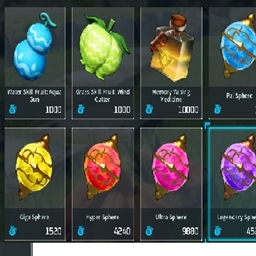
изменения, которые вы можете купить у поставщиков 1.0

Этот мод увеличивает скорость спринта креплений.

Этот мод позволяет вам иметь 100 баз и 40 приятелей из базового уровня 1
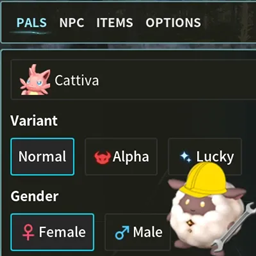
Позволяет вам создавать Pals / NPC и редактировать их Статистику / IV, прежде чем создавать их, а также имеет вкладку для предоставления себе любого элемента в игре!

В лагере нет ограничений по весу.