
Enhanced Graphical Visuals
Enchances Palworld worlds visuals by disabling a few post processing effects and enabling a few and an optional increase in the internal resolution of the game

 Мод для Palworld
от Okaetsu
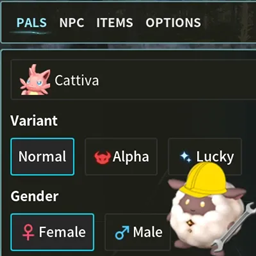
Lets you spawn Pals/NPCs and edit their Stats/IVs before spawning them in and it also has a tab for giving yourself any item in the game!
Creative Menu — мод для Palworld (Палворлд) от автора Okaetsu. Lets you spawn Pals/NPCs and edit their Stats/IVs before spawning them in and it also has a tab for giving yourself any item in the game!
Его скачали 93,1 тыс. раз: это 10-е место среди модов Palworld в нашем каталоге, редкость — «редкий» (топ-50% по скачиваниям). Мод обновлялся в последние полгода, актуальная версия — CreativeMenu (Steam 1.2.4).
Дополнительных модов для работы не требует.
6 шт · нажмите, чтобы открыть
Текст автора на языке оригинала
Hello! This is a more 'advanced' mod that lets you spawn in Pals or you may also give them to yourself directly. Now here's the fun part, you may customize their stats/IVs/abilities/passives to your liking before spawning them in which means you can give Lucky/Legend passive to non shiny or legendary Pals! You may also give yourself any item in the game.
Spawning items/pals/npcs works in multiplayer, however you will need to either be an admin or must be permitted by the host through Options > Permission Management and both the host and client must have this mod.
For Steam: Extract the .pak from inside the .zip into steamapps\common\Palworld\Pal\Content\Paks\~mods and make sure to delete CreativeMenu.pak inside LogicMods folder if you had the old version at some point.
For Game Pass: Extract the .pak, .ucas, .utoc files from inside the .zip into Palworld\Content\Pal\Content\Paks\~mods and make sure to delete CreativeMenu.pak, CreativeMenu.ucas and CreativeMenu.utoc inside LogicMods folder if you had the old version at some point.
You can open the menu with F1 and if you're using the mod for the first time, you'll get a popup asking you to change the keybind. By default it will be set to F1 and if you don't want to change the keybind, just hit OK. If you missed the first time popup, you can open the menu by holding the crouch button for 3 seconds.
Файл скачивается с официального сервера CurseForge, без перезаливов и сторонних установщиков
Подробная инструкция для PalworldВставьте значок в описание на CurseForge, в README или в Discord — русскоязычные игроки сразу попадут на страницу с переводом и инструкцией.

[](https://modka.app/palworld/creative-menu/)<a href="https://modka.app/palworld/creative-menu/"><img src="https://modka.app/badge.png" alt="Описание на русском — Модка" height="44"></a>[url=https://modka.app/palworld/creative-menu/]Описание на русском — Модка[/url]Скачайте «Creative Menu» кнопкой «Скачать» — файл придёт с CurseForge. Откройте папку игры (Steam: правой кнопкой по игре → «Управление» → «Просмотреть локальные файлы») и перейдите в Pal\Content\Paks\~mods. Если папки ~mods нет — создайте её. Распакуйте архив и перенесите в ~mods файлы .pak (а также .ucas и .utoc с тем же названием, если они есть). Запустите игру — мод уже работает.
Файл скачивается с официального сервера CurseForge, куда его загрузил Okaetsu. Мы не перезаливаем и не изменяем моды.
8 августа 2026, актуальная версия — CreativeMenu (Steam 1.2.4). Дата берётся с официальной страницы мода при каждом обновлении каталога.
Enchances Palworld worlds visuals by disabling a few post processing effects and enabling a few and an optional increase in the internal resolution of the game
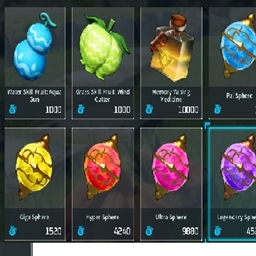
changes what you can buy from vendors 1.0 ready
Cleaner Ui for palworld
A pal info mod that prioritizes performance and stability.
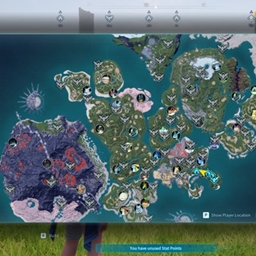
This mod will reveal the full map

This mod increases your carry weight capacity, and/or reduces the weight of items.