
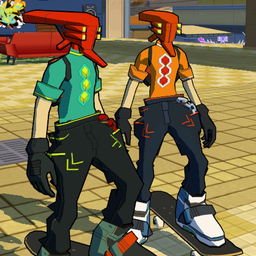
SlopCrew
многопользовательский мод для скейтборда видеоигры
 Мод для Bomb Rush Cyberfunk
от Yuri
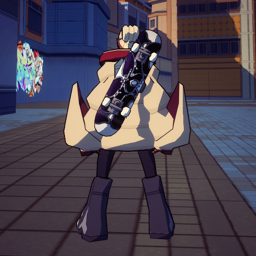
Показывает ваш текущий стиль движения на спине, когда он не используется.
StyleOnBack — мод для Bomb Rush Cyberfunk (Бомб Раш Киберфанк) от автора Yuri. Показывает ваш текущий стиль движения на спине, когда он не используется.
Его скачали 14,1 тыс. раз: это 93-е место среди модов Bomb Rush Cyberfunk в нашем каталоге, редкость — «редкий» (топ-50% по скачиваниям). Мод давно не обновлялся — проверьте совместимость с текущей версией игры, актуальная версия — 1.0.0.
Для работы ему нужны: BepInExPack.
Текст автора на языке оригинала
This adds your current movestyle to your back when not currently in use, furthermore you will also keep the BMX and skateboard in your hand when boosting.
By default this might clip through your character and should be manually tuned with the config. In some cases with custom characters they may not have the appropriate bone to attach to and that will also need to be adjusted.
I highly recommend downloading BepInEx Configuration Manager, this will allow you to edit the config while in game and even has a setting for adjusting the position in real time, this entire configuration section will assume you're using it.
To begin adjusting the position of your movestyle open the configuration manager with the F1 key, find the StyleOnBack section and expand it, optionally you can disable advanced settings with the checkbox in the top of the configuration manager window. From that point on you just want to enable placement mode and adjust the global position, rotation, and scale of your movestyle. You will likely be working with pretty small numbers in most cases and keep in mind negatives are valid, so if your movesetyle is slighting clipping inside your character you might for example adjust the z value of global position by -0.05 to move it just a bit out. Make sure to disable placement mode after you're finished otherwise your movestyle will be permanently on your back. This is all saved automatically so no need to worry about losing it when closing the game.
More advanced configuration will not be covered here, but adjusting each piece of the bmx and each individual inline skate is an option and all of their transforms can be found in the advanced settings, this is also where you can find what bone they're each attached to.
В r2modman ставится автоматически
Файл скачивается с официального сервера Thunderstore, без перезаливов и сторонних установщиков
Подробная инструкция для Bomb Rush CyberfunkВставьте значок в описание на Thunderstore, в README или в Discord — русскоязычные игроки сразу попадут на страницу с переводом и инструкцией.

[](https://modka.app/bomb-rush-cyberfunk/yuri-styleonback/)<a href="https://modka.app/bomb-rush-cyberfunk/yuri-styleonback/"><img src="https://modka.app/badge.png" alt="Описание на русском — Модка" height="44"></a>[url=https://modka.app/bomb-rush-cyberfunk/yuri-styleonback/]Описание на русском — Модка[/url]Скачайте менеджер модов r2modman (или Gale) и выберите в нём игру Bomb Rush Cyberfunk. Создайте профиль — так моды не смешаются с чистой версией игры. Найдите «StyleOnBack» во вкладке Online и нажмите Download — BepInEx и все зависимости подтянутся сами. Нажмите «Start modded» — игра запустится с модами. Чтобы сыграть без модов, запустите игру как обычно из Steam — r2modman не трогает чистую версию игры.
Файл скачивается с официального сервера Thunderstore, куда его загрузил Yuri. Мы не перезаливаем и не изменяем моды.
Установите вместе с ним: BepInExPack. В менеджере модов зависимости подтягиваются автоматически.
3 ноября 2023, актуальная версия — 1.0.0. Это больше года назад: перед установкой проверьте, работает ли мод на текущей версии игры.
многопользовательский мод для скейтборда видеоигры
Восстанавливает и вводит несколько новых механик движения, чтобы обеспечить более быстрый и полезный игровой процесс.

Мод Bomb Rush Cyberfunk, который позволяет добавлять музыку в игру!

Оригинальное название: Emerald Coast from Sonic Adventure.

Добавляет новые трюки Wall Plant и Graffiti Plant, которые могут быть вызваны нажатием клавиши прыжка при проветривании в стены.

Swap Skins и Models для вашего персонажа, Gears, Phone & Spraycan прямо в игре! (Единство не требуется)