

Obeliskial Options
Options to modify gameplay.

 Мод для Across the Obelisk
от Binbin
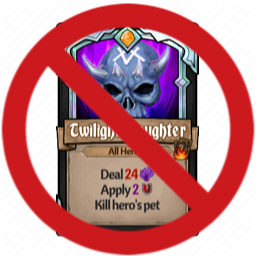
Prevents Lord Hanshek's Twilight Slaughter from killing pets. That is all.
Slaughter Prevention — мод для Across the Obelisk (Экросс зе Обелиск) от автора Binbin. Prevents Lord Hanshek's Twilight Slaughter from killing pets. That is all.
Его скачали 697 раз: это 81-е место среди модов Across the Obelisk в нашем каталоге, редкость — «обычный» (нижняя половина по скачиваниям). Мод давно не обновлялся — проверьте совместимость с текущей версией игры, актуальная версия — 1.2.1.
Для работы ему нужны: BepInExPack AcrossTheObelisk, Obeliskial Essentials.
Текст автора на языке оригинала
A very simple mod that prevents Lord Hanshek's Twilight Slaughter from killing pets. That is all.
Please let me know if you have any issues
com.binbin.ImmortalPets.dll file into the Across the Obelisk\BepInEx\plugins folderAcross the Obelisk folder should now contain a BepInEx folder and a doorstop_libs folder.MultipleRerolls.dll into the Across the Obelisk\BepInEx\plugins folderThis has been updated for version 1.4.
Hope you enjoy it and if have any issues, ping me in Discord or make a post in the modding #support-and-requests channel of the official Across the Obelisk Discord.
Please do not donate to me. If you wish to support me, I would prefer it if you just gave me feedback.
В r2modman ставится автоматически
Файл скачивается с официального сервера Thunderstore, без перезаливов и сторонних установщиков
Подробная инструкция для Across the ObeliskВставьте значок в описание на Thunderstore, в README или в Discord — русскоязычные игроки сразу попадут на страницу с переводом и инструкцией.

[](https://modka.app/across-the-obelisk/binbin-slaughter-prevention/)<a href="https://modka.app/across-the-obelisk/binbin-slaughter-prevention/"><img src="https://modka.app/badge.png" alt="Описание на русском — Модка" height="44"></a>[url=https://modka.app/across-the-obelisk/binbin-slaughter-prevention/]Описание на русском — Модка[/url]Скачайте менеджер модов r2modman (или Gale) и выберите в нём игру Across the Obelisk. Создайте профиль — так моды не смешаются с чистой версией игры. Найдите «Slaughter Prevention» во вкладке Online и нажмите Download — BepInEx и все зависимости подтянутся сами. Нажмите «Start modded» — игра запустится с модами. Чтобы сыграть без модов, запустите игру как обычно из Steam — r2modman не трогает чистую версию игры.
Файл скачивается с официального сервера Thunderstore, куда его загрузил Binbin. Мы не перезаливаем и не изменяем моды.
Установите вместе с ним: BepInExPack AcrossTheObelisk, Obeliskial Essentials. В менеджере модов зависимости подтягиваются автоматически.
17 июня 2025, актуальная версия — 1.2.1. Это больше года назад: перед установкой проверьте, работает ли мод на текущей версии игры.
Options to modify gameplay.
Adds too many new Perks. Some are not particularly balanced. Let me know if you have issues or think something should be changed.

An Unofficial Balance Patch hopefully fixing a bunch of weaker cards/items/enemies and adding in a bunch of new ones.

Beta version of the Unoffical Balance Patch.

New Hero Mod for Ulfvitr, the Wise Wolf, a Wet-Lighting-Regen based Shaman.

redo two enchantments for Sylvie to make her arrows deal magic damage. redo ranged attack cards and Sylvie's initial cards and traits for fitting