
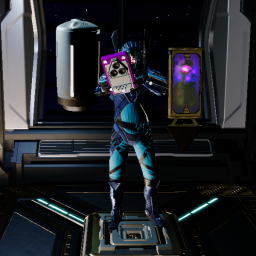
Backpack
Allows the player to carry multiple items at the same time


 Мод для Void Crew
от Captain_Chuncks_Mods
Makes Void Crew's menus and HUD work in VR with UUVR (installed with Rai Pal): a sharp UI screen, head-locked HUD pieces you place yourself, aiming where you look, working terminals and pings, and a VR settings tab.
Void Crew VR UI Fix — мод для Void Crew (Войд Крю) от автора Captain_Chuncks_Mods. Makes Void Crew's menus and HUD work in VR with UUVR (installed with Rai Pal): a sharp UI screen, head-locked HUD pieces you place yourself, aiming where you look, working terminals and pings, and a VR settings tab.
Его скачали 72 раз: это 93-е место среди модов Void Crew в нашем каталоге, редкость — «обычный» (нижняя половина по скачиваниям). Мод обновлялся в последний месяц, актуальная версия — 3.14.1.
Для работы ему нужны: BepInExPack.
Автор пометил мод как клиентский: достаточно установить его себе, друзьям и хосту он не нужен.
Текст автора на языке оригинала
Makes Void Crew's menus and HUD work properly in VR when you play it with UUVR, installed through Rai Pal.
Needs UUVR. UUVR isn't on Thunderstore, and mod managers (r2modman, Thunderstore Mod Manager, Gale) can't install it. Install UUVR with Rai Pal, then put this mod into the BepInEx folder Rai Pal made, as shown below. Keyboard and mouse only; motion controllers aren't supported yet.
It only changes things on your own PC; other players don't need it.
Void Crew and click it.VoidCrewVRUIFix.dll from the zip's plugins folder into the plugins folder there, next to uuvr-mono-modern.The first time the game starts with the mod, it switches UUVR to OpenVR (SteamVR) for the sharp overlay UI. Everything else works out of the box.
Open Settings in the game and pick the VR tab (next to GRAPHICS). Click MODIFY UI at the top to move, resize and lock to your head every piece of the HUD. RESTORE at the bottom of the Settings menu, pressed on the VR tab, puts the defaults back.
Key — What it does
F8 — Recentre the UI in front of you
F7 — Switch between the SteamVR overlay and the in-game panel
F6 — Flip the UI if it is ever upside down
F9 — Write a diagnostics report (for bug reports)
F11 — Turn the game picture on your monitor on or off
F3 — Turn VR on or off (from UUVR)
The full guide, the source code and bug reports are on GitHub: https://github.com/CaptainChunck/VoidCrewVRUIFix
When something goes wrong, press F9 in game, then attach BepInEx\LogOutput.log to your report.
UUVR and Rai Pal by Raicuparta, BepInEx and HarmonyX. Void Crew is made by Hutlihut Games; this mod is a fan project and isn't affiliated with them.
В r2modman ставится автоматически
Файл скачивается с официального сервера Thunderstore, без перезаливов и сторонних установщиков
Подробная инструкция для Void CrewВставьте значок в описание на Thunderstore, в README или в Discord — русскоязычные игроки сразу попадут на страницу с переводом и инструкцией.

[](https://modka.app/void-crew/captain-chuncks-mods-void-crew-vr-ui-fix/)<a href="https://modka.app/void-crew/captain-chuncks-mods-void-crew-vr-ui-fix/"><img src="https://modka.app/badge.png" alt="Описание на русском — Модка" height="44"></a>[url=https://modka.app/void-crew/captain-chuncks-mods-void-crew-vr-ui-fix/]Описание на русском — Модка[/url]Скачайте менеджер модов r2modman (или Gale) и выберите в нём игру Void Crew. Создайте профиль — так моды не смешаются с чистой версией игры. Найдите «Void Crew VR UI Fix» во вкладке Online и нажмите Download — BepInEx и все зависимости подтянутся сами. Нажмите «Start modded» — игра запустится с модами. Чтобы сыграть без модов, запустите игру как обычно из Steam — r2modman не трогает чистую версию игры.
Файл скачивается с официального сервера Thunderstore, куда его загрузил Captain_Chuncks_Mods. Мы не перезаливаем и не изменяем моды.
Установите вместе с ним: BepInExPack. В менеджере модов зависимости подтягиваются автоматически.
18 октября 2026, актуальная версия — 3.14.1. Дата берётся с официальной страницы мода при каждом обновлении каталога.
Allows the player to carry multiple items at the same time
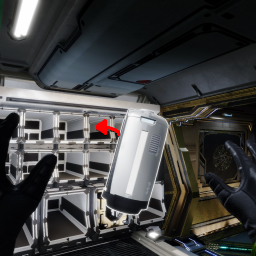
If a thrown item hits an empty slot, it will be put in that slot.
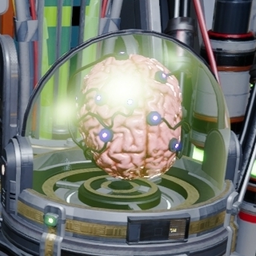
Collection of helpful features that are allowed in all sessions. F5 in-game to adjust.

Provides bug fixes, Log Error eliminations, and Optimizations. Client/Host-Side
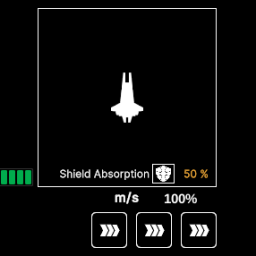
Displays the void charge state while in the pilot's seat.
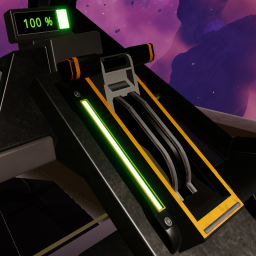
Adds a keybind for the pilot to activate the void jump lever