

RtDMMO
Вдохновленная WoW MMO в мире Вальхайма. Темное, мрачное путешествие со скрытыми знаниями, смертельными испытаниями и забытой властью. В нем есть система классов Demigods, пользовательские подземелья, боссы и монстры с контентом Ocean.

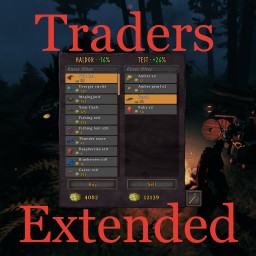
 Мод для Valheim
от shudnal
Расширенный пользовательский интерфейс трейдера, синхронизированные списки JSON / YAML, пользовательские валюты, советы по ценам, ремонт, балансы и выкуп.
TradersExtended — мод для Valheim (Вальхейм) от автора shudnal. Расширенный пользовательский интерфейс трейдера, синхронизированные списки JSON / YAML, пользовательские валюты, советы по ценам, ремонт, балансы и выкуп.
Его скачали 293,8 тыс. раз: это 82-е место среди модов Valheim в нашем каталоге, редкость — «редкий» (топ-50% по скачиваниям). Мод обновлялся в последний месяц, актуальная версия — 2.0.6.
Для работы ему нужны: YamlDotNet, JsonDotNET, BepInExPack Valheim, ConditionalConfigSync.
У мода стоят обе пометки — клиентская и серверная: он может работать и у одного игрока, и у хоста. Чтобы изменения были у всех, надёжнее поставить его всей компании.
Автор отметил совместимость с обновлениями игры: Deep North.
1 шт · нажмите, чтобы открыть
Текст автора на языке оригинала
Traders Extended adds trader-specific and common buy/sell lists, a two-column store UI, item filtering, repairs, trader balances, flexible pricing, persistent buyback, configurable currencies, and live synchronized configuration.
A Thunderstore-compatible mod manager installs these dependencies automatically. For manual installation, install the dependencies before Traders Extended.
New item files should be placed in BepInEx/config/shudnal.TradersExtended. Legacy files beginning with shudnal.TradersExtended. are still supported anywhere below BepInEx/config. Item configurations may also be embedded into the assembly under TradersExtended.Configs.
Supported extensions:
.json.yaml.yml.csvNew file names use this format:
.[.].Examples:
haldor.buy.json
haldor.sell.yaml
hildir.buy.yml
bogwitch.sell.csv
common.buy.yaml
common.sell.json
hildir.buy.food.basic.json
hildir.buy.food.progression.csv
The legacy shudnal.TradersExtended. prefix remains accepted, for example shudnal.TradersExtended.haldor.buy.json. Existing files keep their original names when saved by the editor.
The optional identifier may contain multiple dot-separated segments. It is ignored when selecting the trader and list type, and exists only to split a trader list across multiple human-readable files.
All matching item files are merged. Embedded files are processed first and files below BepInEx/config last. Within each source, files are processed by file name; entries remain in their original order inside each file. Within sell lists, trader-specific entries override common entries for the same item, quality, and stack.
Names are case-insensitive on Windows. Prefab names inside files remain case-sensitive because they are resolved through ObjectDB. Invalid files or entries are logged and skipped without preventing the remaining files from loading.
{
  "prefab": "DragonEgg",
  "stack": 1,
  "price": 500,
  "quality": 0,
  "currency": "Coins",
  "requiredGlobalKey": "defeated_dragon",
  "notRequiredGlobalKey": "",
  "requiredPlayerKey": "",
  "notRequiredPlayerKey": ""
}prefab: item prefab name.stack: number of items covered by the price. The default is 1; values less than one disable the entry.price: price for the configured stack. The default is 1; values less than one disable the entry.quality: required/generated quality. Zero means default quality for buy lists and any quality for sell lists.currency: optional currency prefab for this entry. It overrides the trader default for this buy or sell item only.requiredGlobalKey: comma-separated global keys; all must be present.notRequiredGlobalKey: comma-separated global keys; none may be present.requiredPlayerKey: comma-separated player unique keys; all must be present.notRequiredPlayerKey: comma-separated player unique keys; none may be present.[
{
"prefab": "DragonEgg",
"stack": 1,
"price": 500,
"requiredGlobalKey": "defeated_dragon"
},
{
"prefab": "RawMeat",
"stack": 10,
"price": 2,
"currency": "Ruby"
},
{
"prefab": "Cultivator",
"stack": 1,
"price": 500,
"quality": 4,
"requiredGlobalKey": "defeated_gdking"
}
]- prefab: FishingRod
stack: 1
price: 200
- prefab: Wood
stack: 50
price: 25
requiredGlobalKey: defeated_gdking
- prefab: Fish1
stack: 5
price: 500
quality: 4
currency: RubyThe first row contains property names. prefab is required. Any other column may be omitted when it is not used by any row; omitted values use the same defaults as JSON and YAML.
prefab,stack,price,currency,requiredGlobalKey
FishingRod,1,200,,
Wood,50,25,,defeated_gdking
Fish1,5,500,Ruby,
Supported headers are:
prefab,stack,price,quality,currency,requiredGlobalKey,notRequiredGlobalKey,requiredPlayerKey,notRequiredPlayerKeyQuote a field according to normal CSV rules when it contains a comma, quote, or line break.
Each trader may have one personal settings file:
.config.json
<tr
Описание длинное — здесь его начало. Читать целиком на странице автора
В r2modman ставится автоматически
2 в каталоге
Вдохновленная WoW MMO в мире Вальхайма. Темное, мрачное путешествие со скрытыми знаниями, смертельными испытаниями и забытой властью. В нем есть система классов Demigods, пользовательские подземелья, боссы и монстры с контентом Ocean.

Добавлено 7 новых трейдеров с уникальными товарами, доступными только при покупке.
Файл скачивается с официального сервера Thunderstore, без перезаливов и сторонних установщиков
Подробная инструкция для ValheimВставьте значок в описание на Thunderstore, в README или в Discord — русскоязычные игроки сразу попадут на страницу с переводом и инструкцией.

[](https://modka.app/valheim/shudnal-tradersextended/)<a href="https://modka.app/valheim/shudnal-tradersextended/"><img src="https://modka.app/badge.png" alt="Описание на русском — Модка" height="44"></a>[url=https://modka.app/valheim/shudnal-tradersextended/]Описание на русском — Модка[/url]Скачайте менеджер модов r2modman (или Gale) и выберите в нём игру Valheim. Создайте профиль — так моды не смешаются с чистой версией игры. Найдите «TradersExtended» во вкладке Online и нажмите Download — BepInEx и все зависимости подтянутся сами. Нажмите «Start modded» — игра запустится с модами. Для мультиплеера всем игрокам нужен одинаковый набор модов: в r2modman профиль можно экспортировать кодом и отправить друзьям.
Файл скачивается с официального сервера Thunderstore, куда его загрузил shudnal. Мы не перезаливаем и не изменяем моды.
У мода стоят обе пометки — клиентская и серверная: он может работать и у одного игрока, и у хоста. Чтобы изменения были у всех, надёжнее поставить его всей компании.
Установите вместе с ним: YamlDotNet, JsonDotNET, BepInExPack Valheim, ConditionalConfigSync. В менеджере модов зависимости подтягиваются автоматически.
2 ноября 2026, актуальная версия — 2.0.6. Дата берётся с официальной страницы мода при каждом обновлении каталога.

Odin Architect - это мод, который позволит вам строить больше с большим количеством конструкций и в большем масштабе. Здесь вы найдете не только более крупные аналоги основных зданий, но и совершенно новые

Выберите пункт назначения портала из списка существующих порталов. Больше никаких тегов и никаких порталов! XPortal — это полное переписывание популярного мода AnyPortal.

Временная вилка Valheim Plus. Предоставляет множество настраиваемых игровых настроек.

Четыре настраиваемых сезона. Разный визуальный колорит на каждый сезон, сезонное влияние на игровой процесс. Замороженная вода и льдины зимой. Разная погода, рейды, освещение и товары трейдера. Новая специальная весенняя трава. Минимальное воздействие на fps.

Достижения, награды, охота за сокровищами, метрики игроков, таблица лидеров, индексация, рынок, лотерея

Разделяет Карту между всеми игроками, синхронизирует карту при подключении