
EquipmentAndQuickSlots
Дайте оборудованным предметам свои собственные выделенные слоты для инвентаря, а также до шести быстродействующих слотов с горячим ключом.

 Мод для Valheim
от Roses
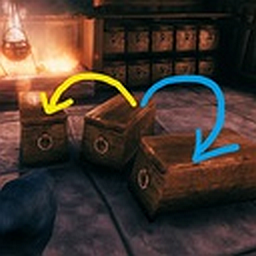
Хотите быстро сбросить добычу? Устали искать сундук с определенным стеком предметов, чтобы сохранить его еще? Научите контейнеры устраивать вещи со своими соседями!
SmarterContainers — мод для Valheim (Вальхейм) от автора Roses. Хотите быстро сбросить добычу? Устали искать сундук с определенным стеком предметов, чтобы сохранить его еще? Научите контейнеры устраивать вещи со своими соседями!
Его скачали 211,2 тыс. раз: это 113-е место среди модов Valheim в нашем каталоге, редкость — «редкий» (топ-50% по скачиваниям). Мод давно не обновлялся — проверьте совместимость с текущей версией игры, актуальная версия — 1.7.0.
Для работы ему нужны: BepInExPack Valheim.
Автор пометил мод как клиентский: достаточно установить его себе, друзьям и хосту он не нужен.
Текст автора на языке оригинала
This is a upload from the Nexus to get a new version. I take no credit in their work. Below is the README from Nexus.
Teaches your containers to automatically send items you put in them to other containers if they are already containing this item-stack. Puts same-kinded items to their siblings; copper-ore goes to chest containing tin-ore and so on. You can create such item-groups from any items combination - just put your carrots, stones and feathers in one box, click the button and from now on your carrots will go to chest with feathers. Configure mod to load-out all specific loot-items from your inventory to a proper chests via a single button click.
When you put an item stack to a container via [Ctrl + Click], if container is full or doesn't contain same items:
In other words: If group contains your item and chest contains any other item from a group, then your item will go to this chest.
There are three available options to define an item-group:
item-type: Tool, Weapon, Ammo, Armor, Trophie(holding ctrl is mandatory since it's a "move-stack" ingame key)
[ItemGroup] config section contains a set of item-names based groups:
valuables = ruby,coins,amber,amberpearl
ore = copperore,flametalore,ironore,silverore,tinore,ironscrap,blackmetalscrap
rock = stone,flint,obsidian
ingots = copper,bronze,flametal,iron,silver,tin,blackmetal
wood = wood,finewood,corewood,ancientbark
mushrooms = Mushroom,MushroomBlue,MushroomYellow
berries = Blueberries,Cloudberry,Raspberry,Honey
vegetables = Carrot,Turnip
cookedMeat = CookedLoxMeat,NeckTailGrilled,MeatCooked,FishCooked,SerpentMeatCooked
food = CarrotSoup,Sausages,QueensJam,SerpentStew,TurnipStew,BloodPudding[PostfixedItemGroups] posfixes = cone,seeds,pelt,hide # i.e. CarrotSeeds will go to TurnipSeeds
[PrefixedItemGroups] prefixes = trophy,mead,arrow,armor,cape,helmet,atgeir,bow,battleaxe,knife,mace,shield,sledge,spear,sword,tankard # i.e. ArrowFire will go to ArrowFlintHow it works: When you put an item stack to container via [Ctrl + Click]
if simple container lookup by same-item-name described above has no results then: check each nearby container and if both container and your item are
if none matched - check each nearby container and if container has any item with item-type same as your items type then item is routed there (could be disabled with itemTypeGroupsEnabled config option) if none of the above matched and fuzzyGroupingEnabled option enabled - additional item-types based groups are checked: IsMaterial, IsConsumable, IsCustomization, IsMisc
Put desired items set to a chest, click the [☼] button (at the bottom-left corner of chest panel). New group will contain all unique item-names from this chest.
When you click the [☼] button mod will check if items in current chest are already members of some item-names based group. In such case - a prompt dialog will appear with options:
You can disable any preconfigured group
Example: "fishes = FishRaw,FishCooked". (requires game-restart) Item-names could be discovered:
Configure it
Описание длинное — здесь его начало. Читать целиком на странице автора
В r2modman ставится автоматически
Файл скачивается с официального сервера Thunderstore, без перезаливов и сторонних установщиков
Подробная инструкция для ValheimВставьте значок в описание на Thunderstore, в README или в Discord — русскоязычные игроки сразу попадут на страницу с переводом и инструкцией.

[](https://modka.app/valheim/roses-smartercontainers/)<a href="https://modka.app/valheim/roses-smartercontainers/"><img src="https://modka.app/badge.png" alt="Описание на русском — Модка" height="44"></a>[url=https://modka.app/valheim/roses-smartercontainers/]Описание на русском — Модка[/url]Скачайте менеджер модов r2modman (или Gale) и выберите в нём игру Valheim. Создайте профиль — так моды не смешаются с чистой версией игры. Найдите «SmarterContainers» во вкладке Online и нажмите Download — BepInEx и все зависимости подтянутся сами. Нажмите «Start modded» — игра запустится с модами. Для мультиплеера всем игрокам нужен одинаковый набор модов: в r2modman профиль можно экспортировать кодом и отправить друзьям.
Файл скачивается с официального сервера Thunderstore, куда его загрузил Roses. Мы не перезаливаем и не изменяем моды.
Автор пометил мод как клиентский: достаточно установить его себе, друзьям и хосту он не нужен.
Установите вместе с ним: BepInExPack Valheim. В менеджере модов зависимости подтягиваются автоматически.
11 ноября 2023, актуальная версия — 1.7.0. Это больше года назад: перед установкой проверьте, работает ли мод на текущей версии игры.
Дайте оборудованным предметам свои собственные выделенные слоты для инвентаря, а также до шести быстродействующих слотов с горячим ключом.

Valheim Mod добавит в игру каталог Adventuring Backpacks. Эти пакеты будут расти и становиться более полезными по мере развития игры.

Дважды оружие, дважды веселье.

Дает больше цели тропинкам. Увеличивает скорость игрока на дорожках и конструкциях. Уменьшает выносливость, потребляемую при беге по дорожкам. Выставляет необязательные модификаторы для обычной местности в каждом биоме. Все значения настраиваются.

Выберите пункт назначения портала из списка существующих порталов. Больше никаких тегов и никаких порталов! XPortal — это полное переписывание популярного мода AnyPortal.

Временная вилка Valheim Plus. Предоставляет множество настраиваемых игровых настроек.