


XPortal
Выберите пункт назначения портала из списка существующих порталов. Больше никаких тегов и никаких порталов! XPortal — это полное переписывание популярного мода AnyPortal.

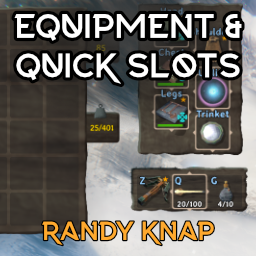
 Мод для Valheim
от RandyKnapp
Дайте оборудованным предметам свои собственные выделенные слоты для инвентаря, а также до шести быстродействующих слотов с горячим ключом.
EquipmentAndQuickSlots — мод для Valheim (Вальхейм) от автора RandyKnapp. Дайте оборудованным предметам свои собственные выделенные слоты для инвентаря, а также до шести быстродействующих слотов с горячим ключом.
Его скачали 1,6 млн раз: это 6-е место среди модов Valheim в нашем каталоге, редкость — «легендарный» (топ-5% по скачиваниям). Мод обновлялся в последний месяц, актуальная версия — 3.2.1.
Для работы ему нужны: Jotunn, BepInExPack Valheim.
Автор пометил мод как клиентский: достаточно установить его себе, друзьям и хосту он не нужен.
Автор отметил совместимость с обновлениями игры: Mistlands, Ashlands, Bog Witch, Deep North.
Текст автора на языке оригинала
Version 3.0 is a complete rewrite.
Give equipped items their own dedicated inventory slots — Head, Chest, Legs, Shoulder, Utility and Trinket — plus up to six hotkeyable quick slots.
the balance settings (slot toggles, quick slot count, keep-on-death) are server-synced and admin-controlled.
after saving under 3.0 — the automatic slot backup protects your items, but the old format is not written anymore.
slots 1–4). While a slot holds an item, its combo takes the D-pad press away from the game; with the slot empty, the press does what it normally does. Change the modifier and each slot's button under Controller in the config. On the Alternative 1 controller layout LB is also the game's alt key, so LB + D-pad camera and minimap zoom give way to the quick slots there.
Equipment Slots / Utility Slot Count, 1–3, default 1): wearmore than one belt, Wishbone or Megingjord. Off by default and server-synced, because it is a balance change. You can never wear two copies of the same item, and the extra items show on your character for everyone.
(Equipment Panel and Container Window in the config). Left Alt + right-click on the chest window puts it back in its automatic place below the inventory. The chest window always stays on the screen.
Please report bugs on our discord: https://discord.gg/ZNhYeavv3C
Source: Github
Install with BepInEx: copy EquipmentAndQuickSlots.dll into the BepInEx/plugins folder.
eaqs_validate — revalidates the slots and relocates overlapping/out-of-grid itemseaqs_api — prints API version, endpoints and slot statesinvcheck — prints the inventory grid contentseaqs_restorebackup (cheat) — restores the automatic slot backup into free slotsbreakequipment, dropall (cheat) — testing helperspositions the quick slot bar: move it with BetterUI's HUD edit key (F7 by default) and BetterUI remembers where you put it. Quick Slots Anchor / Quick Slots Position in this mod's config only decide where the bar starts. If the bar sits somewhere odd after updating from 3.0.0, press F7 and drag it back, or reset BetterUI's uiData setting to none.
inventory, which showed up as a block of empty cells under the inventory and could swallow items. Its quiver is now hosted as three ammo-only slots in the equipment panel, keyed to Better Archery's own hotkeys; everything else it does is untouched. Set Compatibility / Better Archery quiver integration to false to switch its quiver off entirely instead and use the quick slots for ammo.
items you favorited (or that sit in a favorited quick slot) and its trash mark on items you flagged as trash. Turn this off with Quick Slots / Show favorite marks. Its own borders already show on the slots in the equipment panel.
are declared incompatible; BepInEx will not load this mod next to them.
We accept AI-assisted changes. All code, assets etc. Must be reviewed and tested before it will be merged or released.
The following things WILL NOT BE ADDED OR CONSIDERED.
В r2modman ставится автоматически
Файл скачивается с официального сервера Thunderstore, без перезаливов и сторонних установщиков
Подробная инструкция для ValheimВставьте значок в описание на Thunderstore, в README или в Discord — русскоязычные игроки сразу попадут на страницу с переводом и инструкцией.

[](https://modka.app/valheim/randyknapp-equipmentandquickslots/)<a href="https://modka.app/valheim/randyknapp-equipmentandquickslots/"><img src="https://modka.app/badge.png" alt="Описание на русском — Модка" height="44"></a>[url=https://modka.app/valheim/randyknapp-equipmentandquickslots/]Описание на русском — Модка[/url]Скачайте менеджер модов r2modman (или Gale) и выберите в нём игру Valheim. Создайте профиль — так моды не смешаются с чистой версией игры. Найдите «EquipmentAndQuickSlots» во вкладке Online и нажмите Download — BepInEx и все зависимости подтянутся сами. Нажмите «Start modded» — игра запустится с модами. Для мультиплеера всем игрокам нужен одинаковый набор модов: в r2modman профиль можно экспортировать кодом и отправить друзьям.
Файл скачивается с официального сервера Thunderstore, куда его загрузил RandyKnapp. Мы не перезаливаем и не изменяем моды.
Автор пометил мод как клиентский: достаточно установить его себе, друзьям и хосту он не нужен.
Установите вместе с ним: Jotunn, BepInExPack Valheim. В менеджере модов зависимости подтягиваются автоматически.
10 ноября 2026, актуальная версия — 3.2.1. Дата берётся с официальной страницы мода при каждом обновлении каталога.
Выберите пункт назначения портала из списка существующих порталов. Больше никаких тегов и никаких порталов! XPortal — это полное переписывание популярного мода AnyPortal.

Временная вилка Valheim Plus. Предоставляет множество настраиваемых игровых настроек.

Мод Валхейма, который удаляет туман из игры Никакого тумана!

Valheim Mod добавит в игру каталог Adventuring Backpacks. Эти пакеты будут расти и становиться более полезными по мере развития игры.

Odin Architect - это мод, который позволит вам строить больше с большим количеством конструкций и в большем масштабе. Здесь вы найдете не только более крупные аналоги основных зданий, но и совершенно новые
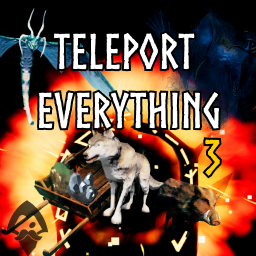
Teleport Everything 3 с пользовательским интерфейсом является официальным модульным пакетом OdinPlus для телепортных существ, телепортных тележек, телепортных лодок и Quick Teleport. Совместимость с Valheim 1.0 (Deep North).