Начните вводить название — например, MoreHead, Sodium или PEAK

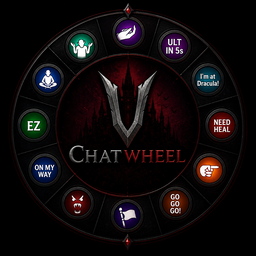
ChatWheel — иконка
Обложка V RisingМод для V Rising

ChatWheel

от casanova

Преобразует колесо эмота в полностью функциональное колесо чата

  • Обычный
  • 389 скачиваний
  • Версия 1.0.2
  • Обновлён 12 мая 2026
  • Серверный

О моде ChatWheel

ChatWheel — мод для V Rising (Ви Райзинг) от автора casanova. Преобразует колесо эмота в полностью функциональное колесо чата

Его скачали 389 раз: это 222-е место среди модов V Rising в нашем каталоге, редкость — «обычный» (нижняя половина по скачиваниям). Мод обновлялся в течение года, актуальная версия — 1.0.2.

Для работы ему нужны: BepInExPack V Rising, VampireCommandFramework.

Автор отметил совместимость с обновлениями игры: Oakveil.

Полное описание ChatWheel

Текст автора на языке оригинала

ChatWheel for V Rising

ChatWheel is a server-side modification for V Rising that transforms the emote wheel into a fully functional chat wheel.

It supports chat commands and dynamic placeholders that provide precise information such as cooldowns, debuff timers, and player locations in real time. By reducing language barriers and improving clarity of communication, ChatWheel enables teams to coordinate more effectively and perform at a higher competitive level.

Feel free to contact me on Discord (nova_nova) if you have any questions or need assistance with the mod.

Watch video here: https://www.youtube.com/watch?v=SIQk_3QC4V8

Player Commands

  • .cw bind (scope) (message)
  • will bind a message to the emote chosen after executing this command
  • scope can be local or clan
  • message supports commands and placeholders
  • Example: .cw bind clan "[$location] 1"
  • Example: .cw bind local ".stash"
  • Example: .cw bind local ".pull rosepot 10"
  • .cw unbind
  • will unbind the message on the emote chosen after executing this command
  • .cw list
  • will list all the bound messages
  • .cw enable
  • will enable the ChatWheel for the player if it's disabled
  • .cw disable
  • will disable the ChatWheel for the player to allow use of the original emotes without clearing or unbinding chatwheels

Message Placeholders

  • $location
  • Replaced by the player's current location derived from the chunk name. Admins are allowed to rename the chunk to whatever they wish to. Castle owner's name will be added if the player is inside a claimed territory.
  • Example: .cw bind clan "im at $location"
  • Example: .cw bind clan "[$location] 1"
  • $combatTimer
  • Replaced by the player's PvP Combat debuff timer.
  • Example: .cw bind clan "I need $combatTimer to drop combat and fully heal"
  • Example: .cw bind clan "$combatTimer fh"
  • $baneTimer and $deathTimer
  • Replaced by the player's Vampire's Bane debuff timer and expected death timer.
  • Example: .cw bind clan "chill for $baneTimer or I'm dead for $deathTimer"
  • $cdUlt
  • Replaced by the player's cooldown for the ultimate.
  • Example: .cw bind clan "ULT in $cdUlt"

Admin Commands

  • .cw rc (name)
  • Renames the current chunk you are in.
  • Example: .cw rc "Admin Hangout Spot"

V Rising Modding Discord | V Rising Modding Wiki

Installation

  1. Install BepInEx, which is required for modding VRising. Follow the instructions provided at BepInEx Installation Guide to set it up correctly in your VRising game directory.
  1. Download the ChatWheel mod along with its dependency (VCF). Ensure you select the correct versions that are compatible with your game.
  1. After downloading, locate the .dll files for ChatWheel and its dependency. Move or copy these .dll files into the BepInEx\Plugins directory within your VRising installation folder.
  • Single Player Note:
  • If you are playing in single player mode, you will need to install ServerLaunchFix. This is a server-side mod that is essential for making the commands work properly on the client side. Make sure to download and place it in the same BepInEx\Plugins directory.
  1. Launch the Game: Start VRising. If everything has been set up correctly, ChatWheel should now be active in the game. Test by typing .cw list.

Credits

  • Odjit for KindredCommands. This mod was originally built upon it!

License

This project is licensed under the AGPL-3.0 license.

Нужно для работы

В r2modman ставится автоматически

Как установить ChatWheel

Файл скачивается с официального сервера Thunderstore, без перезаливов и сторонних установщиков

Подробная инструкция для V Rising
  1. Скачайте менеджер модов r2modman (или Gale) и выберите в нём игру V Rising.
  2. Создайте профиль — так моды не смешаются с чистой версией игры.
  3. Найдите «ChatWheel» во вкладке Online и нажмите Download — BepInEx и все зависимости подтянутся сами.
  4. Нажмите «Start modded» — игра запустится с модами.
  5. Чтобы сыграть без модов, запустите игру как обычно из Steam — r2modman не трогает чистую версию игры.
Вы автор мода? Поставьте ссылку на русское описание

Вставьте значок в описание на Thunderstore, в README или в Discord — русскоязычные игроки сразу попадут на страницу с переводом и инструкцией.

Описание на русском — Модка
Markdown[![Описание на русском — Модка](https://modka.app/badge.png)](https://modka.app/v-rising/casanova-chatwheel/)
HTML<a href="https://modka.app/v-rising/casanova-chatwheel/"><img src="https://modka.app/badge.png" alt="Описание на русском — Модка" height="44"></a>
Steam (BBCode)[url=https://modka.app/v-rising/casanova-chatwheel/]Описание на русском — Модка[/url]

Частые вопросы о ChatWheel

Как установить ChatWheel?

Скачайте менеджер модов r2modman (или Gale) и выберите в нём игру V Rising. Создайте профиль — так моды не смешаются с чистой версией игры. Найдите «ChatWheel» во вкладке Online и нажмите Download — BepInEx и все зависимости подтянутся сами. Нажмите «Start modded» — игра запустится с модами. Чтобы сыграть без модов, запустите игру как обычно из Steam — r2modman не трогает чистую версию игры.

Безопасен ли ChatWheel?

Файл скачивается с официального сервера Thunderstore, куда его загрузил casanova. Мы не перезаливаем и не изменяем моды.

Что нужно для работы ChatWheel?

Установите вместе с ним: BepInExPack V Rising, VampireCommandFramework. В менеджере модов зависимости подтягиваются автоматически.

Когда ChatWheel обновлялся последний раз?

12 мая 2026, актуальная версия — 1.0.2. Дата берётся с официальной страницы мода при каждом обновлении каталога.

Похожие моды

Все моды на V Rising
CoffinSleep — иконка

CoffinSleep

Мод, который ускоряет время, пока вы спите в гробу.

Легендарный38,4 тыс.Серверный

AutoBrazier — иконка

AutoBrazier

Настройка функциональности бразильца

Эпический16,2 тыс.Серверный

AutoCloseDoors — иконка

AutoCloseDoors

Режим автоматического закрытия дверей через несколько секунд.

Эпический15 тыс.Серверный

Notify — иконка

Notify

Мод, который уведомляет, когда пользователь подключается или отключается от сервера, новый пользователь подключается от сервера, когда игрок убивает босса VBlood, систему сообщений дня и систему автоматического объявления, которая работает через каждый определенный интервал.

Эпический13,8 тыс.Серверный

XPRising — иконка

XPRising

Мод сервера, который обменивает уровень передачи элементов на систему выравнивания XP

Эпический13,4 тыс.Серверный

KindredSchematics — иконка

KindredSchematics

Команды для создания, сохранения и загрузки схем

Эпический12,8 тыс.Серверный