
SpeedometerV2
Настраиваемый спидометр. Теперь с поддержкой ModSettings.


 Мод для Titanfall 2
от NachosChipeados
Этот метод имеет специальные инсталляционные инструкции в ОПИСАНИИ, пожалуйста, прочтите их. Модифицированный Northstar. Клиент загружает модули Client-Side на серверы Vanilla
VanillaPlus — мод для Titanfall 2 (Тайтанфол 2) от автора NachosChipeados. Этот метод имеет специальные инсталляционные инструкции в ОПИСАНИИ, пожалуйста, прочтите их. Модифицированный Northstar. Клиент загружает модули Client-Side на серверы Vanilla
Его скачали 13,6 тыс. раз: это 41-е место среди модов Titanfall 2 в нашем каталоге, редкость — «эпический» (топ-20% по скачиваниям). Мод давно не обновлялся — проверьте совместимость с текущей версией игры, актуальная версия — 2.5.1.
Дополнительных модов для работы не требует.
Автор пометил мод как клиентский: достаточно установить его себе, друзьям и хосту он не нужен.
1 шт · нажмите, чтобы открыть
Текст автора на языке оригинала
Patch for Northstar.Client to enable client-side mods on official servers.
A page explaining how to solve most of the common issues with Vanilla+: https://github.com/NachosChipeados/NP.VanillaPlus/blob/main/FAQ.md
1.) Install Northstar if you don't already have it
2.) Create a folder in your Titanfall2 Directory called R2Titanfall
3.) Inside of that folder, create a folder called packages
4.) Place the unzipped Thunderstore download of Vanilla+ in the packages folder, and extract it
5.) The file structure should look like this:
Titanfall2
  R2Titanfall
    packages
      NachosChipeados-VanillaPlus-2.5.1
        mods
NP.VanillaPlus(Titanfall2/R2Titanfall/packages/NachosChipeados-VanillaPlus-2.5.1/mods/NP.VanillaPlus)
Note that the folder in packages is NOT a .zip file. If the file path looks like this: R2Titanfall/packages/NP.VanillaPlus, then you didn't install Vanilla+ correctly.
There are multiple ways you can launch this profile. You only need to do one of these, and it's recommended you do A.
A.) Add -northstar -vanilla -profile=R2Titanfall as launch options to Titanfall 2 on Steam or EA, then launch Titanfall 2 from either launcher (recommended, as this will count hours and achievements, where as a .bat won't)
B.)
Add a Game -> Add a Non-Steam Game -> Browse, and locate your Titanfall2 Directory.Titanfall2.exe and click Add selected Programs. This will create an extra Titanfall2 entry in your library.Titanfall 2: Vanilla+. Then, add -northstar -vanilla -profile=R2Titanfall as launch options for it. This will allow you to launch regular Titanfall 2, and Vanilla+ separately, as well as count hours and achievements.Do note that there's a chance the game won't launch, without giving you any signs or errors, because the EA app is hot garbage. If this happens, keep trying to launch until it finally lets you in.
C.)
R2Titanfall.txt in your Titanfall2 folder, then put the following text in it:NorthstarLauncher.exe -northstar -vanilla -profile=R2TitanfallR2Titanfall.batR2Titanfall.bat to launch the Vanilla+ profile we just made. Open the EA App first if you use this method, otherwise it most likely won't work.An easy way to install mods can be done by simply downloading a mod off of Thunderstore, unzipping the downloaded file, then placing that folder (usually named something like NachosChipeados-VanillaPlus-2.5.1, for example) inside the R2Titanfall/packages directory. Create it if it doesn't exist.
Alternatively, you can follow the guide for installing mods in the 0 directory.
For both ways, remember to also download dependencies listed in the mod page (ignore Mod Settings if it's listed)
Файл скачивается с официального сервера Thunderstore, без перезаливов и сторонних установщиков
Подробная инструкция для Titanfall 2Вставьте значок в описание на Thunderstore, в README или в Discord — русскоязычные игроки сразу попадут на страницу с переводом и инструкцией.

[](https://modka.app/titanfall-2/nachoschipeados-vanillaplus/)<a href="https://modka.app/titanfall-2/nachoschipeados-vanillaplus/"><img src="https://modka.app/badge.png" alt="Описание на русском — Модка" height="44"></a>[url=https://modka.app/titanfall-2/nachoschipeados-vanillaplus/]Описание на русском — Модка[/url]Скачайте менеджер модов r2modman (или Gale) и выберите в нём игру Titanfall 2. Создайте профиль — так моды не смешаются с чистой версией игры. Найдите «VanillaPlus» во вкладке Online и нажмите Download — Northstar и все зависимости подтянутся сами. Нажмите «Start modded» — игра запустится с модами. Чтобы сыграть без модов, запустите игру как обычно из Steam — r2modman не трогает чистую версию игры.
Файл скачивается с официального сервера Thunderstore, куда его загрузил NachosChipeados. Мы не перезаливаем и не изменяем моды.
17 сентября 2025, актуальная версия — 2.5.1. Это больше года назад: перед установкой проверьте, работает ли мод на текущей версии игры.
Настраиваемый спидометр. Теперь с поддержкой ModSettings.

Потрясающий, визуальный ремонт Glitch.

Добавьте Halo Announcer в свою игру!

Cyberpunk 2077 — визуальный мод для Angel City.
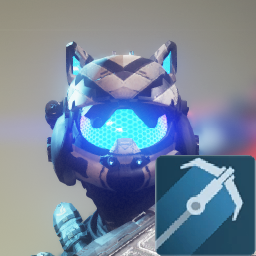
Кошка ушами Grapple Pilot
Используйте спидометр SP в MP.