
e.v.e HUD
interface modification

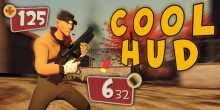
 Мод для Team Fortress 2
от xXtremePilgrimXx
Cool HUD for Cool People
COOL HUD — мод для Team Fortress 2 (ТФ2) от автора xXtremePilgrimXx. Cool HUD for Cool People
Его скачали 67,3 тыс. раз: это 66-е место среди модов Team Fortress 2 в нашем каталоге, редкость — «редкий» (топ-50% по скачиваниям). Мод давно не обновлялся — проверьте совместимость с текущей версией игры, актуальная версия — beta 3.4.
Дополнительных модов для работы не требует.
8 шт · нажмите, чтобы открыть
Текст автора на языке оригинала
by xXtremePilgrimXx COOL HUD features a lot of customization options, check all the addons & extras on the mod file! Quick demo video (1.0 version):
COOL HUD is a modified version of the default TF2 HUD with my personal style. It's called cool because i tried my best to make it look cool while being functional at the same time. It feautes some new interesting HUD designs, additions, and animations, it also features a variant for the minmode that pushes your vital info in the game more to the center of the screen, i recommend you to make this bind: (BindToggle "key" cl_hud_minmode) so you can quickly swap HUD layout in the middle of a game.
This mod changes the overheal colour to yellow, only for the HUD, but there's an extra file that changes the overheal particles colour to yellow aswell, but only works with sv_pure 0 (the particles). The class tokens icons are only applied on the loadout selection screen, the class selection in game and the spy disguise kit icons are the default ones. I hope it works fine for everyone, i made this steam group to report issues or anything you want about the HUD, and i'll try my best to fix them. Big thanks to all the cool people on the W.I.P. page who liked and commented, i really appriciate all of the comments. Well, there's no much more to say, if it convinces you, download it now! it's FREE! *****Gameplay Demo (1.0 version):
*****Minmode Variant Gameplay Demo (1.0 version):
Update 7 Changes:
This is how the Tournament Spectator HUD looks like:
Update 8:
Update 9:
Update 10:
Update 13 (Vignette it's an optional addon):
Update 15:
Update 18:
New animations:
Update 20:
New Addon (TargetID Health Background):
New Addon:
Файл скачивается с официального сервера GameBanana, без перезаливов и сторонних установщиков
Подробная инструкция для Team Fortress 2Вставьте значок в описание на GameBanana, в README или в Discord — русскоязычные игроки сразу попадут на страницу с переводом и инструкцией.

[](https://modka.app/team-fortress-2/cool-hud/)<a href="https://modka.app/team-fortress-2/cool-hud/"><img src="https://modka.app/badge.png" alt="Описание на русском — Модка" height="44"></a>[url=https://modka.app/team-fortress-2/cool-hud/]Описание на русском — Модка[/url]Скачайте «COOL HUD» кнопкой «Скачать» — файл придёт с официального сервера GameBanana. Откройте папку игры: в Steam — правой кнопкой по Team Fortress 2 → «Управление» → «Просмотреть локальные файлы», затем tf\custom. Если в архиве лежит файл .vpk — просто положите его в tf\custom. Если в архиве папка мода (внутри неё materials, models, sound или resource) — положите эту папку в tf\custom целиком. HUD ставится так же: его папка кладётся в tf\custom. Карты .bsp кладутся в tf\maps. Запустите игру — мод уже работает.
Файл скачивается с официального сервера GameBanana, куда его загрузил xXtremePilgrimXx. Мы не перезаливаем и не изменяем моды.
20 июля 2023, актуальная версия — beta 3.4. Это больше года назад: перед установкой проверьте, работает ли мод на текущей версии игры.
interface modification
TF2 HUD

A cleaner, more stylish TF2 hud.

Originally based off an old yA version. Hope you guys like it. Updates are typically delayed because I'm a full-time student, but I love TF2 and can't live without this HUD anymore, so you can always

A more modern take of the default hud
Star's old HUD, updated for the Vaccinator, Steampipe and some other things