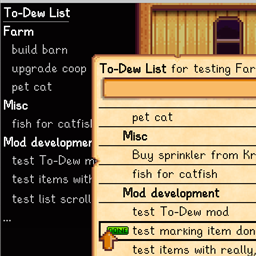
An in-game to-do list mod for Stardew Valley. Horrible pun included at no extra charge.
Installation
Follow the usual installation proceedure for SMAPI mods:
- Install SMAPI
- Download the latest release of this mod and unzip it into the
Mods directory - Run the game using SMAPI
How To Use
Bring up the to-do list by pressing the configurable hotkey (default L for "list"). If you have the Mobile Phone mod installed then you can also bring up the list with the mobile phone app (which does exactly the same thing as the hotkey).
Edit your list. See "List Editing" below for more information on editing.
Press escape to close the list.
List data is saved in the game save file, so any changes since the last save will be lost when you exit.
The list is also displayed in an overlay in the top left corner during game play. This can be disabled in the configuration. When the overlay is enabled, its visibility can be toggled with a hotkey, if you configure the hotkey. (By default, the hotkey is not configured. Or to be pedantic, configured to None, which matches no buttons or keys.)
List Editing
Enter text in the textbox. Press enter to add it to the list.
Use the scroll gesture on your mouse or trackpad to scroll the list if it has more items than fit on one screen. (Arrows will appear to indicate that there are more items.)
Click a list item to mark it done. Items that have been marked as done will not appear in the overlay, and will be removed from the list at the end of the day (or reset to not done if they are repeating items).
Use the small up and down arrows to the right of items to reorder them. Use the small configure icon to the right of an item to edit its per-item properties (see "Item Editing" below).
Right-clicking on an item will copy its text to the textbox (replacing whatever is there). The textbox implementation is from the base game, and as far as I can tell you can only add or remove characters from the end. If you see any open-source mods that have more advanced text editing capabilities then let me know and I'll take a look to see how they're done.
Item Editing
The item configuration screen allows you to edit the item text, move the item to the top or bottom of the list, delete the item, or set any of several properties:
A Header item can help you organize your list by acting as a header or separator in the list. It cannot be marked as "done".
Repeating items have their "done-ness" reset at the end of each day when they were marked as "done". You can specify the number of days before they become visible again.
Item visibility can be set based on the weather, day of the week, and season.
Configuration
When SMAPI runs the mod for the first time it will create a config.json in the mod directory. You can edit this file to configure the hotkey for opening the to-do list and for various properties of the overlay (including whether it is enabled at all).
If Generic Mod Config Menu is installed then there will be an entry for To-Dew in the in-game config menu. A few configuration options are only available in config.json because there is no editor for values of that type in Generic Mod Config Menu. For example, there are configuration options to allow multi-key bindings (introduced in SMAPI 3.9) for the hotkey and overlay hotkey, but these are not available in the in-game config menu.
Import and Export The to-do list for the current game can be exported to or imported from an external file via SMAPI console commands. Type help todo-export or help todo-import in the SMAPI console for detailed usage information.
The feature also allows maintaining an external "library" of todo items that you can add to your game. For example, Nexus user ImperatriceSylvanel has created files for birthdays, daily events, etc. and published them on Github.
Compatibility
Requires Stardew Valley 1.6 / SMAPI 4.0 beginning with version 2.0.Requires Stardew Valley 1.5.5 / SMAPI 3.17 beginning with version 1.13. Requires Stardew Valley 1.5.5 / SMAPI 3.13 beginning with version 1.10. Older versions work with Stardew Valley 1.5 / SMAPI 3.9.
Works in single and multiplayer modes (but see further notes on Multiplayer below). No known incompatibilities with other mods.
I have no idea what things do or do not work with split-screen. As far as I can tell you have to have controllers to even start split-screen, and I don't.
Translations are included for several languages, but the translations are all via Google Translate, so they are probably not very good.
Multiplayer Support
There is a single list for the farm, and everyone (with the mod installed) can edit it.
List data is saved in the game save file, which is only accessible to the host. So, in order to use the to-do list, the host must have To-Dew installed. Farmhands that have To-Dew installed will also be able to use the list. If a farmhand has To-Dew installed but the host does not then the farmhand will not be able to use the to-do list. (I.e., there is no combination of places where the mod is installed or not that will result in the game being unplayable.)
If the host and a farmhand have different versions of To-Dew installed, the mod attempts to make intelligent decisions about what to do. Look for messages in the SMAPI console log. This scenario is probably not well-tested and may contain bugs.
Source Code
Available on GitHub