

AdvancedShadowsOfDoubt
Новые Случаи, добавляет в геймплей и исправляет некоторые вещи.

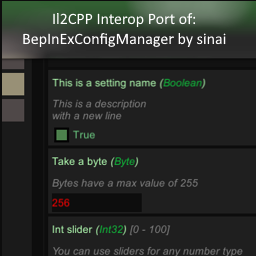
 Мод для Shadows of Doubt
от TeamSpyraxi
A port of BepInExConfigManager v1.3.0 by sinai, modified to work with BepInEx Bleeding Edge Version/Artifact 667. Similar in style to GTFOModding-UnityExplorer_IL2CPP-4.9.1.
BepInExConfigManager — мод для Shadows of Doubt (Шэдоус оф Даут) от автора TeamSpyraxi. A port of BepInExConfigManager v1.3.0 by sinai, modified to work with BepInEx Bleeding Edge Version/Artifact 667. Similar in style to GTFOModding-UnityExplorer_IL2CPP-4.9.1.
Его скачали 14,2 тыс. раз: это 28-е место среди модов Shadows of Doubt в нашем каталоге, редкость — «эпический» (топ-20% по скачиваниям). Мод давно не обновлялся — проверьте совместимость с текущей версией игры, актуальная версия — 1.3.1.
Это библиотека: сама по себе ничего не добавляет, но нужна другим модам.
Текст автора на языке оригинала
The initial commit of this repo is an exact copy of the latest release (as of May 23rd, 2023) located here. The code has been modified to work with BepInEx Bleeding Edge, Version/Artifact 667. I updated the dlls to match those located here, added a simple build pipeline, and changed a few references here and there. The build output has been tested with BepInEx Bleeding Edge Version/Artifact 667, alongside a mod that makes use of it for the game Shadows of Doubt v33.19. It is not guaranteed to work outside of that context.
By sinai-dev.
In-game UI for managing BepInEx Configurations, for IL2CPP and Mono Unity games.
✨ Powered by UniverseLib
Download the latest IL2CPP.CoreCLR release from the Downloads page. Mono and non-Interop IL2CPP versions are not included, see the original repo for those versions.
plugins/BepInExConfigManager.{VERSION}.dll and the UniverseLib.{VERSION}.dll files in your BepInEx/plugins/ folder.patchers/BepInExConfigManager.{VERSION}.Patcher.dll file in your BepInEx/patchers/ folder.F5 to open the Menu.BepInExConfigManager category in the Menu, or by editing the file BepInEx/config/com.sinai.BepInExConfigManager.cfg.Although this tool should work out of the box for most Unity games, in some cases you may need to tweak the settings for it to work properly.
To adjust the settings, open the config file: BepInEx\config\com.sinai.bepinexconfigmanager.cfg
Try adjusting the following settings and see if it fixes your issues:
Startup_Delay_Time - increase to 5-10 seconds (or more as needed), can fix issues with the UI being destroyed or corrupted during startup.Disable_EventSystem_Override - if input is not working properly, try setting this to true.If these fixes do not work, please create an issue in this repo and I'll do my best to look into it.
This config manager supports advanced settings, defined either with the ConfigurationManagerAttributes tag or with a simple "Advanced" tag.
Simple method ("Advanced" string tag):
Config.Bind("Section", "Hidden setting", true, new ConfigDescription("my description", null, "Advanced"));Advanced method (official attributes class):
ConfigurationManagerAttributes class in your project as outlined hereConfig.Bind("Section", "Advanced setting", true, new ConfigDescription("my description", null,
new ConfigurationManagerAttributes() { IsAdvanced = true }));The UI supports the following types by default:
boolint, float etc (any primitive number type)stringUnityEngine.KeyCode or UnityEngine.InputSystem.Keyenum or any setting with AcceptableValueListenum with [Flags] attributeUnityEngine.ColorUnityEngine.Vector3, UnityEngine.Quaternion, etcBepInEx.Configuration.TomlTypeConverter.To make a slider, use a number type and provide an AcceptableValueRange when creating the entry. For example:
Config.Bind("Section", "Int slider", 32, new ConfigDescription("You can use sliders for any number type",
        new AcceptableValueRange(0, 100)));
Dropdowns are used for enum types, as well as any setting with an AcceptableValueList provided.
If you use an AcceptableValueList it will override any other UI handler and force it to be a dropdown.
Config.Bind(new ConfigDefinition("Section", "Some list"), "One", new ConfigDescription("An example of a string list",
new AcceptableValueList("One", "Two", "Three", "Four", "etc..."))); You can override the Toml input for a Type by registering your own InteractiveValue for it. Refer to existing classes for more concrete examples.
// Define an InteractiveValue class to handle 'Something'
public class InteractiveSomething : InteractiveValue
{
    // declaring this ctor is required
    public InteractiveSomething(object value, Type fallbackType) : base(value, fallbackType) { }

    // you could also check "if type == typeof(Something)" to be more strict
    public override bool SupportsType(Type type) => typeof(Something).IsAssignableFrom(type);

    // override other methods as necessary
}

// Register your class in your BasePlugin.Load method:
public class MyMod : BepInEx.Unity.IL2CPP.BasePlugin
{
    public override void Load()
    {
        InteractiveValue.RegisterIValueType();
    }
}2 в каталоге
Новые Случаи, добавляет в геймплей и исправляет некоторые вещи.

Добавляет правдоподобные, прослеживаемые мотивы, которые могут быть раскрыты с помощью дедукции и допроса NPC. Выяснение того, почему кто-то был убит, является достоверным доказательством того, кто убил их.
Файл скачивается с официального сервера Thunderstore, без перезаливов и сторонних установщиков
Подробная инструкция для Shadows of DoubtВставьте значок в описание на Thunderstore, в README или в Discord — русскоязычные игроки сразу попадут на страницу с переводом и инструкцией.

[](https://modka.app/shadows-of-doubt/teamspyraxi-bepinexconfigmanager/)<a href="https://modka.app/shadows-of-doubt/teamspyraxi-bepinexconfigmanager/"><img src="https://modka.app/badge.png" alt="Описание на русском — Модка" height="44"></a>[url=https://modka.app/shadows-of-doubt/teamspyraxi-bepinexconfigmanager/]Описание на русском — Модка[/url]Скачайте менеджер модов r2modman (или Gale) и выберите в нём игру Shadows of Doubt. Создайте профиль — так моды не смешаются с чистой версией игры. Найдите «BepInExConfigManager» во вкладке Online и нажмите Download — BepInEx и все зависимости подтянутся сами. Нажмите «Start modded» — игра запустится с модами. Чтобы сыграть без модов, запустите игру как обычно из Steam — r2modman не трогает чистую версию игры.
Файл скачивается с официального сервера Thunderstore, куда его загрузил TeamSpyraxi. Мы не перезаливаем и не изменяем моды.
25 мая 2023, актуальная версия — 1.3.1. Это больше года назад: перед установкой проверьте, работает ли мод на текущей версии игры.

Заключайте контракты с Синдикатом как наемный убийца. Убейте почти любого гражданина с оружием, ядом или инсценированной аварией; избейте следствие - свидетелей, камеры, отпечатки, судмедэксперты, ордера, охоту - и поднимитесь в подземный мир. Бета.

Написывает пароли текущего черного рынка и торговца оружием на липкой ноте и прикрепляет незаконные адреса и каждую диспетчерскую к вашей доске. От Quick Menu с контроллером, или Ctrl + O, Ctrl + I и Ctrl + M.

Корпусная доска в три раза больше размера, с булавками и струнами вплоть до края. Неограниченные открытые чехлы и кейс-бар, который прокручивается. Пин-кейсы (также из Quick Menu), самые новые, готовые рабочие места, отходят в сторону.

Перестаньте открывать каждую страницу. Посмотрите на документ, и файл гражданина заполняется.

Размещайте удерживаемые предметы именно там, где вы хотите, с помощью управления движением и поворотом, возвращайте их на место вместо того, чтобы бросать их, фиксируйте подвесные потолочные огни и добавляйте большой набор дополнительных предметов в меню декора, включая рабочие защитные приспособления.

Одно меню для всех моих модов: нажмите G или D-pad Down и выберите действие, никаких ключевых привязок для изучения. Выселить жильцов, пропустить время, пин-кейсы, контрольные комнаты и многое другое.