
EdB Prepare Carefully
Настройте своих колонистов RimWorld, выберите снаряжение и тщательно подготовьтесь к аварийной посадке! Используйте дополнительные ограничения по точкам, чтобы попытаться создать сбалансированный старт или сохранить очки

 Мод для RimWorld
от Sergkart
Расширенные режимы работы механоидов или лучшие режимы работы механоидов Добавить 10+ новых модов работы для механоидов: Найти и уничтожить - Механоиды, независимо от их состояния
WVC - Work Modes — мод для RimWorld (Римворлд) от автора Sergkart. Расширенные режимы работы механоидов или лучшие режимы работы механоидов Добавить 10+ новых модов работы для механоидов: Найти и уничтожить - Механоиды, независимо от их состояния
На него подписались 345,8 тыс. раз в Мастерской Steam: это 408-е место среди модов RimWorld в нашем каталоге, редкость — «обычный» (нижняя половина по подпискам). Мод обновлялся в последний месяц.
Нужны ли ему другие моды, видно на его странице в Мастерской Steam в блоке «Необходимые продукты» — при подписке Steam сам предложит их добавить.
Текст автора на языке оригинала
Expanded mechanoids work modes or Better mechanoids work modes Adds 10+ new work mods for mechanoids:
Find and destroy - Mechanoids, regardless of their type, will look for enemies and try to destroy them.
Work and recharge - Work autonomously according to mechanoid type. If the mechanoid cannot work or it has done all the work it shuts down. (Does the same thing as this mod, but for all mechanoids.)
Rechage and shutdown - Mechanoids, regardless of type, will first go to charge, and then to the shutdown zone. (v1.5-v1.6)
Escort and recharge - The mechanoid, regardless of its type, will accompany the overseer and, if necessary, go to charge.
Work, recharge and escort - The mechanoid will accompany the overseer if it does not have a job, and will also be charged if necessary.
Wait enemy - The mechanoid will shutdown and wait for the enemy, and when it appears, it will wake up and head towards the target.
Work and wait - Mechanoids, depending on the type, will work, and when an enemy appears, they will drop everything and go to destroy him. If they don't have a job, they'll just shutdown. (The shutdown lasts longer than in "wait enemy" mode)
Ambush - The mechanoid shutdown and waits for the enemy to approach it, then attacks.
Defend yourself - Mechanoids, regardless of type, will attack enemies that get too close. Or if damaged, they will try to retreat to the nearest safe zone.
Escort if enemy - Mechanoids, regardless of type, will accompany the overseer, but only if there is an enemy on the map. When there is no enemy, mechanoids shutdown.
Work if safe - Mechanoids will work, but only as long as there are no enemies on the map. In case of danger, they will try to get to the safe spot.
Checking for enemies on the map - if the enemy is reachable and is not in the area in which the mechanoid operates, then False is returned and the mechanoid will continue to work normally.
What does it mean: If you enable the "Work if safe" mode and limit the working area, the mechanoid will ignore the intrusion until the enemy is in the mechanoid's working area. If you have enabled the "Find and destroy" mode and locked the mechanoids in a small but open area, then the mechanoid will not pursue enemies, but will try to fight with the enemy that is in the field of view of the mechanoid. This can lead to too smart AI kiting your mechs.
Smart charge - In some modes, mechanoids will try to maintain close to the maximum charge. This is calculated according to the formula (Maximum charge level - 5), that is, if you set the charge to 100%, the mechanoids will be charged up to 95%, and so on. However, unlike vanilla charging, mechanoids will be interrupted if necessary.
Shutdown mode - Some work modes automatically shutdown mechanoids if they have finished their work. For this purpose, special shutdown zones are used. Mechanoids can also shutdown even if these zones do not exist, but then they become an easy target for any threats. In work (with work) modes, the cooldown is much longer than in combat (without work). (For work 1500 ticks (~1 game hour). For combat 650 ticks.)
Note: The shutdown state from the mod uses the vanilla shutdown job. That is, all triggers and checks will count mechanoids as if they were in vanilla "Shutdown mode". For example, the game will not count shutdown paramedics as medics. Distribute mechanoids into groups wisely!
Mechanoid shutdown zone - Mechanoids that have finished all their business and are going to sleep will go to a such zone, if it is in an accessible area for them.
Smart escort - Mechanoids can be assigned an escort purpose. This way the mechanoids will be able to protect and accompany different pawns. This feature only works for the home map.
Version 1.5:
Dormant mode - Mechanoids consume less bandwidth when they are in a shutdown state. Requires manual activation in settings.
Auto-repair On - New mechanoids spawn with auto-repair enabled. Enabled by default.
Version 1.6:
Mechanoid hangar - any room that has a mechanoid charger will be considered a hangar. If possible and in the absence of zones, mechanoids will be sent to a random hangar for shutdown. Enabled by default.
Warning: If you have the Odyssey DLC, the Harmony mod is required!
This mod is primarily aimed at improving performance. It literally grew out of a performance mod.
All modes that use shutdown are performance-friendly and have a lower impact than vanilla Work mode. However, do not expect this mod to boost your tps from 20 to 2000+, since it only reduces a very small part of the game load, and only if you use modes with shutdown support.
Modes without shutdown can affect performance, but not significantly more than vanilla modes.
(v1.6-v1.7) Chinese Traditional by kkosos (v1.4-v1.5) Chinese Traditional by SY1102 (v1.7) Russian by Antyhc Русский by дюрекс (v1.7) Korean by BluePebble
Q: Mechanoids sleep for a whole minute and do nothing! What should I do? A: Wait, wait and wait again. Seriously, shutdown's rollback isn't big enough to report it.
Q: Is it save to add/remove a mod in the mid game? A: Add - Yes. Remove - No
Q: I don't like "anything_name", can it be disabled? A: Yes. In the mod settings. Almost all elements of the mod can be disabled or configured in the mod settings.
Q: Where are the shutdown zone located? A: In the "Biotech" or "Zone" tab in the architect's menu.
Q: I found a bug, what should I do? A: [Go to bug report discussion.](https://steamcommunity.com/workshop/filedetail
Описание длинное — здесь его начало. Читать целиком на странице автора
Мод ставится подпиской в Мастерской Steam — без архивов, перезаливов и сторонних установщиков
Подробная инструкция для RimWorldВставьте значок в описание на Мастерская Steam, в README или в Discord — русскоязычные игроки сразу попадут на страницу с переводом и инструкцией.

[](https://modka.app/rimworld/wvc-work-modes/)<a href="https://modka.app/rimworld/wvc-work-modes/"><img src="https://modka.app/badge.png" alt="Описание на русском — Модка" height="44"></a>[url=https://modka.app/rimworld/wvc-work-modes/]Описание на русском — Модка[/url]Откройте страницу мода «WVC - Work Modes» в Мастерской Steam (кнопка «Скачать» на нашем сайте ведёт именно туда) и нажмите «Подписаться» — Steam сам скачает мод и будет его обновлять. Если Steam покажет список обязательных модов, подпишитесь и на них — без них мод не заработает. Запустите RimWorld, откройте «Моды» в главном меню, включите мод и расставьте порядок загрузки (библиотеки вроде Harmony — выше остальных). Игра перезапустится с новым набором. Если мод не появился в игре, откройте вкладку «Загрузки» в Steam и дождитесь, пока он скачается полностью, затем перезапустите игру. Чтобы убрать мод, нажмите «Отписаться» на его странице в Мастерской — Steam удалит его файлы сам.
Мы ничего не перезаливаем: кнопка скачивания открывает официальную страницу мода в Мастерской Steam. Там нужно нажать «Подписаться» — файлы загрузит и будет обновлять сам Steam.
7 ноября 2026. Дата берётся с официальной страницы мода при каждом обновлении каталога.
Настройте своих колонистов RimWorld, выберите снаряжение и тщательно подготовьтесь к аварийной посадке! Используйте дополнительные ограничения по точкам, чтобы попытаться создать сбалансированный старт или сохранить очки

«Величайший мод на перевозку» - Колонисты куриного плукера собирают вещи в свой инвентарь, а затем перевозят все это в запас. Этот способ перевозки значительно увеличит перевозку..

RimHUD - это мод пользовательского интерфейса, который отображает подробную информацию о выбранном персонаже или существе. Дисплей HUD интегрирован в панель проверки, которая может быть изменена в соответствии с ..
Набор инструментов, чтобы сделать вашу жизнь на Rim немного проще. Легко запретить и незапретить предметы, выбрать похожие вещи, срочно перевезти вещи и повлиять на всю карту
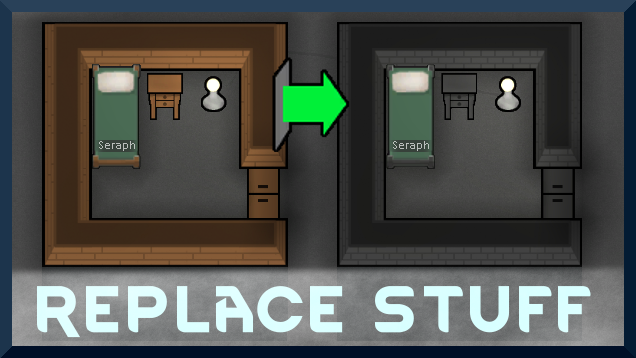
Размещайте здания в любом месте, поверх существующих вещей, и игра справится с этим. Не умер за 1,6! Мои заметки на 1.6, но TL;DR: 1.6 только добавляет чертежи над стенами - не делает..

Рамки для создания новых инопланетных рас в Rimworld Если вы когда-нибудь думали, что расовое разнообразие в риммире... не так многообразно, и вы хотите изменить это, вы пришли