Начните вводить название — например, MoreHead, Sodium или PEAK

More Advanced Debug — иконка
Обложка Pizza TowerМод для Pizza Tower

More Advanced Debug

от Firefighter_M

Gives more tools in debug mode to help you!

  • Редкий
  • 13,7 тыс. скачиваний
  • Версия v3.2
  • Обновлён 21 июля 2024
  • Не обновлялся больше года
  • Разное

О моде More Advanced Debug

More Advanced Debug — мод для Pizza Tower (Пицца Тауэр) от автора Firefighter_M. Gives more tools in debug mode to help you!

Его скачали 13,7 тыс. раз: это 77-е место среди модов Pizza Tower в нашем каталоге, редкость — «редкий» (топ-50% по скачиваниям). Мод давно не обновлялся — проверьте совместимость с текущей версией игры, актуальная версия — v3.2.

Дополнительных модов для работы не требует.

Скриншоты

3 шт · нажмите, чтобы открыть

Полное описание More Advanced Debug

Текст автора на языке оригинала

Now compatible with Noise update!

If I am not very active with this mod, it's because I am sorta busy with other stuff, so yeah.

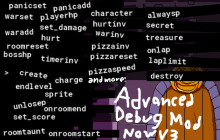
This mod adds new features and commands to the debug console, which can be accessed through the F5 key. The new features are:

  • "debug" no longer required in launch options
  • Ctrl + C copys the text you have in the command line
  • Ctrl + V pastes what you have in your clipboard into the command line
  • Ctrl + R clears the command line
  • Ctrl + Z puts the last command you used into the command line, and multiple presses will go back further. Ctrl + Shift + Z or Ctrl + Y will go forwards.
  • Ctrl + L clears command history
  • Tab chooses the first search suggestion, and pressing it multiple times loops through all the suggestions

Some changes have been made to already existing commands:

  • panic has a second optional argument, setting it to 1 will make the first argument be in seconds, and 0 makes it like the original.
  • player_room now only accepts rooms and not other assets.
  • switch_char has arguments (described below)

There are also new commands now. A full list of them are provided in the readme in the mod's zip file. Here are some of them:

  • switch_char:

The first argument determines the character. "P" for peppino/noise, "N" for pogo noise, "V" for vigilante, and "M" for pepperman. Any other value does weird stuff. The second optional argument is the ispeppino value which determines whether the game thinks you're peppino (true) or the noise (false), or if you have character "P", whether you are peppino or noise. Without arguments, this acts like base game switch_char.

  • switch_charspr: switch_char, but it only changes the sprites, not the actual character values.
  • unlosep: If you lose your combo, this command makes the game forget you lost it, and the level's p rankable again.
  • create: This creates the object you put in, along with an

x,y parameter which sets the location the object is created at relative to the player's location (x and y must be seperated with a comma and no space). If x and y aren't provided, the location defaults to the player's location.

  • destroy: This destroys the object you put in. Example:"destroy obj_ratblock" destroys all the stupid rats in your way.
  • laplimit:

This sets the amount of laps you can do. Zero means infinite, and one means no lap portal. Laps after lap 2 just act the same as lap 2, sending the player back to the start and not changing the timer.

  • onlap:

This command is complicated. The first value you put in is the lap you want the commands to be run on, and the rest are the commands to be run. To demonstrate, example: "onlap 3 create obj_pizzaface" makes pizzaface spawn on lap 3. Multiple commands are seperated with a comma and then a space, and will be ran in order. When nested, single comma refers to the outer command, double comma refers to the command inside, and so on. Lap 1 means when you hit pillar john. If you add a + after the lap, it will apply to all laps greater or equal to it.

  • pizzainv: Makes you immune to pizzaface timing you up.
  • hurtinv:

Makes you immune to getting hurt by enemies and bosses. Note: if Fake Peppino grabs you, and hurtinv is on, it will softlock you and make you stuck in a "hurt" state. You can get out by running noclip.

  • warinv: When the war timer runs out, this prevents you from getting times up.
  • waradd: This add the number of seconds you put in to the war timer.
  • warset: This sets the time remaining on the war timer.
  • set_player_hp: Sets the player hp in boss fights.
  • sprite: Sets the object to the specified sprite. The first argument is the object, and the second is the sprite. You can set sprite to 0 to make the object invisible, and if you don't set it, then it just resets the object's sprite. There's a third optional argument which sets a constant speed of the sprite to whatever you want.
  • snick: Toggles snick chasing you throughout the level.
  • alarm: Sets an alarm. The first argument is the alarm number to set, which goes from 0 to 11. The second is how many frames until the alarm should go off. Only useful with onalarm.
  • onalarm: Runs commands when the alarm goes off, same style as onlap. First argument is the alarm number to run for, and the rest are the commands. Worth mentioning that you can put the alarm command inside of onalarm to make the commands run every x frames.
  • ghostinv: This prevents John Ghost from catching you.
  • onpress: This runs the commands when the player presses a key. The first argument is the key to press, and the rest are the commands. Only number and letter keys work, and letters must be capitalized.
  • setvar: This sets a variable. The first argument is what object to change the variable of. Putting global sets a global variable. The second is the variable name. Third is the type of the value you are setting it to (optional), 0 is string, 1 is number, and 2 is asset (sprite, object, etc.). Fourth is the value to set it to.
  • on startup: When this is run, it will start recording the commands you run. When it is run again, it will stop recording and save the commands, so that when you boot up the game, those commands will get ran automatically. To reset, run the command twice.

Hope you enjoy the mod!

Как установить More Advanced Debug

Файл скачивается с официального сервера GameBanana, без перезаливов и сторонних установщиков

Подробная инструкция для Pizza Tower
  1. Скачайте «More Advanced Debug» кнопкой «Скачать» — файл придёт с официального сервера GameBanana.
  2. Откройте папку игры: в Steam — правой кнопкой по Pizza Tower → «Управление» → «Просмотреть локальные файлы».
  3. Сначала сделайте копию файла data.win (например, назовите её data_original.win) — по ней игра вернётся к оригиналу.
  4. Если в архиве лежит готовый data.win — замените им файл в папке игры. Если в архиве файл .xdelta — примените его к data.win программой Delta Patcher (или xdelta UI): выберите оригинальный data.win, патч и нажмите «Apply patch».
  5. Пользовательские уровни (CYOP) ставятся иначе: нужен мод Create Your Own Pizza, а уровни кладутся в его папку — как именно, написано на странице уровня.
  6. Запустите игру как обычно. Чтобы вернуть оригинал, верните сохранённую копию data.win или проверьте целостность файлов в Steam.
Вы автор мода? Поставьте ссылку на русское описание

Вставьте значок в описание на GameBanana, в README или в Discord — русскоязычные игроки сразу попадут на страницу с переводом и инструкцией.

Описание на русском — Модка
Markdown[![Описание на русском — Модка](https://modka.app/badge.png)](https://modka.app/pizza-tower/more-advanced-debug/)
HTML<a href="https://modka.app/pizza-tower/more-advanced-debug/"><img src="https://modka.app/badge.png" alt="Описание на русском — Модка" height="44"></a>
Steam (BBCode)[url=https://modka.app/pizza-tower/more-advanced-debug/]Описание на русском — Модка[/url]

Частые вопросы о More Advanced Debug

Как установить More Advanced Debug?

Скачайте «More Advanced Debug» кнопкой «Скачать» — файл придёт с официального сервера GameBanana. Откройте папку игры: в Steam — правой кнопкой по Pizza Tower → «Управление» → «Просмотреть локальные файлы». Сначала сделайте копию файла data.win (например, назовите её data_original.win) — по ней игра вернётся к оригиналу. Если в архиве лежит готовый data.win — замените им файл в папке игры. Если в архиве файл .xdelta — примените его к data.win программой Delta Patcher (или xdelta UI): выберите оригинальный data.win, патч и нажмите «Apply patch». Пользовательские уровни (CYOP) ставятся иначе: нужен мод Create Your Own Pizza, а уровни кладутся в его папку — как именно, написано на странице уровня. Запустите игру как обычно. Чтобы вернуть оригинал, верните сохранённую копию data.win или проверьте целостность файлов в Steam.

Безопасен ли More Advanced Debug?

Файл скачивается с официального сервера GameBanana, куда его загрузил Firefighter_M. Мы не перезаливаем и не изменяем моды.

Когда More Advanced Debug обновлялся последний раз?

21 июля 2024, актуальная версия — v3.2. Это больше года назад: перед установкой проверьте, работает ли мод на текущей версии игры.

Похожие моды

Все моды на Pizza Tower
Transformation Giver — иконка

Transformation Giver

Use Peppino's transformations anywhere
Легендарный82,9 тыс.Разное

Modifiers Mod — иконка

Modifiers Mod

Spice up your game with some modifiers

Эпический40,7 тыс.Разное

Playable Pizzaface — иконка

Playable Pizzaface

A Mod that adds Playable Pizzaface

Эпический26,7 тыс.Разное