

UPDATED Infinite Weight In Camp
В лагере нет ограничений по весу.


 Мод для Palworld
от ItsZiliya
Удваивает емкость каждого контейнера для хранения - сундуки, полки, шкафы, холодильники и кормовые коробки - сохраняя относительный размер каждого контейнера в том же порядке, что и ваниль, поэтому прогрессирование все еще кажется правильным.
Better Storage — мод для Palworld (Палворлд) от автора ItsZiliya. Удваивает емкость каждого контейнера для хранения - сундуки, полки, шкафы, холодильники и кормовые коробки - сохраняя относительный размер каждого контейнера в том же порядке, что и ваниль, поэтому прогрессирование все еще кажется правильным.
Его скачали 3,1 тыс. раз: это 200-е место среди модов Palworld в нашем каталоге, редкость — «обычный» (нижняя половина по скачиваниям). Мод обновлялся в последние полгода, актуальная версия — BetterStorage-maintenance-2026-10-01.zip.
Дополнительных модов для работы не требует.
Текст автора на языке оригинала
Better Storage expands the slot capacity of every placeable storage container in the game to 3x its vanilla size. A Wooden Chest still holds less than an Advanced Chest, a Cooler Box still holds less than a Refrigerator — nothing gets flattened to one blanket number. You just stop running out of room so fast.
This is a pure configuration mod: it changes the default capacity each container is built with. It does not add any new scripts, background processes, or syncing behavior between containers. Every chest is independent, exactly like vanilla — just bigger.
Container Vanilla Slots New Slots (3x)
Wooden Chest 10 30
Metal Chest 24 72
Refined Metal Chest 40 120
Advanced Chest 54 162
Cooler Box 10 30
Refrigerator 25 75
Wooden Barrel 8 24
Wooden Box 10 30
Wooden Shelf 10 30
Wooden Barrel Shelf 15 45
Wooden Wall Shelf 2 6
Iron Shelf 15 45
Iron Wall Shelf 3 9
Long Iron Shelf 15 45
Small Container 10 30
Cloth Covered Container 10 30
Large Container 40 120
Antique Bookshelf 10 30
Antique Wall Cabinet 3 9
Antique Wardrobe 20 60
Orange Locker 20 60
Locker 20 60
Antique Chest 10 30
Antique Side Chest 7 21
Antique Cabinet 12 36
Antique Long Cabinet 15 45
Large Antique Cabinet 15 45
Japanese-Style Chest (Tansu) ~15 (estimated) 45
Feed Box ~10 (estimated) 30
Cold Food Box 30 90
Two entries (Tansu and Feed Box) don't have a publicly documented vanilla slot count anywhere we could find, so their vanilla values are estimated based on similar-tier containers. If you know the exact vanilla numbers for either, let us know and we'll correct the listing (the in-game values are still tripled correctly relative to whatever the true base is close to).
This must be installed on the server, not just the client, for it to take effect for anyone connecting to it. The server is authoritative over container data, so a client-only install won't just "do nothing" safely — it can show you a bigger slot grid locally than the server actually has for that container, which can cause failed item interactions or desync. Don't run this client-side against a server that doesn't have it installed; install it on the server, or not at all for that server.
The new slot counts apply to containers as they're constructed — that means any container you place after installing this mod will be the new, bigger size immediately. Containers that were already placed in your world before installing this mod may keep their old (smaller) size, since their capacity was already set at the time they were built. If an existing chest doesn't show the new size after installing, pick it up and place it again — the newly-placed instance will use the new capacity.
Файл скачивается с официального сервера CurseForge, без перезаливов и сторонних установщиков
Подробная инструкция для PalworldВставьте значок в описание на CurseForge, в README или в Discord — русскоязычные игроки сразу попадут на страницу с переводом и инструкцией.

[](https://modka.app/palworld/better-storage/)<a href="https://modka.app/palworld/better-storage/"><img src="https://modka.app/badge.png" alt="Описание на русском — Модка" height="44"></a>[url=https://modka.app/palworld/better-storage/]Описание на русском — Модка[/url]Скачайте «Better Storage» кнопкой «Скачать» — файл придёт с CurseForge. Откройте папку игры (Steam: правой кнопкой по игре → «Управление» → «Просмотреть локальные файлы») и перейдите в Pal\Content\Paks\~mods. Если папки ~mods нет — создайте её. Распакуйте архив и перенесите в ~mods файлы .pak (а также .ucas и .utoc с тем же названием, если они есть). Запустите игру — мод уже работает.
Файл скачивается с официального сервера CurseForge, куда его загрузил ItsZiliya. Мы не перезаливаем и не изменяем моды.
2 октября 2026, актуальная версия — BetterStorage-maintenance-2026-10-01.zip. Дата берётся с официальной страницы мода при каждом обновлении каталога.
В лагере нет ограничений по весу.

Добавление предметов в таблицы выпадения монстров

Посмотрите на мир вокруг себя и отслеживайте Pals, игроков, базовые лагеря и многое другое.

Этот мод позволяет заставить перезапустить полевых боссов и сбросить охлаждения на других боссов!

Этот мод просто удаляет все потребление выносливости даже для планера Да, я знаю, что вы можете изменить настройки мира, чтобы удалить выносливость, но истинное преимущество этого мода заключается в том, что он также работает на многопользовательском режиме
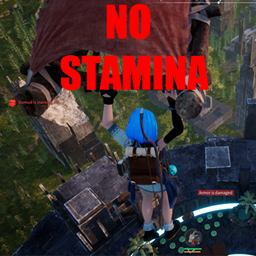
Использование ключа F7 Toggles Stamina