BetterInventory
Inventory menu improvements: 'Salvage', 'Send to Stash', 'Send to Host's Stash', 'Send to Other Player' in item menu. Show item price in inventory. More information in readme.

 Мод для Outward
от Faeryn
Allows modders to provide localization for their mods using the game's localization system, and also to localize other mods without changing them.
LocalizationExtension — мод для Outward (Аутворд) от автора Faeryn. Allows modders to provide localization for their mods using the game's localization system, and also to localize other mods without changing them.
Его скачали 81,6 тыс. раз: это 19-е место среди модов Outward в нашем каталоге, редкость — «эпический» (топ-20% по скачиваниям). Мод давно не обновлялся — проверьте совместимость с текущей версией игры, актуальная версия — 1.1.3.
Для работы ему нужны: BepInExPack Outward.
Текст автора на языке оригинала
Allows modders to provide localization for their mods using the game's localization system.
If you are not a mod developer, you can most likely ignore this mod. The only exception is if you are manually installing mods (instead of using the Thunderstore mod manager) in which case download this mod and put it into your BepInEx plugins folder.
SideLoader already has its own localization table patcher, and it does not support different languages. My current workaround to that is not perfect, you may have to restart the game after changing language.
Add this mod as dependency to your mod's Thunderstore manifest. Example:
"dependencies": [
    "BepInEx-BepInExPack_Outward-5.4.18",
    "Faeryn-LocalizationExtension-1.1.3"
]
Add one or more language files to your mod's lang folder (you will have to create it). The files should be in the following format: languagekey.ext, where
English, French, German, Italian, Spanish, zeChinese, zeJapanese, zeKorean, zePolish, zePortuguese, zeRussian, zeTurkishcfg is supported.Example:
MyMod.zip
|- plugins
|  |- MyMod.dll
|  -- lang
|     |- English.cfg
|     |- Spanish.cfg
|     -- French.cfg
|- icon.png
|- manifest.json
-- README.md
The contents of a cfg file is a list of key-value pairs separated by =. Keys are WITHOUT your mod's GUID. For example:
some.key=Some Value
some.key.with_parameter=Some Key With {1} Parameter {2}
Note: Parameter numbering starts from 1, not 0.
Empty lines and lines starting with # or ; are ignored so you can also add comments. The cfg format doesn't allow newlines (each line is a single entry), therefore if you want to add newlines, you will have to use \n, like so:
some.key.with_newline=This is the first line\nThis is the second line\n\nThird line is empty, this is the fourthThen you can use the game's localization manager for texts in your mod, like so:
LocalizationManager.Instance.GetLoc($"{YourMod.GUID}.some.key");Or with parameters:
LocalizationManager.Instance.GetLoc($"{YourMod.GUID}.some.key.with_parameter", "param1", "param2");In case you don't provide a language file for each language, you should also add a file named default.txt into the lang folder containing the name of your fallback language (which will be used for unsupported languages). Default is English if the file is missing.
For item and skill localization, the key should be in the following format:
/item/[itemID]/name
/item/[itemID]/description
Where [itemID] is the ID of the item or skill in question. Note that this will override the name and description specified in the SideLoader item definition. Example:
/item/-1234567/name=Example Item
/item/-1234567/description=An item that serves as a good example
Enchantments added by SideLoader require the following key format:
/Enchantment_[enchantmentID]
/DESC_Enchantment_[enchantmentID]
Where [enchantmentID] is the ID of the enchantment in question. Note that this will override the name and description specified in the SideLoader enchantment definition.
Example:
/Enchantment_-1234567=Example Enchantment
/DESC_Enchantment_-1234567=This is an example enchantment
Status effects added by SideLoader require the following key format:
/NAME_[StatusIdentifier]
/DESC_[StatusIdentifier]
Where [StatusIdentifier] is the StatusIdentifier of the status effect in question (defined in the TargetStatusIdentifier field). Note that this will override the name and description specified in the SideLoader status effect definition.
Example:
/NAME_ExampleStatusEffect=Example Status Effect
/DESC_ExampleStatusEffect=A good exampleBy default, general localization entries are prefixed by mod GUID. If you, for some reason, need to override existing entries, then the / prefix can be used. For example:
/examplekeyThis will override the general localization entry examplekey. Note: Currently this works reliably only for vanilla Outward entries, unless noted. Overriding other mods' entries may or may not work.
It is possible to localize other SideLoader mods that do not use LocalizationExtension. Only items/skills, effects and enchantments can be localized this way, using the aforementioned override mechanism. If the target mod uses LocalizationExtension, then the additional languages will be added seamlessly. Trying to override existing languages (for example the original mod has German language support, and you are also adding a German language file) may or may not work.
Simply create a mod, as described in the General usage section while excluding the mod dll (or any SideLoader resource):
ModName_Localization.zip
|- plugins
|  -- lang
|     |- English.cfg
|     |- Spanish.cfg
|     -- French.cfg
|- icon.png
|- manifest.json
-- README.md
In the manifest file include the original mod too, as dependency:
"dependencies": [
    "BepInEx-BepInExPack_Outward-5.4.18",
    "Faeryn-LocalizationExtension-1.1.3",
    "OtheMod-OtherAuthor-1.0.0"
]
This way your mod will be compatible with the original mod even as new versions are released, since you are only patching the localization tables.
Note: It's a good idea to distinguish your localization mod from the original, for example by adding your language suffix to the name "OtherMod_SP", and making sure the description is clear about the fact that this is only a localization patch, NOT the full mod.
Example mod: https://github.co
Описание длинное — здесь его начало. Читать целиком на странице автора
В r2modman ставится автоматически
5 в каталоге
Inventory menu improvements: 'Salvage', 'Send to Stash', 'Send to Host's Stash', 'Send to Other Player' in item menu. Show item price in inventory. More information in readme.

Adds a potion that significantly increases movement speed when not in combat. The increase gradually happens over time and resets upon entering combat. The potion and recipe has a chance to appear at the Soroborean Caravanner.
Adds a 'Mods' menu with various tools to help troubleshoot mod-related problems (such as showing mod version, comparing mods between client and host). Allows the user to send error reports to the ModSupport server to help fix mod errors.

For Definitive Edition Outward only, this contains all of my mods, their configs, and are fit to play with multiple people, sliding scale of difficulty, and new classes. Intended with the inclusion of some ground rules.

A massive Outward Definitive Edition modpack built with balance in mind. More classes, quests, magic, gear and crafting, a graphics overhaul, quality-of-life and co-op features. Includes fixes. Read the README for important info and known issues.
Файл скачивается с официального сервера Thunderstore, без перезаливов и сторонних установщиков
Подробная инструкция для OutwardВставьте значок в описание на Thunderstore, в README или в Discord — русскоязычные игроки сразу попадут на страницу с переводом и инструкцией.

[](https://modka.app/outward/faeryn-localizationextension/)<a href="https://modka.app/outward/faeryn-localizationextension/"><img src="https://modka.app/badge.png" alt="Описание на русском — Модка" height="44"></a>[url=https://modka.app/outward/faeryn-localizationextension/]Описание на русском — Модка[/url]Скачайте менеджер модов r2modman (или Gale) и выберите в нём игру Outward. Создайте профиль — так моды не смешаются с чистой версией игры. Найдите «LocalizationExtension» во вкладке Online и нажмите Download — BepInEx и все зависимости подтянутся сами. Нажмите «Start modded» — игра запустится с модами. Для мультиплеера всем игрокам нужен одинаковый набор модов: в r2modman профиль можно экспортировать кодом и отправить друзьям.
Файл скачивается с официального сервера Thunderstore, куда его загрузил Faeryn. Мы не перезаливаем и не изменяем моды.
Автор не указал, клиентский это мод или серверный. Безопаснее, чтобы одинаковый набор модов был у всех игроков в лобби: проще всего поделиться профилем r2modman.
Установите вместе с ним: BepInExPack Outward. В менеджере модов зависимости подтягиваются автоматически.
10 июня 2023, актуальная версия — 1.1.3. Это больше года назад: перед установкой проверьте, работает ли мод на текущей версии игры.
Inventory menu improvements: 'Salvage', 'Send to Stash', 'Send to Host's Stash', 'Send to Other Player' in item menu. Show item price in inventory. More information in readme.
Combines all Stash inventories so all of your items are accessible from any Stash.
Display Sell Price and Silver/Lb. in inventory.
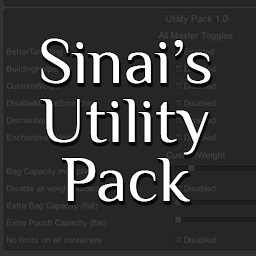
A utility pack containing several small mods: BetterTargeting, BuildingHelper, CustomTimeSpeed, CustomWeight, DisableMouseSmoothing, Dismantler and EnchantmentHelper.

Use action button to gather resources out of combat
Expand QuickSlots with highly configurable Action Slots. Add hotkeyable Equipment Sets. Damaged equipment Durability Display. Reposition HUD elements. Access stash from character inventory, crafting and merchant menus. Preserve food in the stash.