Начните вводить название — например, MoreHead, Sodium или PEAK

InventorySelectionHighlight — иконка
Обложка Old Market SimulatorМод для Old Market Simulator

InventorySelectionHighlight

от Ice_Box_Studio

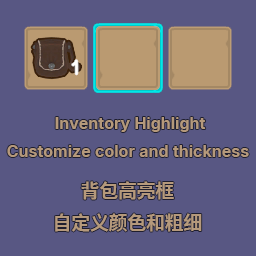
背包格子选中框不够清晰?看不清楚当前选中的格子?本模组支持自定义物品栏选中框高亮颜色和粗细。| Is the inventory grid selection box not clear enough? Can't see the currently selected grid? This mod allows you to customize the highlight color and thickness of the inventory selection box.

  • Обычный
  • 3,5 тыс. скачиваний
  • Версия 1.0.0
  • Обновлён 21 ноября 2025

О моде InventorySelectionHighlight

InventorySelectionHighlight — мод для Old Market Simulator (Олд Маркет Симулятор) от автора Ice_Box_Studio. 背包格子选中框不够清晰?看不清楚当前选中的格子?本模组支持自定义物品栏选中框高亮颜色和粗细。| Is the inventory grid selection box not clear enough? Can't see the currently selected grid? This mod allows you to customize the highlight color and thickness of the inventory selection box.

Его скачали 3,5 тыс. раз: это 49-е место среди модов Old Market Simulator в нашем каталоге, редкость — «обычный» (нижняя половина по скачиваниям). Мод обновлялся в течение года, актуальная версия — 1.0.0.

Для работы ему нужны: BepInExPack.

Полное описание InventorySelectionHighlight

Текст автора на языке оригинала

InventorySelectionHighlight (中文)

背包格子选中框不够清晰?看不清楚当前选中的格子?本模组支持自定义物品栏选中框高亮颜色和粗细。

主要功能

  • 随心所欲自定义物品栏选中框高亮颜色和粗细
  • 默认颜色为青色(#00FFFFFF),默认粗细为 3 像素

其他功能

  • 配置文件
  • 可以启用/禁用模组
  • 可以自定义选中框颜色,支持 HAX 颜色码和 RGBA 颜色码
  • 可以自定义选中框粗细
  • 配置文件路径:BepInEx\config\IceBoxStudio.InventorySelectionHighlight.cfg
  • 配置文件的描述文本可根据游戏语言自动更改(依赖于模组支持的语言)
  • 多语言支持
  • 默认支持简体中文、繁体中文、英语,根据游戏语言自动切换模组语言
  • 注:可根据现有文本翻译为需要的语言,翻译文件在 BepInEx\config\InventorySelectionHighlight\Localization 目录下,格式为 语言代码.json(或者发给我加入默认语言)
  • 当前游戏支持的语言的语言代码:fr, de, ja, ko, pt, ru, es, tr, uk

兼容性

  • 游戏版本: 2.0.0+

Bug & 新语言提交

  • 如果您发现了任何问题或想添加新的语言,请通过 GitHub Issues 提交,或直接通过邮箱 764884112@qq.com 联系我。

InventorySelectionHighlight (English)

Is the inventory grid selection box not clear enough? Can't see the currently selected grid? This mod allows you to customize the highlight color and thickness of the inventory selection box.

Main Features

  • Freely customize the highlight color and thickness of the inventory selection box
  • Default color is cyan (#00FFFFFF), default thickness is 3 pixels

Other Features

  • Configuration File
  • Allows enabling/disabling the mod
  • Customize the selection box color, supporting HAX color codes and RGBA color codes
  • Customize the selection box thickness
  • Configuration file path: BepInEx\config\IceBoxStudio.InventorySelectionHighlight.cfg
  • The description text in the configuration file can automatically change based on the game's language (depends on supported languages in the mod)
  • Multi-language Support
  • By default, supports Simplified Chinese, Traditional Chinese, and English, automatically switches mod language based on the game's language
  • Note: Can be translated into the required language using the existing text, translation files are in BepInEx\config\InventorySelectionHighlight\Localization directory, format is language code.json (or send it to me for adding to the default language)
  • Language codes for currently supported game languages: fr, de, ja, ko, pt, ru, es, tr, uk

Compatibility

  • Game version: 2.0.0+

Bug Reports & New Language Submissions

  • If you find any issues or want to add new languages, please submit through GitHub Issues, or contact me directly at 764884112@qq.com.

Нужно для работы

В r2modman ставится автоматически

Как установить InventorySelectionHighlight

Файл скачивается с официального сервера Thunderstore, без перезаливов и сторонних установщиков

Подробная инструкция для Old Market Simulator
  1. Скачайте менеджер модов r2modman (или Gale) и выберите в нём игру Old Market Simulator.
  2. Создайте профиль — так моды не смешаются с чистой версией игры.
  3. Найдите «InventorySelectionHighlight» во вкладке Online и нажмите Download — BepInEx и все зависимости подтянутся сами.
  4. Нажмите «Start modded» — игра запустится с модами.
  5. Чтобы сыграть без модов, запустите игру как обычно из Steam — r2modman не трогает чистую версию игры.
Вы автор мода? Поставьте ссылку на русское описание

Вставьте значок в описание на Thunderstore, в README или в Discord — русскоязычные игроки сразу попадут на страницу с переводом и инструкцией.

Описание на русском — Модка
Markdown[![Описание на русском — Модка](https://modka.app/badge.png)](https://modka.app/old-market-simulator/ice-box-studio-inventoryselectionhighlight/)
HTML<a href="https://modka.app/old-market-simulator/ice-box-studio-inventoryselectionhighlight/"><img src="https://modka.app/badge.png" alt="Описание на русском — Модка" height="44"></a>
Steam (BBCode)[url=https://modka.app/old-market-simulator/ice-box-studio-inventoryselectionhighlight/]Описание на русском — Модка[/url]

Частые вопросы о InventorySelectionHighlight

Как установить InventorySelectionHighlight?

Скачайте менеджер модов r2modman (или Gale) и выберите в нём игру Old Market Simulator. Создайте профиль — так моды не смешаются с чистой версией игры. Найдите «InventorySelectionHighlight» во вкладке Online и нажмите Download — BepInEx и все зависимости подтянутся сами. Нажмите «Start modded» — игра запустится с модами. Чтобы сыграть без модов, запустите игру как обычно из Steam — r2modman не трогает чистую версию игры.

Безопасен ли InventorySelectionHighlight?

Файл скачивается с официального сервера Thunderstore, куда его загрузил Ice_Box_Studio. Мы не перезаливаем и не изменяем моды.

Что нужно для работы InventorySelectionHighlight?

Установите вместе с ним: BepInExPack. В менеджере модов зависимости подтягиваются автоматически.

Когда InventorySelectionHighlight обновлялся последний раз?

21 ноября 2025, актуальная версия — 1.0.0. Дата берётся с официальной страницы мода при каждом обновлении каталога.

BigBag — иконка

BigBag

Modify the backpack size, default is 11 slots 修改大背包大小,默认11格

Легендарный56,1 тыс.

FastFishing — иконка

FastFishing

FastFishing is a mod that allows you to fish faster, without having to wait 10 seconds to reel in your fishing rod.
Эпический24,8 тыс.

MoreItemStackSize — иконка

MoreItemStackSize

此插件允许一个背包格子能够存储多个同样的物品,不再需要让背包格子占满整个屏幕--This plugin allows a backpack slot to store multiple identical items, no longer requiring the backpack slot to occupy the entire screen.
Эпический19,3 тыс.

OneClickCrafting — иконка

OneClickCrafting

别再一件件往机器里面摆材料了,用我一键制作商品不好吗?--Stop placing materials into the machine one by one! Why not use my one-click crafting feature instead?
Эпический15,3 тыс.

BetterOrder — иконка

BetterOrder

Add the current stock quantity of the product and categories to the order page. 订购页面添加当前商品剩余数量,添加分类

Эпический14,7 тыс.