

Easy Mine Addon 一括破壊アドオン
У вас проблемы с ломкой руд и бревен? Хотите сломать их быстрее и легче? Попробуйте это дополнение! Это дополнение может легко взять руду и бревна!

 Мод для Minecraft Bedrock (PE)
от Endermen76428
Прогуливаясь по миру, вы, возможно, сталкивались с невероятными сооружениями или красивыми местами, но они были слишком далеко, чтобы посетить или построить невероятный дом, но с Waystones вы сможете телепортироваться между мирами и измерениями.
Simple Waystone — мод для Minecraft Bedrock (PE) (Майнкрафт ПЕ) от автора Endermen76428. Прогуливаясь по миру, вы, возможно, сталкивались с невероятными сооружениями или красивыми местами, но они были слишком далеко, чтобы посетить или построить невероятный дом, но с Waystones вы сможете телепортироваться между мирами и измерениями.
Его скачали 1 млн раз: это 61-е место среди модов Minecraft Bedrock (PE) в нашем каталоге, редкость — «эпический» (топ-20% по скачиваниям). Мод обновлялся в последний месяц, актуальная версия — Simple_Waystone_v9.4_Full.mcaddon.
Дополнительных модов для работы не требует.
8 шт · нажмите, чтобы открыть
Текст автора на языке оригинала
**
A simple addon to help you travel across large distances or dimensions using the magic of teleport.
##
This addon have 2 version, choose the correct to play:
[](https://discord.gg/tChCVn6mBf)
To create a Waystone you first need to create a Warpstone. And With it and any material you can create your Waystone:
##
To create the Warpstone Pedestal you need 3 Obsidian, 3 Polished Andesite and 1 Warpstone.
With this block you can teleport like a normal Waystone;
##
To create the Teleporter Pad you need a Broken Teleporter Shard and a normal Teleporter Shard. With this when you step on this block you can teleport to destination registered at the Teleport Shard.
- Stone:
- Tuff:
- Deepslate:
- Obsidian:
- Blackstone:
- Basalt:
- Nether:
- Nether Bricks:
- Wart:
- Ice:
- Prismarine:
- Sand:
- Resin:
- Ore:
- Quartz:
- End:
- Raw Ore:
- Copper:
- Table:
- Wood:
- Sculk:
- Concrete Powder:
- Concrete:
- Terracotta:
- Wool:
- Glass:
Using a dye in a activated waystone, it will paint the waystone text, there are 16 colors.
When you place the Waystone on the ground, a screen will appear where you can name your waystone and define whether it will be public. (Public waystones can be used by other players even if you have not claimed them)
To claim a waystone you just need to interact with one, it will play a sound if it is successfully claimed. Be careful where you place your waystone in your secret base :)
After creating your waystone, click on it again to access a screen with all your private and public waystones.
- Warpstone Pedestal: It works the same way as any other waystone, but you can't create a point where you place the pedestal you only can teleport to other waystones already created.
Perfect to place at your secret room, where you can leave but no enter.
Have 3 Items to teleport without a waystone:
The Teleporter Pad is similar to a waystone, but here you only need to step on this block and you will be teleported to destination registered in the Teleport Shard;
After you create one Pad you can place it on the ground and it automatically registered the position of that Pad on the Teleport Shard. The pad will become empty, and when you place another registered Teleport Shard on that empty pad, it will be linked to the Shard.
It also works with Items and Entities:
By clicking on the Waystone while hold the shift you access the Settings Screen:
There are some buttons:
Here you can know some informations about this waystone, like:
##
Discount level is represented by Ore Blocks, to set a upgrade discount you only need to hold the ore block in your hand and interact with your waystone:
##
Here we have some configuration like:
##
Now you can remove yours created Waystones, only select which Waystone you would to delete and confirm.
Select which section you want to set or remove your favorite waystones;
Favorite Waystones always will appear at the top of the list;
The toggle is enabled
Описание длинное — здесь его начало. Читать целиком на странице автора
Файл скачивается с официального сервера CurseForge, без перезаливов и сторонних установщиков
Подробная инструкция для Minecraft Bedrock (PE)Вставьте значок в описание на CurseForge, в README или в Discord — русскоязычные игроки сразу попадут на страницу с переводом и инструкцией.

[](https://modka.app/minecraft-bedrock/simple-waystone/)<a href="https://modka.app/minecraft-bedrock/simple-waystone/"><img src="https://modka.app/badge.png" alt="Описание на русском — Модка" height="44"></a>[url=https://modka.app/minecraft-bedrock/simple-waystone/]Описание на русском — Модка[/url]Скачайте «Simple Waystone» кнопкой «Скачать» — файл придёт с CurseForge. Откройте скачанный файл .mcaddon или .mcpack — на ПК двойным щелчком, на телефоне через «Открыть с помощью» → Minecraft. Игра покажет «Импорт выполнен». Создайте мир или откройте настройки существующего: в разделах «Пакеты поведения» и «Наборы ресурсов» нажмите на аддон и «Активировать». Если аддон требует экспериментальные функции — включите их в настройках мира в разделе «Эксперименты».
Файл скачивается с официального сервера CurseForge, куда его загрузил Endermen76428. Мы не перезаливаем и не изменяем моды.
24 октября 2026, актуальная версия — Simple_Waystone_v9.4_Full.mcaddon. Дата берётся с официальной страницы мода при каждом обновлении каталога.
У вас проблемы с ломкой руд и бревен? Хотите сломать их быстрее и легче? Попробуйте это дополнение! Это дополнение может легко взять руду и бревна!
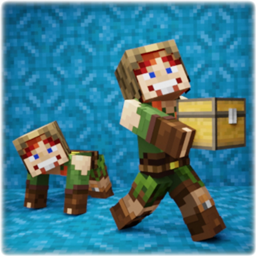
Это дополнение позволяет вам сидеть, лежать, ползать, подниматься по стенам и собирать моба, игрока или блок и нести его! Вы также можете пролезть через отверстие в 1 блок! Также работает в мультиплеере!

Создайте условия для быстрой телепортации! Общественная система путевых точек со списком «мои любимые»! Каждый игрок может иметь и публиковать до 999 путевых точек! Количество игроков онлайн не ограничено! Совместим с любыми дополнениями! Классные эффекты камеры при телепортации!

Возьмите игрока, моба или сундук с предметами и перенесите его в нужное место! Все мобы, игроки и блоки с предметами переносимы! Даже мобы или блоки из других аддонов!
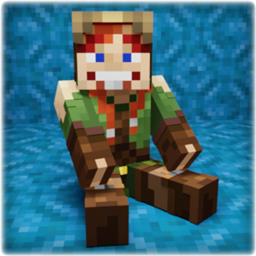
Этот аддон позволяет вам сидеть, лежать, ползать и перелезать через стены! Камера от первого лица корректирует свое положение в зависимости от состояния тела. Вы также можете пролезть через отверстие в 1 блок! Также работает в мультиплеере!

3D GUNS Mod с хэдшотами, плавной анимацией, оружием с частотой стрельбы 1200 оборотов в минуту и многое другое! Скачайте сейчас и получите множество оружия в вашем мире Minecraft!!!