

Dragon Evolution (Dragon Ball Add-on)
Пробудите свою внутреннюю силу, преодолейте невероятные трудности и столкнитесь с грозными врагами из вселенной Dragon Ball.

 Мод для Minecraft Bedrock (PE)
от Halo333XYT
Дополнение безопасности для вашего мира, чтобы защитить себя от других.
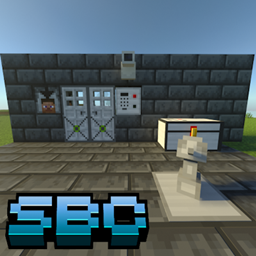
SecurityBeCraft — мод для Minecraft Bedrock (PE) (Майнкрафт ПЕ) от автора Halo333XYT. Дополнение безопасности для вашего мира, чтобы защитить себя от других.
Его скачали 193,7 тыс. раз: это 351-е место среди модов Minecraft Bedrock (PE) в нашем каталоге, редкость — «обычный» (нижняя половина по скачиваниям). Мод давно не обновлялся — проверьте совместимость с текущей версией игры, актуальная версия — SecurityBeCraft.
Дополнительных модов для работы не требует.
Текст автора на языке оригинала
Beta API's gameplay it's required for this addon.
To start, we need to get the security table, this table can be created with just 2 materials.
We will need 3 iron ingots and 4 wooden sticks
With this security table, we can create all the available objects, such as: Security cameras, reinforced and password-protected chests, turrets, spy drones...
(Only clicking in the item, you can see the recipe)
In order to use the cameras and drones, we need to get a tablet, so we can access the view of the cameras and drones. The cameras will always be in fixed locations, while the drones can be piloted and moved around the world.
In order to obtain the tablet, we need to craft, we will need these objects:
We already have the tablet, now this will give us access to all our cameras and drones, but now we need to craft these. Here are the recipes:
In order to use the camera, you need to follow these steps:
Done, the camera configuration has been successful, now we can use the camera from the tablet.
We will have 4 buttons available:
While in a camera, we can continue using the tablet, we can return to ourselves, change cameras or use a drone.
Drones work the same way, but these are placed on the ground, and when they are placed on the ground, you interact with the drone to be able to assign it a name.
That's it, your drone is now set up and ready to fly. The drone has a signal limit, though, so if at any point you can no longer control it, you have to get closer to it so it can get a signal again.
Fly Insructions:
Okay, we've already learned how to use the drones and cameras in the add-on, let's move on to something even easier now.
Mines work very similar to cameras, they are assigned a unique name, and with the mine module, we can control them and say whether they explode or not.
We have to put the mine on the floor, and then interact with it.
After setting up the mine, it will turn a red hue, indicating that it can now explode, this can happen if you step on it or by using the module. This is the recipe:
We have 2 types of reinforced chest.
You can identify the normal chests by the name, the normal chests do not have the word "KeyPad" in their name, another way to identify them is by the top of the chest model, it is completely white.
To identify the password protected safes, you can rely on the name, as the name includes the word "KeyPad", another way to identify them is by the top of the safe model, which has black dots.
There are 2 sizes of chest for each type, the small size and the large size of chest.
Set the password
Password added
Unlocked chest
Small chest
Big Chest
Recipes
Turrets defend areas from enemies, whether monsters or players. They must be placed on the ground, and their owner will be the player who placed them.
After placing the turret, you will be able to interact with it to adjust it. It looks like a block of iron
If you have more than 1 turret and you want to control them all at once, it is possible with the turret module, this will allow you to control all the turrets:
The only difference is being able to control all the turrets and being able to remove them all.
These reinforced doors are indestructible, as are all other objects. With these doors, other people will not be able to enter your house if you wish, since they have the option of operating through a scanner or a keypad.
For the scanner to work, you have to look directly at it.
In order for the keypad to work, you will first need to set a password. After setting the password, use the password to open the door.
This is probably one of the most important things. Block reinforcement allows your blocks to be indestructible to explosions and breaking.
For this we will have 2 very important tools:
Описание длинное — здесь его начало. Читать целиком на странице автора
Файл скачивается с официального сервера CurseForge, без перезаливов и сторонних установщиков
Подробная инструкция для Minecraft Bedrock (PE)Вставьте значок в описание на CurseForge, в README или в Discord — русскоязычные игроки сразу попадут на страницу с переводом и инструкцией.

[](https://modka.app/minecraft-bedrock/securitybecraft/)<a href="https://modka.app/minecraft-bedrock/securitybecraft/"><img src="https://modka.app/badge.png" alt="Описание на русском — Модка" height="44"></a>[url=https://modka.app/minecraft-bedrock/securitybecraft/]Описание на русском — Модка[/url]Скачайте «SecurityBeCraft» кнопкой «Скачать» — файл придёт с CurseForge. Откройте скачанный файл .mcaddon или .mcpack — на ПК двойным щелчком, на телефоне через «Открыть с помощью» → Minecraft. Игра покажет «Импорт выполнен». Создайте мир или откройте настройки существующего: в разделах «Пакеты поведения» и «Наборы ресурсов» нажмите на аддон и «Активировать». Если аддон требует экспериментальные функции — включите их в настройках мира в разделе «Эксперименты».
Файл скачивается с официального сервера CurseForge, куда его загрузил Halo333XYT. Мы не перезаливаем и не изменяем моды.
6 апреля 2025, актуальная версия — SecurityBeCraft. Это больше года назад: перед установкой проверьте, работает ли мод на текущей версии игры.
Пробудите свою внутреннюю силу, преодолейте невероятные трудности и столкнитесь с грозными врагами из вселенной Dragon Ball.

Добавьте в игру 34 великолепных и исключительно анимированных 3D-оружия. Включает блики, шкуры и гранаты! Est 2019, возрождение 2026. Приложение использует player.json

Воссоздание боевой системы Java для Minecraft Bedrock включает в себя временные попадания, охлаждения, улучшенный нокбэк и функции QOL. Разработчик: Catalyst Interactive.

В Bedrock Edition добавлено 1.9 элементов боевого обновления.

Приложение представляет мир Jujutsu Kaisen в Minecraft в комплекте с системой Проклятой Энергии, уникальными Проклятыми Техниками и основанными на манге взаимодействиями между методами столкновения.

[Стабильно] Этот аддон представляет культовые костюмы героев, такие как Человек-железо Флэша, Капитан Америка, Бэтмен. Халк Супермен Человек-паук Веном Дэдпул, росомаха догпула, тереть его топор [ADDON].