

Bean's Armed Forces
Военное дополнение для Minecraft Bedrock, которое добавляет самолеты, танки и другие армейские / военные вещи.

 Мод для Minecraft Bedrock (PE)
от JhonFX
Создавайте порталы, путешествуйте между измерениями и исследуйте свой мир совершенно по-новому!
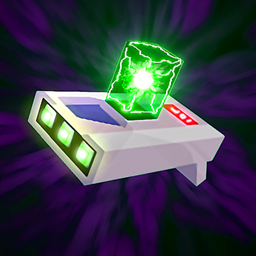
Portal Gun [Rick and Morty Add-On] — мод для Minecraft Bedrock (PE) (Майнкрафт ПЕ) от автора JhonFX. Создавайте порталы, путешествуйте между измерениями и исследуйте свой мир совершенно по-новому!
Его скачали 659,5 тыс. раз: это 105-е место среди модов Minecraft Bedrock (PE) в нашем каталоге, редкость — «редкий» (топ-50% по скачиваниям). Мод обновлялся в последний месяц, актуальная версия — Portal Gun v1.3.1.
Дополнительных модов для работы не требует.
2 шт · нажмите, чтобы открыть
Текст автора на языке оригинала
This add-on is still actively being developed and will continue to receive updates over time. A major revamp is also planned, bringing improvements and changes to the project.
Want to follow its development and stay up to date with the latest news? Join our Discord server and be part of the community!
Ever wanted to travel through dimensions like Rick and Morty? Now you can!
The Portal Gun Add-On brings fully functional portal guns to Minecraft Bedrock, allowing you to create portals, travel across your world, and even explore custom dimensions.
Create your portal gun, choose your destination, and step through the portal. Whether you're building massive transportation systems, escaping dangerous situations, or simply experimenting with portals, the possibilities are endless.
**Chip
**
Dark Matter Dust
**Phase Matter
**
Empty Tube
**Beaker
**
Prototype Portal Gun
Standard Portal Gun
Prime Portal Gun
Evil Morty's Portal Gun
**
Quantum Isotope R-426
->
Interspatial Travel Solution
->
Interdimensional Travel Solution ->
Extradimensional Travel Solution
->
**Rick Sanchez Hair
**
Lab Coat
Eye Patch
After creating your Travel Solution, place it on the ground and interact with an empty tube to fill it with Portal Fluid.
Next, place the Portal Fluid in your offhand and interact with the Portal Gun Base to assemble your Portal Gun. You can also use empty tubes instead of charged ones.
Once assembled, simply interact to shoot a portal, or Shift + Interact to open the Portal Gun's menu. Each Portal Gun has its own unique interface!
##
The Portal Gun allows you to set specific coordinates as a destination for your portals.
When entering a coordinate, use the following format:
x y z dimension_id
For example:
100 64 200 overworld
The dimension ID specifies which dimension the portal should be connected to.
For vanilla Minecraft dimensions, the minecraft: namespace is optional.
Both of these formats work:
100 64 -250 overworld
100 64 -250 minecraft:overworld
##
For custom dimensions, you must use the exact dimension ID, including its namespace.
For example:
100 70 200 myaddon:custom_dimension
Make sure the ID matches the dimension's registered ID exactly. Otherwise, the Portal Gun will not be able to find the destination dimension.
##
If you don't know the ID of a custom dimension, you can easily find it using the Portal Gun's terminal.
First, travel to the custom dimension by any other means. Then, open the Portal Gun's Terminal, which can be found under Settings.
Run the following command:
coords The terminal will display your current coordinates along with the exact ID of the dimension you're in. You can then use this ID when setting a destination coordinate.
##
First, download the latest version of the Portal Gun Add-On that is compatible with your version of Minecraft Bedrock. Once downloaded, you should have the addon .mcaddon file.
The next step depends on your device:
After importing, create or edit a world and activate the addon from the Behavior Packs and Resource Packs sections.
Файл скачивается с официального сервера CurseForge, без перезаливов и сторонних установщиков
Подробная инструкция для Minecraft Bedrock (PE)Вставьте значок в описание на CurseForge, в README или в Discord — русскоязычные игроки сразу попадут на страницу с переводом и инструкцией.

[](https://modka.app/minecraft-bedrock/portal-gun-addon-tek/)<a href="https://modka.app/minecraft-bedrock/portal-gun-addon-tek/"><img src="https://modka.app/badge.png" alt="Описание на русском — Модка" height="44"></a>[url=https://modka.app/minecraft-bedrock/portal-gun-addon-tek/]Описание на русском — Модка[/url]Скачайте «Portal Gun [Rick and Morty Add-On]» кнопкой «Скачать» — файл придёт с CurseForge. Откройте скачанный файл .mcaddon или .mcpack — на ПК двойным щелчком, на телефоне через «Открыть с помощью» → Minecraft. Игра покажет «Импорт выполнен». Создайте мир или откройте настройки существующего: в разделах «Пакеты поведения» и «Наборы ресурсов» нажмите на аддон и «Активировать». Если аддон требует экспериментальные функции — включите их в настройках мира в разделе «Эксперименты».
Файл скачивается с официального сервера CurseForge, куда его загрузил JhonFX. Мы не перезаливаем и не изменяем моды.
2 ноября 2026, актуальная версия — Portal Gun v1.3.1. Дата берётся с официальной страницы мода при каждом обновлении каталога.
Военное дополнение для Minecraft Bedrock, которое добавляет самолеты, танки и другие армейские / военные вещи.

Оригинальное название: Spiteful Fox for the Original Java Mod.

Добавление, посвященное персонажам MARVEL Comics для Minecraft Bedrock, с акцентом на геймплей выживания.

Это конец света, и мертвые воскресли! Сможете ли вы пережить зомби-апокалипсис?

Современная мебель - это аддон декора с более чем 750 блоками, предлагающий широкий выбор гладких и стильных предметов мебели. Идеально подходит для создания современных жилых помещений с уникальным и функциональным дизайном. Идеально подходит для современных зданий и внутренней отделки.

Добро пожаловать в Волшебный путь, аддон, предлагающий более 100 заклинаний. Создайте свою собственную книгу заклинаний с различными типами и литьем оружия. Персонализируйте свой магический опыт и исследуйте широкий спектр магических способностей.