

Better Trees - Azalea Tree Update
[Достижение совместимо] Сделайте так, чтобы мир Minecraft ожил с лучшими деревьями! Это дополнение улучшает внешний вид деревьев, делая леса более естественными и реалистичными.


 Мод для Minecraft Bedrock (PE)
от qduoubp
это дополнение приносит новую механику жажды и температуры, чтобы улучшить опыт выживания.
Adventure Condiment: Thirst and Temperature — мод для Minecraft Bedrock (PE) (Майнкрафт ПЕ) от автора qduoubp. это дополнение приносит новую механику жажды и температуры, чтобы улучшить опыт выживания.
Его скачали 234,3 тыс. раз: это 298-е место среди модов Minecraft Bedrock (PE) в нашем каталоге, редкость — «обычный» (нижняя половина по скачиваниям). Мод обновлялся в последние полгода, актуальная версия — Adventure Condiment Behavior v1.5.
Дополнительных модов для работы не требует.
4 шт · нажмите, чтобы открыть
Текст автора на языке оригинала
Adventure Condiment is an addon that enhances survival gameplay by introducing thirst and temperature systems. While its current focus is on these mechanics, future updates will expand it with additional survival features.
Requires:
Thirst and Temperature Bar
Just like in real life, players can now experience varying temperatures and must manage an extra thirst bar.
Indicator list:
Thirst Bar – Shows the player’s remaining hydration.
Soaked Indicator – Display soaked body level. Soaked level will affect how speed the player absorbs temperature.
Temperature Resistance Bar – Displays the amount of temperature resistance provided by the player’s armor.
Burnt Heart – A health overlay indicating the player’s burn threshold; exceeding it causes burn damage.
Frozen Heart – A health overlay showing the frozen threshold; falling below it results in instant death.
Player Temperature – Displays the current body temperature of the player.
Items
Winter and Desert Armor – Specialized armor sets designed for extreme climates, offering the same defense level as leather armor.
Winter and Desert Armor Recipes
Diving Helmet – An upgraded version of the turtle helmet, equipped with an oxygen tank, allowing players to explore underwater for longer periods.
Thermometer – Displays the current area’s temperature. Can be equipped in the Charm Slot (requires the Novelty addon).
Heated Stone – Keeps the player warm when carried in the inventory. Heated stone can be recharged by smelting it in a furnace.
Fabric – A material used to add temperature resistance attributes to armor.
Sewing Tool – A tool for applying temperature attributes to armor using the forging table.
Water Flask – Contains filtered drinking water for hydration.
Hot and Cool Drink – A drinkable item that can change the player's temporary temperature for 8 minutes, and can be purified using milk.
Mechanics
Thirst
Players now have a thirst mechanic influenced by temperature, status effects, and food consumption. When thirst drops below 3 bars, the player’s screen will display a thirst effect. Thirst can be replenished by punching water to drink directly, or by consuming a water flask or water bottle.
Temperature
Players can now absorb environmental temperatures, which are determined by biome conditions making this system compatible with custom biomes. To avoid burning or freezing, players can add temperature resistance modifiers to their armor. The rate at which temperature is absorbed depends on the player’s soaked level and the armor’s temperature insulation.
Apply Temperature Attributes Recipes
Apply Temperature Insulation Recipes
Gravestone Player now will had gravestone when they dies. Interact with gravestone to auto pickup inventory, it also can stored Accessories item like Novelty. Only it's own owner that can interact with gravestone.
Knockout & Revive When player dies in multiplayer it won't dies instantly, instead it will knocked and can be revived by other player by sneaking in near of knocked player.
Infection Player now has a chance to get infected by zombie or any variant of zombie. Whenever player dies that had infection, it will summon a related zombie that was infected player.
Compatibility
Developer can make their compatibility with this addon by using a custom component or scripting module that I already made for use.
Using Custom Component:
"adventure_condiment:thirst" example:
/items/apple_juice.json
{ "format_version": "1.21.90", "minecraft:item": { "description": { "identifier": "test:apple_juice", "menu_category": { "category": "nature" } },
"components": { "minecraft:icon": "apple_juice", "minecraft:tags": { "tags": [ "minecraft:is_food" ] }, "minecraft:use_animation": "eat", "minecraft:use_modifiers": { "use_duration": 1.6, "movement_modifier": 0.35 }, "minecraft:food": { "nutrition": 2, "saturation_modifier": 0.3 }, "adventure_condiment:thirst": { "value": 10, "is_dirty": false } } } }
"adventure_condiment:temperature" example:
/items/battlemage_boots.json
{ "format_version": "1.21.90", "minecraft:item": { "description": { "identifier": "test:battlemage_boots", "menu_category": { "category": "equipment", "group": "minecraft:itemGroup.name.boots" } },
"components": { "minecraft:icon": { "textures": { "default": "battlemage_boots", "dyed": "battlemage_boots" } }, "minecraft:wearable": { "protection": 4, "slot": "slot.armor.feet" }, "minecraft:repairable": { "repair_items": [ { "items": [ "minecraft:netherite_ingot" ], "repair_amount": 107 } ] }, "minecraft:max_stack_size": 1, "minecraft:enchantable": { "value": 5, "slot": "armor_feet" }, "minecraft:durability": { "damage_chance": { "min": 20, "max": 100 }, "max_durability": 425 }, "minecraft:dyeable": { "default_color": "#a0432b" }, "adventure_condiment:temperature": { "temperature_resistance": 2, "temperature_insulation": false } } } }
Using Adventure Condiment Module:
You can copy this module from "/scripts/module/AdventureCondimentModule.js". example:
/scripts/register_item.js
**import { AdventureCondimentModule } from "./module/AdventureCondimentModule"
Описание длинное — здесь его начало. Читать целиком на странице автора
Файл скачивается с официального сервера CurseForge, без перезаливов и сторонних установщиков
Подробная инструкция для Minecraft Bedrock (PE)Вставьте значок в описание на CurseForge, в README или в Discord — русскоязычные игроки сразу попадут на страницу с переводом и инструкцией.

[](https://modka.app/minecraft-bedrock/adventure-condiment/)<a href="https://modka.app/minecraft-bedrock/adventure-condiment/"><img src="https://modka.app/badge.png" alt="Описание на русском — Модка" height="44"></a>[url=https://modka.app/minecraft-bedrock/adventure-condiment/]Описание на русском — Модка[/url]Скачайте «Adventure Condiment: Thirst and Temperature» кнопкой «Скачать» — файл придёт с CurseForge. Откройте скачанный файл .mcaddon или .mcpack — на ПК двойным щелчком, на телефоне через «Открыть с помощью» → Minecraft. Игра покажет «Импорт выполнен». Создайте мир или откройте настройки существующего: в разделах «Пакеты поведения» и «Наборы ресурсов» нажмите на аддон и «Активировать». Если аддон требует экспериментальные функции — включите их в настройках мира в разделе «Эксперименты».
Файл скачивается с официального сервера CurseForge, куда его загрузил qduoubp. Мы не перезаливаем и не изменяем моды.
29 августа 2026, актуальная версия — Adventure Condiment Behavior v1.5. Дата берётся с официальной страницы мода при каждом обновлении каталога.
[Достижение совместимо] Сделайте так, чтобы мир Minecraft ожил с лучшими деревьями! Это дополнение улучшает внешний вид деревьев, делая леса более естественными и реалистичными.

Отображает модель игрока от первого лица, при этом стараясь изо всех сил сохранить ее ненавязчивой.
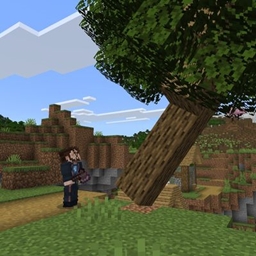
Падающие деревья с реалистичной, интерактивной физикой.

Rustic Furniture - это ресурспак для Minecraft, который добавляет широкий спектр деревенской и декоративной мебели для настройки ваших сборок
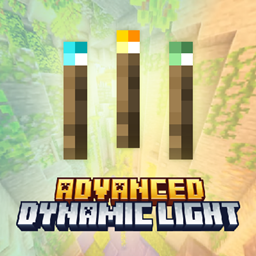
Освети свой мир! Держите факелы, фонари и предметы на заказ, чтобы динамически освещать ваше окружение в Minecraft Bedrock!

Добавляет множество улучшенных печей, изготовленных из руд и других материалов. Каждый новый уровень плавится быстрее, использует топливо более эффективно и помогает быстрее обрабатывать предметы по мере прохождения игры.