
Magnificus Mod
[Последнее обновление] Добавляет в игру новый акт на основе magnificus dungeon crawler.

 Мод для Inscryption
от CORE_API_TEAM
Простой способ позволить пользователю настроить поведение плагина без необходимости создавать свой собственный графический интерфейс.
Configuration Manager Inscryption — мод для Inscryption (Инскрипшн) от автора CORE_API_TEAM. Простой способ позволить пользователю настроить поведение плагина без необходимости создавать свой собственный графический интерфейс.
Его скачали 1,8 тыс. раз: это 287-е место среди модов Inscryption в нашем каталоге, редкость — «обычный» (нижняя половина по скачиваниям). Мод давно не обновлялся — проверьте совместимость с текущей версией игры, актуальная версия — 17.0.1.
Для работы ему нужны: BepInExPack Inscryption.
1 шт · нажмите, чтобы открыть
Текст автора на языке оригинала
An easy way to let user configure how a plugin behaves without the need to make your own GUI. The user can change any of the settings you expose, even keyboard shortcuts.
The configuration manager can be accessed in-game by pressing the hotkey (by default F1). Hover over the setting names to see their descriptions, if any.
Note: The .xml file is useful for plugin developers when referencing ConfigurationManager.dll in your plugin, it will provide descriptions for types and methods to your IDE. Users can ignore it.
ConfigurationManager will automatically display all settings from your plugin's Config. All metadata (e.g. description, value range) will be used by ConfigurationManager to display the settings to the user.
In most cases you don't have to reference ConfigurationManager.dll or do anything special with your settings. Simply make sure to add as much metadata as possible (doing so will help all users, even if they use the config files directly). Always add descriptive section and key names, descriptions, and acceptable value lists or ranges (wherever applicable).
Specify AcceptableValueRange when creating your setting. If the range is 0f - 1f or 0 - 100 the slider will be shown as % (this can be overridden below).
CaptureWidth = Config.AddSetting("Section", "Key", 1, new ConfigDescription("Description", new AcceptableValueRange(0, 100)));Specify AcceptableValueList when creating your setting. If you use an enum you don't need to specify AcceptableValueList, all of the enum values will be shown. If you want to hide some values, you will have to use the attribute.
Note: You can add System.ComponentModel.DescriptionAttribute to your enum's items to override their displayed names. For example:
public enum MyEnum
{
    // Entry1 will be shown in the combo box as Entry1
    Entry1,
    [Description("Entry2 will be shown in the combo box as this string")]
    Entry2
}Add a setting of type KeyboardShortcut. Use the value of this setting to check for inputs (recommend using IsDown) inside of your Update method.
The KeyboardShortcut class supports modifier keys - Shift, Control and Alt. They are properly handled, preventing common problems like K+Shift+Control triggering K+Shift when it shouldn't have.
private ConfigEntry ShowCounter { get; set; }

public Constructor()
{
    ShowCounter = Config.AddSetting("Hotkeys", "Show FPS counter", new KeyboardShortcut(KeyCode.U, KeyCode.LeftShift));
}

private void Update()
{
    if (ShowCounter.Value.IsDown())
    {
        // Handle the key press
    }
}You can change how a setting is shown inside the configuration manager window by passing an instance of a special class as a tag of the setting. The special class code can be downloaded here. Simply download the .cs file and drag it into your project.
Here's an example of overriding order of settings and marking one of the settings as advanced:
// Override IsAdvanced and Order
Config.AddSetting("X", "1", 1, new ConfigDescription("", null, new ConfigurationManagerAttributes { IsAdvanced = true, Order = 3 }));
// Override only Order, IsAdvanced stays as the default value assigned by ConfigManager
Config.AddSetting("X", "2", 2, new ConfigDescription("", null, new ConfigurationManagerAttributes { Order = 1 }));
Config.AddSetting("X", "3", 3, new ConfigDescription("", null, new ConfigurationManagerAttributes { Order = 2 }));If you are using a setting type that is not supported by ConfigurationManager, you can add a drawer Action for it. The Action will be executed inside OnGUI, use GUILayout to draw your setting as shown in the example below.
To use a custom seting drawer for an individual setting, use the CustomDrawer field in the attribute class. See above for more info on the attribute class.
void Start()
{
    // Add the drawer as a tag to this setting.
    Config.AddSetting("Section", "Key", "Some value"
        new ConfigDescription("Desc", null, new ConfigurationManagerAttributes{ CustomDrawer = MyDrawer });
}

static void MyDrawer(BepInEx.Configuration.ConfigEntryBase entry)
{
    // Make sure to use GUILayout.ExpandWidth(true) to use all available space
    GUILayout.Label(entry.BoxedValue, GUILayout.ExpandWidth(true));
}You can specify a drawer for all settings of a setting type. Do this by using ConfigurationManager.RegisterCustomSettingDrawer(Type, Action).
Warning: This requires you to reference ConfigurationManager.dll in your project and is not recommended unless you are sure all users will have it i
Описание длинное — здесь его начало. Читать целиком на странице автора
В r2modman ставится автоматически
Файл скачивается с официального сервера Thunderstore, без перезаливов и сторонних установщиков
Подробная инструкция для InscryptionВставьте значок в описание на Thunderstore, в README или в Discord — русскоязычные игроки сразу попадут на страницу с переводом и инструкцией.

[](https://modka.app/inscryption/core-api-team-configuration-manager-inscryption/)<a href="https://modka.app/inscryption/core-api-team-configuration-manager-inscryption/"><img src="https://modka.app/badge.png" alt="Описание на русском — Модка" height="44"></a>[url=https://modka.app/inscryption/core-api-team-configuration-manager-inscryption/]Описание на русском — Модка[/url]Скачайте менеджер модов r2modman (или Gale) и выберите в нём игру Inscryption. Создайте профиль — так моды не смешаются с чистой версией игры. Найдите «Configuration Manager Inscryption» во вкладке Online и нажмите Download — BepInEx и все зависимости подтянутся сами. Нажмите «Start modded» — игра запустится с модами. Чтобы сыграть без модов, запустите игру как обычно из Steam — r2modman не трогает чистую версию игры.
Файл скачивается с официального сервера Thunderstore, куда его загрузил CORE_API_TEAM. Мы не перезаливаем и не изменяем моды.
Установите вместе с ним: BepInExPack Inscryption. В менеджере модов зависимости подтягиваются автоматически.
22 апреля 2025, актуальная версия — 17.0.1. Это больше года назад: перед установкой проверьте, работает ли мод на текущей версии игры.
[Последнее обновление] Добавляет в игру новый акт на основе magnificus dungeon crawler.
15 новых вызовов и 6 новых вызовов моду Кейси Окружающая среда, Пираты, Уроборос и многое другое!

Архипелаг Multiworld Randomizer для шифрования.

Колоссальная коллекция карт, охватывающих все три основных акта шифрования - с особым акцентом на закон 1 / мод Кейси - с большим количеством Закона 2 и 3 любви.
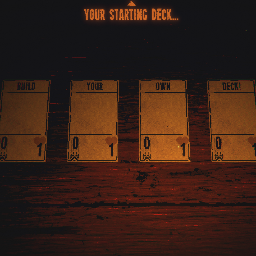
DeckbuilderMod позволяет добавлять любое количество карт в стартовую колоду!

Настраиваемый мод «разблокировать все» для Акта 1 и Мод Кейси.