
PerfectBoosters
Change the effect value of boosters to optimal value, and they will never be consumed.
 Мод для GTFO
от Talcazzar
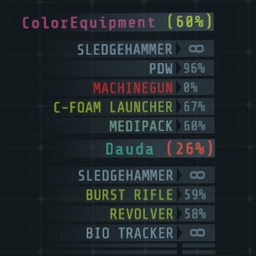
Add color to the map screen and teammate HUD based on available resource amounts
ColorEquipment — мод для GTFO (ГТФО) от автора Talcazzar. Add color to the map screen and teammate HUD based on available resource amounts
Его скачали 17,3 тыс. раз: это 115-е место среди модов GTFO в нашем каталоге, редкость — «редкий» (топ-50% по скачиваниям). Мод давно не обновлялся — проверьте совместимость с текущей версией игры, актуальная версия — 1.0.0.
Для работы ему нужны: BepInExPack GTFO.
4 шт · нажмите, чтобы открыть
Текст автора на языке оригинала
This plugin was conceived as an extension of CGHI and as such has some overlap in features. There is code in place to ensure some compatability with the current version of CGHI (0.0.4).
Color values are HTML color codes in the format #RRGGBB (no alpha).
Color thresholds are floating point values between 0.0 and 1.0, representing 0% and 100% respectively.
The color scaler follows these three rules:
Normally any resource amount that is above the Low threshold will not result in a change of color. In order to always have a color the Low threshold should be set to 1. We only want to use two colors, so also set the Critical threshold to 1. Now when the value is at 100% we effectively use the Low color, when the value is 0% we use the Critical color.
Set all thresholds to 1; this will allow us to scale directly from the Low color to the Critically low color.
[Thresholds]
Resource Low = 1
Resource Critical = 1
Health Low = 1
Health Critical = 1
Set the Low to the desired color when a resource is at 100%. Set the Critical to the desired color when a resource is at 0%.
[Colors]
Low = #00FF00
Critical = #FF0000
The color will now blend between the two values, as shown in this figure:
В r2modman ставится автоматически
Файл скачивается с официального сервера Thunderstore, без перезаливов и сторонних установщиков
Подробная инструкция для GTFOВставьте значок в описание на Thunderstore, в README или в Discord — русскоязычные игроки сразу попадут на страницу с переводом и инструкцией.

[](https://modka.app/gtfo/talcazzar-colorequipment/)<a href="https://modka.app/gtfo/talcazzar-colorequipment/"><img src="https://modka.app/badge.png" alt="Описание на русском — Модка" height="44"></a>[url=https://modka.app/gtfo/talcazzar-colorequipment/]Описание на русском — Модка[/url]Скачайте менеджер модов r2modman (или Gale) и выберите в нём игру GTFO. Создайте профиль — так моды не смешаются с чистой версией игры. Найдите «ColorEquipment» во вкладке Online и нажмите Download — BepInEx и все зависимости подтянутся сами. Нажмите «Start modded» — игра запустится с модами. Для мультиплеера всем игрокам нужен одинаковый набор модов: в r2modman профиль можно экспортировать кодом и отправить друзьям.
Файл скачивается с официального сервера Thunderstore, куда его загрузил Talcazzar. Мы не перезаливаем и не изменяем моды.
Автор не указал, клиентский это мод или серверный. Безопаснее, чтобы одинаковый набор модов был у всех игроков в лобби: проще всего поделиться профилем r2modman.
Установите вместе с ним: BepInExPack GTFO. В менеджере модов зависимости подтягиваются автоматически.
29 марта 2023, актуальная версия — 1.0.0. Это больше года назад: перед установкой проверьте, работает ли мод на текущей версии игры.
Change the effect value of boosters to optimal value, and they will never be consumed.
Play GTFO with more players.

A mod to save full game replays.

booster farmer, perfect booster, custom booster
Make dead monsters no longer block bullets.

Turn off bullet damage to teammates. (but they can still hurt you)