
Начните вводить название — например, MoreHead, Sodium или PEAK

ResourceHelper — иконка
Обложка GTFOМод для GTFO

ResourceHelper

от Localia

Mark all the resources you and your teammates have found.Now support ExtraResourceHelper.

  • Легендарный
  • 106,5 тыс. скачиваний
  • Версия 3.0.1
  • Обновлён 21 октября 2022
  • Не обновлялся больше года
  • Клиентский
  • Инструменты
  • Удобства

О моде ResourceHelper

ResourceHelper — мод для GTFO (ГТФО) от автора Localia. Mark all the resources you and your teammates have found.Now support ExtraResourceHelper.

Его скачали 106,5 тыс. раз: это 9-е место среди модов GTFO в нашем каталоге, редкость — «легендарный» (топ-5% по скачиваниям). Мод давно не обновлялся — проверьте совместимость с текущей версией игры, актуальная версия — 3.0.1.

Для работы ему нужны: BepInExPack GTFO.

Полное описание ResourceHelper

Текст автора на языке оригинала

Overview

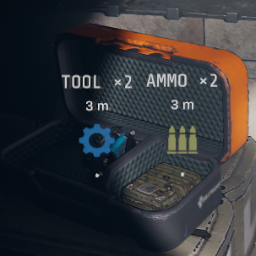
  • Mark all the resources you and your teammates have found.Displays the name, capacity, distance, and exclusive icon of the resource on your screen.
  • Package resources can be displayed at a long distance, other items can only be displayed at a close distance. But when someone marks something with the Middle Mouse Button, all the surrounding resources can be displayed at a very long distance.
  • You can set the display name of resources in Localia.ResourceHelper-Plus.cfg.

For Devs

You can add extar icons(.png) for ResourceHelper in /Your MTFO Rundown Folder/Custom/ExtraResourceHelper/

It's a simple way to configure by "file name".

The file name consists of 9 parameters, and separated by ",":

For Example:MyCustomRundown,Gold Bulkhead Key,146,GOLD_KEY,0,40,1.0,1.0,0.0.png

Parameters: rundown_name,tag_name,item_id,show_name,ammo_divisor,fade_distance,R,G,B

1.rundownname

  • The name of your rundown.
  • Players will not see it in the game.
  • Be used to generate the config in Localia.ResourceHelper-Plus.cfg
  • Do not use "ResourceHelper" as rundown_name, which will mess up the sorting of CFG.

2.tagname

  • The internal name of your custom item.
  • Players will not see it in the game.
  • Be used to generate the config in Localia.ResourceHelper-Plus.cfg.

3.itemid

  • The item's persistentID in ItemDataBlock.
  • Cannot use duplicate ID. (Including the items already provided by ResHelper)

4.showname

  • The name displayed on the icon in the game.
  • On the first time it is loaded, this name will be saved to cfg as the default name.

5.ammodivisor(0~100)

  • Divisor of item capacity.
  • Determines the quantity calculation displayed after the display name like ""x 2".
  • Resource packs are usually set to 20 and other consumables to 1.
  • When it is 0, it means that the item has no stacking quantity ( such as flashlight ).
  • If the value is wrong, it will show a incorrect quantity on icon.

6.fadedistance(1~60)

  • Maximum distance the icon can display.
  • Resource packs are usually set to 40 and other consumables to 10.

7~9.RGB(0.0~1.0)

  • Color of the icon.
  • Values between 0.0~1.0 , not 0~255.

You can access and refer to the original PNG files of ResHelper, which are the best templates.

Credits

Thanks Flowaria for the code to loads the additional icon (from ExtraEnemyCustomization).

Note

Contact Localia#5666 on the modding server if you want to give feedback or have found any issue.

============ Change Log ============

v3.0.1

  • Add yellow glowsticks.

v3.0.0

  • Re-complied for bepinex3.0.

v2.0.3

  • Fixed file path.

v2.0.2

  • Fixed an issue that could not load properly in some countries.

v2.0.0

  • Rewrite most of the code, support ExtarResourceHelper.
  • Added a settable function of auto fade icon out when ADS.
  • Cfg is renamed as Localia.ResourceHelper-Plus.cfg.

v1.8.8

  • Fixed file path.

v1.8.6

  • Re-complied for bepinex2.0.
  • Remove dependency on "PingEverything".

v1.8.5

  • Add support for red/orange glowsticks.
  • Add a fade-in effect.

v1.8.1

  • Support for checkpoint.
  • Optimized code.

v1.6.5

  • Fixed bug in ammo reading, now compatible with mod "Stacks".

v1.6.0

  • Improve compatibility with other mods.

v1.5.1

  • Optimized code and improved performance.

v1.5.0

  • Optimized zoom display of long-distance resources.
  • Optimized the experience of marking resources with the middle mouse button, and can be displayed at a longer distance after marking.

v1.1.0

  • Fix the problem of invalidation after changing the level.

v1.0.0

  • Initial Release

Нужно для работы

В r2modman ставится автоматически

Моды, которым нужен ResourceHelper

21 в каталоге · показаны самые популярные

ProjectEternal — иконка

ProjectEternal

OBJECTIVE STACK REITERATION UNKNOWN - PROBE DEEPER UNTIL ://ERROR
Легендарный123,7 тыс.Рандауны

Fatal Experiment 2 — иконка

Fatal Experiment 2

The ''Deep End'' of GTFO Modded, are you ready? 25 Expeditions. Custom Guns. 150+ Enemy Variants. Team of 4 recommended.
Эпический58,6 тыс.Рандауны

Legacy — иконка

Legacy

://[OMNI]-Legacy: Superjacent sectors access denied, find a way to disengage lockdown and retrieve ALL resources.
Эпический58,3 тыс.Рандауны

Turkey Hunt — иконка

Turkey Hunt

Turkey Themed Mod, 8 Levels of Slaying Turkeys.

Эпический34,3 тыс.Рандауны

Survival — иконка

Survival

://Survival: The Warden’s new order has come down—we fight as one, carve through the darkness, and escape this damnation with our lives intact! Together, we survive!
Редкий30,4 тыс.Рандауны

Solo Trials — иконка

Solo Trials

13 Expeditions available. Balanced for solo play. Begins with easy vanilla-like difficulty and enemies, but later leans into brutal difficulty and custom enemies.

Редкий24,8 тыс.Рандауны

Как установить ResourceHelper

Файл скачивается с официального сервера Thunderstore, без перезаливов и сторонних установщиков

Подробная инструкция для GTFO
  1. Скачайте менеджер модов r2modman (или Gale) и выберите в нём игру GTFO.
  2. Создайте профиль — так моды не смешаются с чистой версией игры.
  3. Найдите «ResourceHelper» во вкладке Online и нажмите Download — BepInEx и все зависимости подтянутся сами.
  4. Нажмите «Start modded» — игра запустится с модами.
  5. Для мультиплеера всем игрокам нужен одинаковый набор модов: в r2modman профиль можно экспортировать кодом и отправить друзьям.
Вы автор мода? Поставьте ссылку на русское описание

Вставьте значок в описание на Thunderstore, в README или в Discord — русскоязычные игроки сразу попадут на страницу с переводом и инструкцией.

Описание на русском — Модка
Markdown[![Описание на русском — Модка](https://modka.app/badge.png)](https://modka.app/gtfo/localia-resourcehelper/)
HTML<a href="https://modka.app/gtfo/localia-resourcehelper/"><img src="https://modka.app/badge.png" alt="Описание на русском — Модка" height="44"></a>
Steam (BBCode)[url=https://modka.app/gtfo/localia-resourcehelper/]Описание на русском — Модка[/url]

Частые вопросы о ResourceHelper

Как установить ResourceHelper?

Скачайте менеджер модов r2modman (или Gale) и выберите в нём игру GTFO. Создайте профиль — так моды не смешаются с чистой версией игры. Найдите «ResourceHelper» во вкладке Online и нажмите Download — BepInEx и все зависимости подтянутся сами. Нажмите «Start modded» — игра запустится с модами. Для мультиплеера всем игрокам нужен одинаковый набор модов: в r2modman профиль можно экспортировать кодом и отправить друзьям.

Безопасен ли ResourceHelper?

Файл скачивается с официального сервера Thunderstore, куда его загрузил Localia. Мы не перезаливаем и не изменяем моды.

Нужно ли друзьям ставить ResourceHelper?

Автор не указал, клиентский это мод или серверный. Безопаснее, чтобы одинаковый набор модов был у всех игроков в лобби: проще всего поделиться профилем r2modman.

Что нужно для работы ResourceHelper?

Установите вместе с ним: BepInExPack GTFO. В менеджере модов зависимости подтягиваются автоматически.

Когда ResourceHelper обновлялся последний раз?

21 октября 2022, актуальная версия — 3.0.1. Это больше года назад: перед установкой проверьте, работает ли мод на текущей версии игры.

Похожие моды

Все моды на GTFO
PerfectBoosters — иконка

PerfectBoosters

Change the effect value of boosters to optimal value, and they will never be consumed.
Эпический57,5 тыс.Клиентский

PreciseUI — иконка

PreciseUI

Displays more detailed stamina, infection, health, bioscan progress, and more in the UI/HUD.

Редкий18,2 тыс.Клиентский

Zombified Initiative — иконка

Zombified Initiative

Control over bot resource pickups and usage, also ability to send bots to kill sleeping enemies

Редкий16,5 тыс.Клиентский

NoBotFriendlyFire — иконка

NoBotFriendlyFire

bots magically miss you and each other, and scan extractions with you
Редкий14,4 тыс.Клиентский

DropResource — иконка

DropResource

Allow dropping resources back into containers. Currently has some bugs.
Обычный13 тыс.Клиентский

AllVanity — иконка

AllVanity

Unlocks all Vanity items locally.

Обычный12,1 тыс.Клиентский