
GTFriendlyO
A major overhaul to GTFO, designed to bring more depth and fun with friends WITHOUT removing all of the challenge! A unique class system, new & reworked weapons/tools, improved mechanics, overhauled boosters, enhanced enemies, and more!
 Мод для GTFO
от Andocas
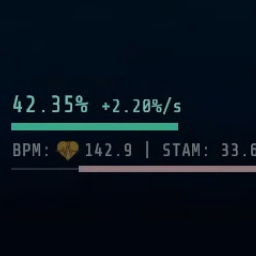
Displays more detailed stamina, infection, health, bioscan progress, and more in the UI/HUD.
PreciseUI — мод для GTFO (ГТФО) от автора Andocas. Displays more detailed stamina, infection, health, bioscan progress, and more in the UI/HUD.
Его скачали 18,2 тыс. раз: это 111-е место среди модов GTFO в нашем каталоге, редкость — «редкий» (топ-50% по скачиваниям). Мод обновлялся в течение года, актуальная версия — 0.3.4.
Для работы ему нужны: BepInExPack GTFO.
Текст автора на языке оригинала
PreciseUI provides enhanced information about yourself and your teammates. Particularly helpful for understanding bioscan scaling and stamina mechanics.
All changes are configurable in BepInEx/config/PreciseUI.cfg. Most configurations are applied immediately, although some don't take effect until the next time the corresponding UI element is updated.
Changes to the status bar at the bottom of the HUD:
The text between the health bar and the infection bar is extremely customizable. With the default configuration:
Changes to the team status display on the right hand side of the map:
Adds configurable decimal places for ammo and tool percentages for yourself and your teammates. Currently disabled by default.
Changes to the bioscan graphic:
Changes to the bioscan progress text at the top of the HUD:
В r2modman ставится автоматически
1 в каталоге
A major overhaul to GTFO, designed to bring more depth and fun with friends WITHOUT removing all of the challenge! A unique class system, new & reworked weapons/tools, improved mechanics, overhauled boosters, enhanced enemies, and more!
Файл скачивается с официального сервера Thunderstore, без перезаливов и сторонних установщиков
Подробная инструкция для GTFOВставьте значок в описание на Thunderstore, в README или в Discord — русскоязычные игроки сразу попадут на страницу с переводом и инструкцией.

[](https://modka.app/gtfo/andocas-preciseui/)<a href="https://modka.app/gtfo/andocas-preciseui/"><img src="https://modka.app/badge.png" alt="Описание на русском — Модка" height="44"></a>[url=https://modka.app/gtfo/andocas-preciseui/]Описание на русском — Модка[/url]Скачайте менеджер модов r2modman (или Gale) и выберите в нём игру GTFO. Создайте профиль — так моды не смешаются с чистой версией игры. Найдите «PreciseUI» во вкладке Online и нажмите Download — BepInEx и все зависимости подтянутся сами. Нажмите «Start modded» — игра запустится с модами. Для мультиплеера всем игрокам нужен одинаковый набор модов: в r2modman профиль можно экспортировать кодом и отправить друзьям.
Файл скачивается с официального сервера Thunderstore, куда его загрузил Andocas. Мы не перезаливаем и не изменяем моды.
Автор не указал, клиентский это мод или серверный. Безопаснее, чтобы одинаковый набор модов был у всех игроков в лобби: проще всего поделиться профилем r2modman.
Установите вместе с ним: BepInExPack GTFO. В менеджере модов зависимости подтягиваются автоматически.
1 марта 2026, актуальная версия — 0.3.4. Дата берётся с официальной страницы мода при каждом обновлении каталога.

Change the effect value of boosters to optimal value, and they will never be consumed.

Control over bot resource pickups and usage, also ability to send bots to kill sleeping enemies

bots magically miss you and each other, and scan extractions with you
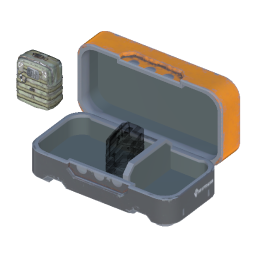
Allow dropping resources back into containers. Currently has some bugs.

Unlocks all Vanity items locally.

Make lights breakable, in multiplayer too