

Начните вводить название — например, MoreHead, Sodium или PEAK

UXAssist — иконка
Обложка Dyson Sphere ProgramМод для Dyson Sphere Program

UXAssist

от soarqin

Some functions and patches for better user experience / 一些提升用户体验的功能和补丁

  • Эпический
  • 184,4 тыс. скачиваний
  • Версия 1.6.3
  • Обновлён 31 октября 2026
  • Оптимизация
  • Удобства
  • Dyson
  • Логистика

О моде UXAssist

UXAssist — мод для Dyson Sphere Program (Дайсон Сфер Програм) от автора soarqin. Some functions and patches for better user experience / 一些提升用户体验的功能和补丁

Его скачали 184,4 тыс. раз: это 15-е место среди модов Dyson Sphere Program в нашем каталоге, редкость — «эпический» (топ-20% по скачиваниям). Мод обновлялся в последний месяц, актуальная версия — 1.6.3.

Для работы ему нужны: BepInEx, DSPModSave, CommonAPI.

Полное описание UXAssist

Текст автора на языке оригинала

UXAssist

Read me in English

Some functions and patches for better user experience

Bug reports

  • QQ group: 372754090

Usage

  • Press ` Alt+(BackQuote) `` to call up the config panel. You can change the shortcut on the panel.
  • There are also buttons on title screen and planet minimap area to call up the config panel.
  • Patches:
  • Strict hotkey dectection for build menu, thus building hotkeys(0~9, F1~F10, X, U) are not triggered while holding Ctrl/Alt/Shift.
  • Fix a bug that warning popup on Veins Utilization upgraded to level 8000+
  • Sort blueprint structures before saving, to reduce generated blueprint data size a little
  • Add an Auto-fill description button and a Proliferation checkbox to the blueprint browser, copy, and paste panels, to fill the description with the blueprint's material flows per minute and its power demand
  • Replaces the main description with full-load material flows and writes power demand to a Power custom field, preserving other custom fields. Proliferation defaults to on when the blueprint contains a Spray Coater. Save the blueprint manually to keep the changes.
  • Large material rates use the largest exact K/M/G suffix with at most one decimal place; rates that cannot be shortened without losing display precision keep their ordinary format. Numbers with four or more integer digits use comma thousands separators, including before suffixes (for example, 12,345 and 1,234.5K).
  • Increase maximum count of Metadata Instantiations to 20000 (from 2000)
  • Increase capacity of player order queue to 128 (from 16)
  • Enable Hide UI (F11 by default) in Star Map view, hiding UI and other scene elements
  • Append mod profile name to game window title, if using mod managers (Thunderstore Mod Manager or r2modman).
  • Features:
  • General
  • Enable game window resize
  • Remember window position and size on last exit
  • Convert Peace-Mode saves to Combat-Mode on loading
  • Mod manager profile based save folder
  • Save files are stored in Save\ folder.
  • Will use original save location if matching default profile name.
  • Mod manager profile based option
  • Option file is stored as Options\.xml.
  • Logical Frame Rate
  • This will change game running speed, down to 0.1x slower and up to 10x faster.
  • Use Ctrl+- and Ctrl+= by default to decrease or increase the logical frame rate by 0.5x; change the bindings in the system options.
  • Note:
  • High logical frame rate is not guaranteed to be stable, especially when factories are under heavy load.
  • This will not affect some game animations.
  • When set game speed in mod Auxilaryfunction, this feature will be disabled.
  • When BulletTime is installed, this feature is hidden; use BulletTime's own speed controls.
  • Set process priority
  • Increase maximum count of Metadata Instantiations to 20000 (from 2000)
  • Increase capacity of player order queue to 128 (from 16)
  • Factory
  • Sunlight at night
  • Lighting follows the camera instead of Icarus's facing direction, including planet view. Negative X tilts the light toward the camera; negative Y shifts it to the right of the screen. Positive values reverse these directions. Existing angle values are retained.
  • Lighting directions stay synchronized across buildings and terrain. Native lighting is restored when sailing, disabling the feature, or using the game's white rendering mode.
  • Remove some build conditions
  • Remove build count and range limit
  • Larger area for upgrade and dismantle (up to 31x31)
  • Larger area for terraform (up to 30x30)
  • Applies to both foundation placement and Restore Terrain
  • Off-grid building and stepped rotation
  • Cut conveyor belt
  • Press shortcut key to cut conveyor belt under cursor.
  • The default shortcut key is Alt+X, you can set it in system options panel.
  • Treat stack items as single in monitor components
  • Quick build and dismantle stacking labs/storages/tanks
  • Fast fill in to and take out from tanks
  • You can set multiplier for tanks' operation speed
  • This affects manually fill in to and/or take out from tanks, as well as transfer from upper to lower level.
  • Protect veins from exhaustion
  • Mining-rate estimates, mining resource counts, and miner hover counts exclude veins stopped by protection; remaining reserves stay visible.
  • Default protection thresholds are 1,000 remaining vein units and an oil extraction rate of 1.0/s; change them in the config file.
  • Mining or pumping stops at the configured threshold. Disable protection to resume consuming the remaining resources.
  • Vein mining can continue at the threshold when Veins Utilization reduces the mining cost rate to zero.
  • Do not render factory entities (except belts and sorters)
  • This also makes players click though factory entities but belts and sorters
  • Hide sorters too: also hide sorters, leaving only belts (and their cargo) visible
  • Drag building power poles in maximum connection range
  • Optionally alternate Tesla Towers and Wireless Power Towers when dragging from a Wireless Power Tower
  • Auto-construct
  • Automatically flies toward pending buildings and routes around obstacles
  • Enable automatic construction in the settings. The separate button option shows a toggle and the pending-building count near the bottom of the screen.
  • Hiding the button does not disable automatic construction.
  • Shortcut keys for Blueprint Copy mode
  • Ctrl+A selects all buildings; Ctrl+X dismantles the selection by default. Change both bindings in the system options.
  • Ctrl+Shift+Click to pick items from whole belts
  • Optionally

Описание длинное — здесь его начало. Читать целиком на странице автора

Нужно для работы

В r2modman ставится автоматически

Моды, которым нужен UXAssist

2 в каталоге

CheatEnabler — иконка

CheatEnabler

Add various cheat functions while disabling abnormal determinants / 添加一些作弊功能,同时屏蔽异常检测

Эпический91,1 тыс.Энергия

UniverseGenTweaks — иконка

UniverseGenTweaks

Universe Generation Tweaks / 宇宙生成参数调节

Обычный19,5 тыс.Game Breaking

Как установить UXAssist

Файл скачивается с официального сервера Thunderstore, без перезаливов и сторонних установщиков

Подробная инструкция для Dyson Sphere Program
  1. Скачайте менеджер модов r2modman (или Gale) и выберите в нём игру Dyson Sphere Program.
  2. Создайте профиль — так моды не смешаются с чистой версией игры.
  3. Найдите «UXAssist» во вкладке Online и нажмите Download — BepInEx и все зависимости подтянутся сами.
  4. Нажмите «Start modded» — игра запустится с модами.
  5. Чтобы сыграть без модов, запустите игру как обычно из Steam — r2modman не трогает чистую версию игры.
Вы автор мода? Поставьте ссылку на русское описание

Вставьте значок в описание на Thunderstore, в README или в Discord — русскоязычные игроки сразу попадут на страницу с переводом и инструкцией.

Описание на русском — Модка
Markdown[![Описание на русском — Модка](https://modka.app/badge.png)](https://modka.app/dyson-sphere-program/soarqin-uxassist/)
HTML<a href="https://modka.app/dyson-sphere-program/soarqin-uxassist/"><img src="https://modka.app/badge.png" alt="Описание на русском — Модка" height="44"></a>
Steam (BBCode)[url=https://modka.app/dyson-sphere-program/soarqin-uxassist/]Описание на русском — Модка[/url]

Частые вопросы о UXAssist

Как установить UXAssist?

Скачайте менеджер модов r2modman (или Gale) и выберите в нём игру Dyson Sphere Program. Создайте профиль — так моды не смешаются с чистой версией игры. Найдите «UXAssist» во вкладке Online и нажмите Download — BepInEx и все зависимости подтянутся сами. Нажмите «Start modded» — игра запустится с модами. Чтобы сыграть без модов, запустите игру как обычно из Steam — r2modman не трогает чистую версию игры.

Безопасен ли UXAssist?

Файл скачивается с официального сервера Thunderstore, куда его загрузил soarqin. Мы не перезаливаем и не изменяем моды.

Что нужно для работы UXAssist?

Установите вместе с ним: BepInEx, DSPModSave, CommonAPI. В менеджере модов зависимости подтягиваются автоматически.

Когда UXAssist обновлялся последний раз?

31 октября 2026, актуальная версия — 1.6.3. Дата берётся с официальной страницы мода при каждом обновлении каталога.

PackageLogistic — иконка

PackageLogistic

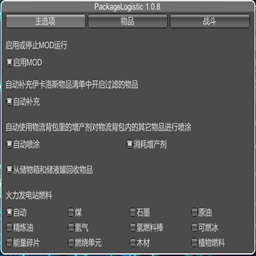
通过物流背包提供物品收发能力。Provides the ability to send and receive items through deliveryPackage

Обычный9 тыс.Логистика

DeliverySlotsTweaks — иконка

DeliverySlotsTweaks

Let replicator and build tools use items in logistic slots. Tweak slots count and stacksize. Right click on hotbar to craft building. 手搓和建造可以直接使用物流背包的物品,配置文件可改物流背包容量及背包堆叠倍率

Эпический92,1 тыс.Mecha

CheatEnabler — иконка

CheatEnabler

Add various cheat functions while disabling abnormal determinants / 添加一些作弊功能,同时屏蔽异常检测

Эпический91,1 тыс.Энергия

BuildToolOpt — иконка

BuildToolOpt

Reduce lag when placing building. Allow directly replace PLS with ILS, and show allowed range. Import blueprint from clipboard directly when Ctrl+V. (Optional)Build ghost/hologram when lack of items. 优化建筑工具:替换升级物流塔,提示塔间距,优化蓝图UI,(可选)建设虚影,(可选)减少物流塔建造卡顿

Редкий40,7 тыс.Чертежи

DSPStationInfo — иконка

DSPStationInfo

Shows the contents of the station Without opening the window. This don't affect achievements or milestones. ウィンドウを開かずにステーションの内容を表示します。実績やマイルストーンには影響しません。

Редкий39,4 тыс.Удобства

FactoryOverclock — иконка

FactoryOverclock

Обеспечивает глубокие инструменты для увеличения скорости производства машин (Ассемблеры, плавильщики, шахтеры, лаборатории, эжекторы, силосы), при этом динамически масштабируя требования к мощности и обходя пропускную способность станции 3600 единиц в минуту и ограничение фракционатора.

Обычный19,1 тыс.Belts and Sorters