Начните вводить название — например, MoreHead, Sodium или PEAK

AutoStationConfig — иконка
Обложка Dyson Sphere ProgramМод для Dyson Sphere Program

AutoStationConfig

от Pasukaru

Автоматически настраивает ILS при размещении.

  • Обычный
  • 19,4 тыс. скачиваний
  • Версия 1.4.0
  • Обновлён 29 января 2022
  • Не обновлялся больше года
  • Транспорт
  • Удобства
  • Хранение

О моде AutoStationConfig

AutoStationConfig — мод для Dyson Sphere Program (Дайсон Сфер Програм) от автора Pasukaru. Автоматически настраивает ILS при размещении.

Его скачали 19,4 тыс. раз: это 86-е место среди модов Dyson Sphere Program в нашем каталоге, редкость — «обычный» (нижняя половина по скачиваниям). Мод давно не обновлялся — проверьте совместимость с текущей версией игры, актуальная версия — 1.4.0.

Для работы ему нужны: BepInEx.

Полное описание AutoStationConfig

Текст автора на языке оригинала

AutoStationConfig

Features

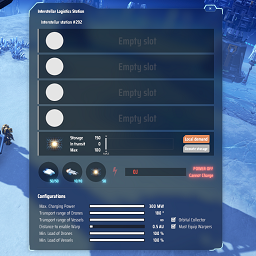
This mod automatically configures PLS (Planetary Logistics Stations) and ILS (Interstellar Logistics Station) when they are placed.

This mod is intended for faster scaling of your production lines in end-game.

By default, PLS will be setup like this (all of this can be changed via config):

  • Automatically add Drones from inventory (if you don't have enough, it will use all that are available)
  • Max Charging Power: Max
  • Transport Range of Drones: Max (180°)
  • Min Load of Drones: 100%

By default, ILS will be setup like this (all of this can be changed via config):

  • Automatically add Drones & Vessels from inventory (if you don't have enough, it will use all that are available)
  • Max Charging Power: Max
  • Transport Range of Drones & Vessels: Max (180° (Drones), Infinite (Vessels))
  • Distance to enable warp: Min (0.5 AU)
  • Min Load of Drones & Vessels 100%
  • Last item slot: Space Warper | 100 | Local Demand | Remote Storage

When there are not enough drones or vessels in your inventory, a message will pop up and a sound will play.

To change the config, enable the mod and start the game once. Once in the main menu, close the game. The available settings will then appear in the r2modman Config Editor (look for pasukaru.dsp.AutoStationConfig).

Changelog

1.4.0

Added configuration option for the amount of warpers requested. Previously was hardcoded to 100. The default value for this config option is still 100, so change it manually if you want something else. Only applies to newly placed stations. Existing stations will not have their warper requests changed.

Thanks to DanielHeEGG for the PR!

1.3.4

The mod now automatically checks all ILS after loading a save and fixes the duplicate warper config glitch. See github ticket #12 for details.

It only needs to run once. So load up your save game, then save it and close the game. Then disable this setting for a possibly faster loading (on large save games).

1.3.3

Fix endless request of Warpers. This was caused by placing ILS from copy/pasting and the source ILS had warpers configured in a different slot. Now it checks if the placed ILS has any Warper slots configured, and if so, will NOT configure the last slot to be a warper request.

1.3.2

Compatibility with latest DSP version (2022-01-24).

Thanks to nclow for the PR!

1.3.1

Compatibility with latest DSP version (2021-04-03).

Thanks to fuhaiwei for the PR!

1.3.0

Send a notification when there are not enough drones / vessels in inventory to auto fill.

1.2.1

Fixed Vessel insertion using configured drone percentage.

Thanks to Veretragna for finding and reporting it!

1.2.0

Added configurable mod settings.

Credits & Thanks to 3therios for the heavy lifting!

1.1.0

Added settings for PLS

1.0.0

Initial Release

Нужно для работы

В r2modman ставится автоматически

Как установить AutoStationConfig

Файл скачивается с официального сервера Thunderstore, без перезаливов и сторонних установщиков

Подробная инструкция для Dyson Sphere Program
  1. Скачайте менеджер модов r2modman (или Gale) и выберите в нём игру Dyson Sphere Program.
  2. Создайте профиль — так моды не смешаются с чистой версией игры.
  3. Найдите «AutoStationConfig» во вкладке Online и нажмите Download — BepInEx и все зависимости подтянутся сами.
  4. Нажмите «Start modded» — игра запустится с модами.
  5. Чтобы сыграть без модов, запустите игру как обычно из Steam — r2modman не трогает чистую версию игры.
Вы автор мода? Поставьте ссылку на русское описание

Вставьте значок в описание на Thunderstore, в README или в Discord — русскоязычные игроки сразу попадут на страницу с переводом и инструкцией.

Описание на русском — Модка
Markdown[![Описание на русском — Модка](https://modka.app/badge.png)](https://modka.app/dyson-sphere-program/pasukaru-autostationconfig/)
HTML<a href="https://modka.app/dyson-sphere-program/pasukaru-autostationconfig/"><img src="https://modka.app/badge.png" alt="Описание на русском — Модка" height="44"></a>
Steam (BBCode)[url=https://modka.app/dyson-sphere-program/pasukaru-autostationconfig/]Описание на русском — Модка[/url]

Частые вопросы о AutoStationConfig

Как установить AutoStationConfig?

Скачайте менеджер модов r2modman (или Gale) и выберите в нём игру Dyson Sphere Program. Создайте профиль — так моды не смешаются с чистой версией игры. Найдите «AutoStationConfig» во вкладке Online и нажмите Download — BepInEx и все зависимости подтянутся сами. Нажмите «Start modded» — игра запустится с модами. Чтобы сыграть без модов, запустите игру как обычно из Steam — r2modman не трогает чистую версию игры.

Безопасен ли AutoStationConfig?

Файл скачивается с официального сервера Thunderstore, куда его загрузил Pasukaru. Мы не перезаливаем и не изменяем моды.

Что нужно для работы AutoStationConfig?

Установите вместе с ним: BepInEx. В менеджере модов зависимости подтягиваются автоматически.

Когда AutoStationConfig обновлялся последний раз?

29 января 2022, актуальная версия — 1.4.0. Это больше года назад: перед установкой проверьте, работает ли мод на текущей версии игры.

FactoryOverclock — иконка

FactoryOverclock

Обеспечивает глубокие инструменты для увеличения скорости производства машин (Ассемблеры, плавильщики, шахтеры, лаборатории, эжекторы, силосы), при этом динамически масштабируя требования к мощности и обходя пропускную способность станции 3600 единиц в минуту и ограничение фракционатора.

Обычный19,1 тыс.Belts and Sorters

PackageLogistic — иконка

PackageLogistic

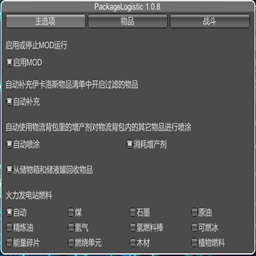
通过物流背包提供物品收发能力。Provides the ability to send and receive items through deliveryPackage

Обычный9 тыс.Логистика

DeliverySlotsTweaks — иконка

DeliverySlotsTweaks

Let replicator and build tools use items in logistic slots. Tweak slots count and stacksize. Right click on hotbar to craft building. 手搓和建造可以直接使用物流背包的物品,配置文件可改物流背包容量及背包堆叠倍率

Эпический92,1 тыс.Mecha

DSPAutoSorter — иконка

DSPAutoSorter

Sort automatically in inventory or storage. Added forced sort mode.This don't affect achievements or milestones. インベントリなどを開いたときに自動的にアイテムをソートします。強制ソートモードを追加しました。実績やマイルストーンには影響しません。

Эпический73,8 тыс.Удобства

DSPStationInfo — иконка

DSPStationInfo

Shows the contents of the station Without opening the window. This don't affect achievements or milestones. ウィンドウを開かずにステーションの内容を表示します。実績やマイルストーンには影響しません。

Редкий39,4 тыс.Удобства

Dustbin — иконка

Dustbin

Can turn Storages and Tanks into Dustbin(Destroy incoming items) / 储物仓和储液罐可以转变为垃圾桶(销毁送进的物品)

Обычный19,3 тыс.Удобства