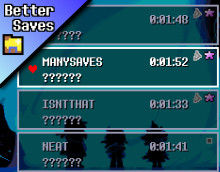
BetterSaves (Infinite Save Slots)
Finally, I can commence my 17 playthroughs with ZERO consequences...
 Мод для DELTARUNE
от BadArtAdventure
A full 60 FPS mod for Deltarune Chapters 1-4.
60 FPS Overhaul — мод для DELTARUNE (Дельтарун) от автора BadArtAdventure. A full 60 FPS mod for Deltarune Chapters 1-4.
Его скачали 60,4 тыс. раз: это 5-е место среди модов DELTARUNE в нашем каталоге, редкость — «легендарный» (топ-5% по скачиваниям). Мод обновлялся в последний месяц, актуальная версия — V2.0.2.
Дополнительных модов для работы не требует.
5 шт · нажмите, чтобы открыть
Текст автора на языке оригинала
A 60 FPS mod for DELTARUNE Chapters 1–5 that is nearly 1:1 with the vanilla game. Every chapter now runs at twice the frame rate, and the goal throughout was that nothing else changes. Every single last thing is the same speed as vanilla, but with twice the smoothness.
It covers Chapter 1 through Chapter 5 and the chapter-select launcher, so everything from the launcher to the credits runs at 60.
Reason for this mod
Other than the obvious fact that 60 FPS generally feels better in almost any scenario, Deltarune is a particularly important case, as it deals with the two places the game leans on hardest: dodging in battle and moving around the overworld. Doubling the frame rate roughly halves input latency and makes fast motion much easier to read, which matters tremendously for a bullet hell game, and Chapter 5 raised the stakes again with a full side-scrolling platformer on top of the battles.
The problem is that GameMaker games measure almost everything in frames rather than seconds. Delta_time does exist in GameMaker, Deltarune just does not use it. This makes scaling almost 100% manual due to the nature of the engine. The point of this mod is to raise the frame rate and leave the actual game alone, hopefully providing a new basis to build on.
Vanilla Parity
The rule I held to was vanilla parity above everything else. Of course, there were instances where the higher frame rate happened to, from a certain perspective, make something look better than the original by accident, such as certain attacks which looked "cooler" or visual effects that felt more interesting. However, in any case, I still treated anything unscaled as a bug and something to absolutely be matched to the vanilla game. The aim is faithfulness, not a remaster. If you have played the game a multitude of times at 30 FPS, your muscle memory should carry over exactly.
Getting there meant going through several thousand individual pieces of timing-sensitive code in each of the later chapters, with Chapter 1 handled separately because it runs on an older internal structure, then testing every fight and cutscene in the game and playtesting the whole thing start to finish before release.
The whole chapter runs at 60 FPS: the overworld, battles, the platforming sections, the dash and runner sections, the festival minigames, Castle Town, the credits, and of course the Weird Route.
The big piece was the 2D platformer, and it really is a whole engine: its own player controller (jump buffering, coyote time, variable jump height), a full set of bullet-hell hazards, a cast of enemies and minibosses, ropes, wind, dash rooms. There is no real need to explain the obvious; Chapter 5 is the biggest chapter yet for both this mod's implementation and in terms of sheer literal content in regard to the base game.
Because the platformer scrolls, it also got the one feature in this mod that is not a straight parity fix:
Smooth Camera (Chapter 5 only, optional)
In the side-scrolling sections, Smooth Camera lets the screen scroll with a sub-pixel camera while the sprites themselves stay crisp, instead of the original whole-pixel steps. It lives in CONFIG > Mod Settings and has three settings:
If you play at 1080p and want a crisp, full-size picture, use the NXRune-compatible download: its border layout gives an exact 2x scale.
What Smooth Camera is
Now, if you're wondering what exactly "Smooth Camera" is and why it was created, it's primarily due to the fact that when converting the platforming sections to 60 FPS, sprite jitter could not reasonably be avoided.
The primary problem is, at 30 FPS the game moves things in whole pixels: Kris walks 4 pixels this frame, the camera follows by 4 pixels, everything stays on the pixel grid. Halve every speed for 60 FPS and a lot of those steps turn into fractions. A speed of 3 becomes 1.5, a jump arc passes through positions like 240.25, and the camera, which follows the player, ends up at fractional positions too. GameMaker then has to decide which whole pixel to draw each sprite on, and it decides differently from one frame to the next depending on where the fraction happens to fall. The result is that while the screen scrolls, sprites can shimmer/jitter by a pixel against the background and against each other, and tile seams can also have a strange flicker. It essentially looks like the image is vibrating, especially during more aggressive camera movement (which is most of Chapter 5).
In the top-down chapters this was fixable in a more boring way: keep everything on whole pixels, carry the leftover fraction over to the next frame, and the camera never leaves the grid. That works because overworld walking is a constant speed. The platformer is different. It is accelerating, decelerating and arcing through the air constantly, and the camera scrolls the whole time, so if you force it onto whole pixels it steps by one pixel at uneven intervals and the scrolling stutters instead. You get to pick between jittery sprites and a juddering camera, and of course, neither is acceptable.
Smooth Camera is the way out of that. The game itself is drawn with the camera on a whole pixel, so every sprite lands cleanly on the pixel grid and stays sharp. Then, when the finished frame is put on the screen, it is shifted by the leftover fraction of a pixel. Because the game is displayed at 2x or more, half a game pixel is a whole screen pixel, so the scroll comes out smooth while the sprites never move off the grid. That is also why PIXEL wants an exact whole-number scale: at 2x the s
Описание длинное — здесь его начало. Читать целиком на странице автора
Файл скачивается с официального сервера GameBanana, без перезаливов и сторонних установщиков
Подробная инструкция для DELTARUNEВставьте значок в описание на GameBanana, в README или в Discord — русскоязычные игроки сразу попадут на страницу с переводом и инструкцией.

[](https://modka.app/deltarune/60-fps-overhaul/)<a href="https://modka.app/deltarune/60-fps-overhaul/"><img src="https://modka.app/badge.png" alt="Описание на русском — Модка" height="44"></a>[url=https://modka.app/deltarune/60-fps-overhaul/]Описание на русском — Модка[/url]Скачайте «60 FPS Overhaul» кнопкой «Скачать» — файл придёт с официального сервера GameBanana. Откройте папку игры: в Steam — правой кнопкой по DELTARUNE → «Управление» → «Просмотреть локальные файлы». У каждой главы свой data.win — в папке главы (например, chapter1_windows); для какой главы мод, автор пишет на его странице. Сначала сделайте копию файла data.win (например, назовите её data_original.win) — по ней игра вернётся к оригиналу. Если в архиве лежит готовый data.win — замените им файл в папке игры. Если в архиве файл .xdelta — примените его к data.win программой Delta Patcher (или xdelta UI): выберите оригинальный data.win, патч и нажмите «Apply patch». Запустите игру как обычно. Чтобы вернуть оригинал, верните сохранённую копию data.win или проверьте целостность файлов в Steam.
Файл скачивается с официального сервера GameBanana, куда его загрузил BadArtAdventure. Мы не перезаливаем и не изменяем моды.
24 октября 2026, актуальная версия — V2.0.2. Дата берётся с официальной страницы мода при каждом обновлении каталога.
Finally, I can commence my 17 playthroughs with ZERO consequences...
The refined 60 FPS mod!
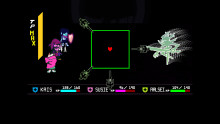
They're green now. Whose attack is this?
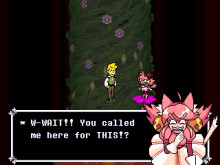
After the Pink & Kris cafe break has been completed, Flowery calls her in to sing the missing Flower Man vocals.
Are you prepared?
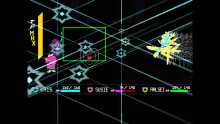
Dess stuck her antlers in an outlet