
Detailed Map Tacks
Введение Вам надоело подсчитывать бонусы за соседство в вашем районе? Этот мод может помочь вам спланировать размещение ваших районов, рассчитав потенциальную доходность

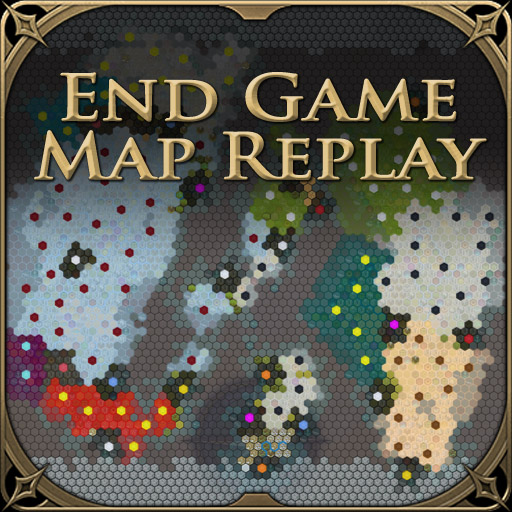
 Мод для Civilization VI
от Technoluddite
Оживите подъем или, возможно, падение вашей цивилизации и посмотрите, как развивался остальной мир в течение игры. Обновлено 2021-11-27 Новое: Bugfixes для игр Hotseat
Endgame Map Replay — мод для Civilization VI (Цивилизацию 6) от автора Technoluddite. Оживите подъем или, возможно, падение вашей цивилизации и посмотрите, как развивался остальной мир в течение игры. Обновлено 2021-11-27 Новое: Bugfixes для игр Hotseat
На него подписались 85 тыс. раз в Мастерской Steam: это 247-е место среди модов Civilization VI в нашем каталоге, редкость — «обычный» (нижняя половина по подпискам). Мод давно не обновлялся — проверьте совместимость с текущей версией игры.
Нужны ли ему другие моды, видно на его странице в Мастерской Steam в блоке «Необходимые продукты» — при подписке Steam сам предложит их добавить.
Текст автора на языке оригинала
Updated 2021-11-27 New: Bugfixes for Hotseat games
A new tab, 'The World', is added to the End Game screen. When selected this displays a map of the of the world, initally showing it as it was at the begining of the game. History can then be replayed showing cities being founded, infrastructure being built, territory gained and lost, and religions spreading over the course of time. There are playback controls at the bottom of the screen to control the replay speed, skip forward and back through time, etc.
The map history is also available during a game, as well as at the end. It can be accessed from the Map History button on the Launch Bar (top left of the screen), and will show the known world as it exists at the time. All the same playback controls are available as for the End Game screen. The In Game map does not reveal any information that the player didn't already have access to. It will only show territory that you have actually explored, and will not show resources that you have not learned about. There are two modes for this screen, a window view and a fullscreen view. By default, it will open in fullscreen mode and you can switch between this and window mode using the expand\collapse button to the left of the close button.
There are a number of configurable options for what is shown on the map: Land ownership or religion overlays; cities, infrastructure, resources and features on each tile; which events should generate a 'ping', and whether to play a sound for each ping. These can be accessed by clicking the leftmost button in the playback controls (the one with the gear icon).
In the End Game screen you can also choose whether to show unrevealed resources, unrevealed territory, whether to scale the size of map to the amount of visible territory (if not showing unrevealed territory) , and whether to dynamically centre the map to try and make sure the edges are through water tiles.
On the In Game map only dynamic sizing is configurable; unrevealed territory and unrevealed resources cannot be shown while the game is still in progress, and the map is always dynamically centred on the revealed territory.
Default settings for most of the options can be changed by editing AKMH_DefaultOptions.lua in the mod directory. You can also completely disable the In Game map, or change whether it defaults to window or fullscreen by setting the relevant option in this file.
Has been tested with huge, sixteen player, maps on marathon speed out to around turn 1700, as a worst case scenario: Impact on the game performance is minimal, adding may be second in between turns in the late game, and one or two seconds to the time to load a save game from around turn 1000. On a standard map at standard game speed there is almost no impact. Map display and playback performance remains acceptable even in this worst case scenario. Maximum playback speed is, however, effected by the size of the map and the amount it is changing from one turn to the next: Speed 10 on a huge map around turn 1000 will be slower than speed 10 on a small map around turn 100. Reverse playback is also slower than forward playback.
This mod needs to be active to track changes to the state of the world, so it is best enabled from the start of a new game, although it can be added to, or removed from, in progress games at any time. Although it does add data to savegames it is not marked as AffectSavegame as it does not make any gameplay changes.
Should work with any combination of Expansions\DLC, but has only been tested with all DLC enabled. Should play nicely with mods that add new districts or wonders, as long as they have icons that are similiar in style and size to those of the vanilla game. Will probably conflict with other mods that change the End Game screen, if there are any of those!?
Has only been tested with singleplayer games, but it should work for hotseat and multiplayer games as well.
Chinese translation by 'D' German translation by Junky included in Civilization VI Mods - German translations Russian translation by Skalozubio included in Civilization VI Mods - Russian translations
Thrones and Palaces What Did I Promise? Greatest Cities Greatest Cities Rewards
Мод ставится подпиской в Мастерской Steam — без архивов, перезаливов и сторонних установщиков
Подробная инструкция для Civilization VIВставьте значок в описание на Мастерская Steam, в README или в Discord — русскоязычные игроки сразу попадут на страницу с переводом и инструкцией.

[](https://modka.app/civilization-6/endgame-map-replay/)<a href="https://modka.app/civilization-6/endgame-map-replay/"><img src="https://modka.app/badge.png" alt="Описание на русском — Модка" height="44"></a>[url=https://modka.app/civilization-6/endgame-map-replay/]Описание на русском — Модка[/url]Откройте страницу мода «Endgame Map Replay» в Мастерской Steam (кнопка «Скачать» на нашем сайте ведёт именно туда) и нажмите «Подписаться» — Steam сам скачает мод и будет его обновлять. Если Steam покажет список обязательных модов, подпишитесь и на них — без них мод не заработает. Запустите Civilization VI, откройте «Дополнительный контент» → «Моды» и включите мод в списке. Если мод не появился в игре, откройте вкладку «Загрузки» в Steam и дождитесь, пока он скачается полностью, затем перезапустите игру. Для игры по сети подпишитесь на одни и те же моды всей компанией: набор модов у хоста и у игроков, как правило, должен совпадать.
Мы ничего не перезаливаем: кнопка скачивания открывает официальную страницу мода в Мастерской Steam. Там нужно нажать «Подписаться» — файлы загрузит и будет обновлять сам Steam.
В сетевой игре Civilization VI набор модов у хоста и у остальных игроков, как правило, должен совпадать: подпишитесь на одни и те же моды всей компанией. Исключения — моды, которые меняют только то, что видите и слышите вы сами; точные требования автор пишет в описании мода.
27 ноября 2021. Это больше года назад: перед установкой проверьте, работает ли мод на текущей версии игры.
Введение Вам надоело подсчитывать бонусы за соседство в вашем районе? Этот мод может помочь вам спланировать размещение ваших районов, рассчитав потенциальную доходность

GoldenAge - Infinity Pinnacle Top и самый полный геймплейный мод в Civilization VI! Добавляет несколько новых режимов игры, капитальный ремонт и исправляет большинство иррациональностей в игре
Введение Вы устали спрашивать цену каждого ИИ, чтобы узнать, кто платит больше всего? Этот мод предоставляет вам интерфейс, чтобы увидеть все предложения ИИ для предметов, которые вы хотите использовать

Новый v7.0 по состоянию на 23.05 - Главный технический редизайн и несколько новых функций, улучшений и исправлений. Подробная информация на вкладке Change Notes. Больше информации в докладе..
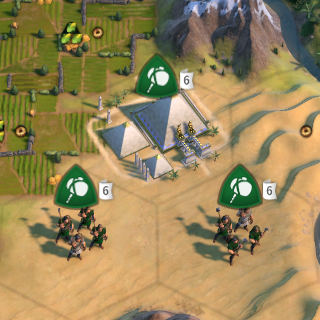
Этот мод может помочь отображать текущие сборки Builder на стороне флага блока для более легкого отслеживания, поэтому вам не нужно выбирать каждый Builder для проверки.
Улучшенный Mod Manager Этот мод перестраивает экран диспетчера модов, в первую очередь, путем разделения одного списка модов по умолчанию на два. Теперь моды отображаются либо слева (инвалидные), либо..