
Maddie's Helping Hand
A grab bag of requests

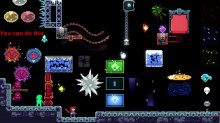
 Мод для Celeste
от Viv
A grab bag helper for Celeste modding, with something for everyone.
VivHelper — мод для Celeste (Селесту) от автора Viv. A grab bag helper for Celeste modding, with something for everyone.
Его скачали 709,4 тыс. раз: это 13-е место среди модов Celeste в нашем каталоге, редкость — «легендарный» (топ-5% по скачиваниям). Мод давно не обновлялся — проверьте совместимость с текущей версией игры, актуальная версия — 1.13.
Дополнительных модов для работы не требует.
3 шт · нажмите, чтобы открыть
Текст автора на языке оригинала
This is my sort of grab bag helper. It contains all sorts of useful stuff you can use for any map, with detailed tooltips and a documentation explaining some of the extra details, while being simple and efficient.
Things it contains:
Holdable Barriers: Requested by iamdadbod for Ferocious Sanctuary, these will be able to hold any holdable entity (included Modded entities!) as if it is on ground, while once picked up becomes intangible.
Holdable Barrier Controller: This allows the creator to customize the colors and particle direction in every holdable barrier in the same room as this controller.
Custom Spinners: These new custom spinners have more options than ever before: Includes: Custom Directories for foreground spinners, background spinners, and custom debris!!, Custom coloring, and shatter coloring, Custom Border Colors, mixing color bgtiles, scaling, custom texture scaling, the ability to remove that pesky rectangle hitbox, and the ability to shatter on dash or on a Flag. (Please read the README for information on how to structure this and feel free to ping me to ask about how to set it up, as its not the most intuitive system as of now, tooltips coming when I have the time to complete them.)
Animated Spinners: The real reason I made those custom spinners was to let these work properly. These are Animated Spinners, which allow you to set animations for your spinners, which can include variations on idly moving and upon being collided with by the player. The README will be useful for setting this up, or you can ping me to ask about how to structure it. Tooltips will be coming soon. Thanks to Scroogle for the rotating spinners sprites I use as example!
Custom Core Messages: Core Messages are notably weird to work with, so I tried to make them easier to customize with these Custom Core Messages. These allow you to structure them so they always render in frame, can change depth to fix the pause bug (try pausing in game while in the end of Core, you'll notice Core Messages render over the pause menu.) These also give Custom Coloring and Color Borders, and give the ability to lock the position (there is a parallax effect by default.)
Corner Boost Block: This block is a partial fix for Corner Boosts. It serves to work as an always-consistent version of the FloatySpaceBlock without Corner Correction, and works for all x-position dependent Corner Boosts, with y-subpixel dependence not taken into account yet. In the README there is an explanation as to how the block actually "fixes" corner boosts.
Crumble Jump Thru: This works nearly identically to Crumble Block on Touch, except it is a Jump Thru Platform.
Reskinnable Berry: This is identical to Reskinning a berry. However, because this is a separate entity it allows you to make multiple different berries in your map. So you can have strawberries and also, say, blueberries.
New Custom Blocks: Custom Coverup Wall: Gives you the ability to set a transparency to the coverup wall and also has a flag attribute to turn it on/off. Custom Dash Block: Adds the ability to set a flag upon being dashed into, as well as have a Custom break sound, something that is bugged in current versions of Dash blocks. Custom Depth Tile Entity: This works like any old solid (Connects to itself like FloatySpaceBlocks) except you can change the depth to whatever you like. Complete with a list of example Depths. (Depths determine how late something is rendered, with lower numbers representing rendering over higher numbers.) Custom Falling Block: This has 4 directions of movement, acceleration and speed modifiers, and the ability to set a flag when triggered as well as when it lands on whatever surface it may land on. (Toggles off when falling again, and on when it lands.) Flag Condition Blocks: I made this for someone before Max's Helping Hand released Flag Exit Blocks, these work the same.
Enter Blocks: Enter blocks are like exit blocks but better. Upon the screen loading, Enter Blocks are invisible (or with a set Transparency (alpha) value). Once entered they change to rendering with a low (customizable) transparency, and once exited, they become a solid block.
Rainbow Spikes: Rainbow Spikes do 2 things. One, they are colorable. If you want to set a custom color spike, just set the Color attribute to whatever color you like, or add a hex code for more customizability. Two, and the cooler piece: By leaving the color blank, it sets itself to the Rainbow Color that Spinners use. These are further customizable with Max's Helping Hand Custom Rainbow Controller, for all sorts of cool uses! Thanks to Dabba for the White Reflection Sprites!
Laser Blocks: Laser blocks are solid entities that shoot the beams that Badeline normally shoots. They can also attach to solids for extra gameplay, with custom timings. These are kind of in beta, in that not all of the sprites work the way that they should (specifically with modifying the Active Timer). Thanks to KAERRA for the initial sprites!
Blackout Controller: This is a weird entity. It allows you to control the screen being blacked out completely save for a few entities (the actual entity depth is -249900, so if you put some entity with depth above that you can render stuff over the blackout.) The current list of overriden entities include: Players Watchtowers (Vanilla and Playback/Hint Watchtowers only) Player Playbacks Any item that is Holdable Also disables all lights and blooms when the effect is set to true. Set it to flag for use with other entities. The relevant flag that sets it on/off is "VH_Blackout"
Custom Player Playbacks: This is a highly requested entity. Custom Player Playbacks give you more options to make your life easier for Ghost Player Playbacks. You can: Change the delay before the animation starts
Описание длинное — здесь его начало. Читать целиком на странице автора
Файл скачивается с официального сервера GameBanana, без перезаливов и сторонних установщиков
Подробная инструкция для CelesteВставьте значок в описание на GameBanana, в README или в Discord — русскоязычные игроки сразу попадут на страницу с переводом и инструкцией.

[](https://modka.app/celeste/vivhelper/)<a href="https://modka.app/celeste/vivhelper/"><img src="https://modka.app/badge.png" alt="Описание на русском — Модка" height="44"></a>[url=https://modka.app/celeste/vivhelper/]Описание на русском — Модка[/url]Скачайте Olympus с официального сайта Everest (everestapi.github.io) и запустите его. Нажмите «Install Everest» — Olympus найдёт Celeste и поставит загрузчик. Скачайте «VivHelper» кнопкой «Скачать» и положите .zip-архив, не распаковывая, в папку Mods внутри папки игры. Запустите игру через Olympus или как обычно — моды появятся в меню «Моды», а новые карты — в списке глав. Многим картам нужны хелперы (Maddie's Helping Hand и другие): Everest предложит скачать недостающие сам.
Файл скачивается с официального сервера GameBanana, куда его загрузил Viv. Мы не перезаливаем и не изменяем моды.
2 февраля 2025, актуальная версия — 1.13. Это больше года назад: перед установкой проверьте, работает ли мод на текущей версии игры.
A grab bag of requests
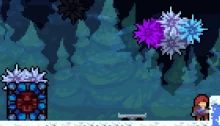
You can see the source code & feature list at [https://github.com/JaThePlayer/FrostHelper](https://github.com/JaThePlayer/FrostHelper/tree/master)
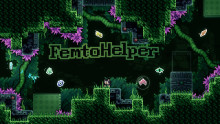
Objects as wacky as this helper's alternative name!

A mod providing useful features for collabs

A collection of new mechanics, conceived of by the community, for everyone to use.

A Celeste mod for controlling gravity in realtime.