Начните вводить название — например, MoreHead, Sodium или PEAK

Lucky Helper — иконка
Обложка CelesteМод для Celeste

Lucky Helper

от Lucky_boy

If have any issues, call me in [Issues · LuckyBoy-7/LuckyHelper](https://github.com/LuckyBoy-7/LuckyHelper/issues), quite thanks!!! Sorry for so many bugs T_T

  • Редкий
  • 79,3 тыс. скачиваний
  • Версия 0.5.3
  • Обновлён 1 ноября 2026
  • Хелперы

О моде Lucky Helper

Lucky Helper — мод для Celeste (Селесту) от автора Lucky_boy. If have any issues, call me in [Issues · LuckyBoy-7/LuckyHelper](https://github.com/LuckyBoy-7/LuckyHelper/issues), quite thanks!!! Sorry for so many bugs T_T

Его скачали 79,3 тыс. раз: это 77-е место среди модов Celeste в нашем каталоге, редкость — «редкий» (топ-50% по скачиваниям). Мод обновлялся в последний месяц, актуальная версия — 0.5.3.

Дополнительных модов для работы не требует.

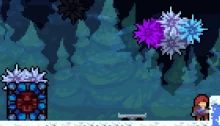
Скриншоты

4 шт · нажмите, чтобы открыть

Полное описание Lucky Helper

Текст автора на языке оригинала

If have any issues, call me in Issues · LuckyBoy-7/LuckyHelper, quite thanks!!! Sorry for so many bugs T_T

中文文档: LuckyBoy-7/LuckyHelper, Bug 反馈: Issues · LuckyBoy-7/LuckyHelper, QQ: 3079351998

更新日志(Update Log): Commits · LuckyBoy-7/LuckyHelper

Tips: You can hover your cursor over an attribute in Loenn to get a more detailed description of some crabbed names.

All Stuff:

  • Custom Water(Entity): You can do simple DIY with water like gravity, speed or fraction of player.
  • Death Count Text(Entity): Show how many death you cost to pass a room
  • Timer Text(Entity): Show how much time you cost to pass a room
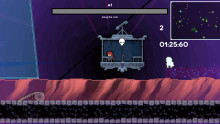
  • Custom Gondola(Entity): You can do simple control with gondola now
  • Arbitrary Shape Conquest Area(Entity): You can do simple DIY with conquest area now(I borrowed some code of Frost Helper, which reduced lots of work! Thanks a lot!)
  • Dream Zone(Entity): A Hollow DreamBlock
  • Enable Player Falling Through JumpThru(Settings): When crouch and press the specified button, you can fall through the JumpThru
  • Light Source Adjust(Trigger): It can adjust the specific entity's light's alpha and radius
  • Decal With Combined Registry(Entity): You can combine different registries to one decal now
  • TalkComponent Controller(Trigger): You can control a TalkComponent to show/hide by flag
  • Overlap Pair Set Flag(Trigger): While two OverlapPairSetFlagTrigger with same id has collision, the flag will be set, otherwise removed
  • Set Falling Block Block Floaty Space Block(Trigger): When FallingBlock land on FloatySpaceBlock, it will stop
  • Fast Bubble Controller(Trigger): Disable fast bubble tech
  • Entity Pinner(Entity): You can create a space that can attract most entities to it's center
  • Speed Redirect(Entity): You can adjust player's speed on entering this area
  • Player Movement Controller(Trigger): You can adjust player's move speed or acceleration...
  • Crystal Heart Dialog Controller(Entity): Set dialog text for the specific crystal heart
  • Set Condition Flag(Trigger): Set flag when player do the specific action
  • Invert Flag(Trigger): Invert the specified flag
  • Logic Flag(Trigger): You can set flag with logic expression like (flag1 && (flag2 || !flag3)), if the expression returns true, you can set the specified flag, which may work like "Flag If Flag"
  • Follower Container(Entity): Eeveelike container, can be attached to player, detached or collected
  • Detach Follower Container(Trigger): Detach Follower Container to a certain position
  • AudioAdjust(Trigger): Adjust specified audio property like volume
  • ColorModifier(Entity): Change entity's color
  • OrderedFlag(Trigger): Set flags orderly
  • ToggleOrbitContainer(Entity):  Moves entities along a circle or sector. Movement can be automatic or controlled via a flag, and can also be influenced by wind.
  • CameraUpdateHelper(Trigger): Control camera's movement in certain situation
  • PlayerInvincibleController(Trigger): Set the player to be invincible under certain conditions, for example, not dying when dashing at the moment of touching spikes.
  • MenuButtonController(Entity): Use flag to disable the certain button in pause menu
  • MoveContainer(Entity): More advanced flag mover(maybe
  • QuantumContainer(Entity): Something like ow's quantum shards
  • Ball(Entity): A holdable ball
  • AtlasPathReplacer(Entity): You can replace some hardcoded image/sprite path in game
  • LinkedWire(Entity): Wires that can be linked together
  • DummyPlayer(Entity): A dummy player that can interact with trigger or trigger dash with flag
  • PasteRoom(Entity): You can paste from other rooms
  • CopyItem(Trigger): You can copy entity, trigger and decal
  • PasteItem(Entity): You can paste items copied by Copy Item Trigger
  • PasteItemDuplicator(Trigger): Generate items using PasteItem entity with offsets
  • CrackAdder(Entity): Automatically add cracks to foreground tiles
  • DisperseSprites(Trigger): Disperse entity sprites like granny in 9a's end farewell

GhostTranspose

  • Ghost Tranpose(Trigger): You can cast a ghost to teleport to the certain point like nang s9
  • Ghost Transpose Barrier(Entity): Blocks ghost but don't block player
  • KillGhost(Trigger)
  • ghost(Decal)

Scripts(Loenn Scripts)

  • flip room: you can flip all stuff in room

LootSpeedrun This is a mini game about looting loots spread among the rooms in limited time, when time is over, you'll be killed and respawn in the hub(where the 'LootSpeedrunController' is placed), To use these stuff, here's instruction:

You have to create a room as hub, put 'LootSpeedrunController' in the hub to set basic params about the mini game, then move it close to a respawnPoint(Player), which will be regarded  by 'LootSpeedrunController' as a returnPoint when time is over, then put 'LootSpeedrunStartup' in the hub and put 'Loot'  and 'LootCollectArea' in other rooms. That's all.

  • Loot(Entity): An entity like strawberry but with a value field and only works in this mini game
  • LootCollectArea(Trigger): Loot can only be collected when player touches this
  • LootInfoVisibleSet(Trigger): To show or hide texts of timer and looted value
  • LootMaxValueText(Entity): An text to show the max looted value
  • LootSpeedrunController(Entity): Set basic info about this loot speedrun like time or time reduce speed, and will find the closest spawn point as a return point when time is over
  • LootSpeedrunInfoDisplay(Entity, but instantiated by LootSpeedrunController): Show left time and gained values
  • LootSpeedrunStartup(Trigger): The entrance of this loot speedrun, it will start t

Описание длинное — здесь его начало. Читать целиком на странице автора

Как установить Lucky Helper

Файл скачивается с официального сервера GameBanana, без перезаливов и сторонних установщиков

Подробная инструкция для Celeste
  1. Скачайте Olympus с официального сайта Everest (everestapi.github.io) и запустите его.
  2. Нажмите «Install Everest» — Olympus найдёт Celeste и поставит загрузчик.
  3. Скачайте «Lucky Helper» кнопкой «Скачать» и положите .zip-архив, не распаковывая, в папку Mods внутри папки игры.
  4. Запустите игру через Olympus или как обычно — моды появятся в меню «Моды», а новые карты — в списке глав.
  5. Многим картам нужны хелперы (Maddie's Helping Hand и другие): Everest предложит скачать недостающие сам.
Вы автор мода? Поставьте ссылку на русское описание

Вставьте значок в описание на GameBanana, в README или в Discord — русскоязычные игроки сразу попадут на страницу с переводом и инструкцией.

Описание на русском — Модка
Markdown[![Описание на русском — Модка](https://modka.app/badge.png)](https://modka.app/celeste/lucky-helper/)
HTML<a href="https://modka.app/celeste/lucky-helper/"><img src="https://modka.app/badge.png" alt="Описание на русском — Модка" height="44"></a>
Steam (BBCode)[url=https://modka.app/celeste/lucky-helper/]Описание на русском — Модка[/url]

Частые вопросы о Lucky Helper

Как установить Lucky Helper?

Скачайте Olympus с официального сайта Everest (everestapi.github.io) и запустите его. Нажмите «Install Everest» — Olympus найдёт Celeste и поставит загрузчик. Скачайте «Lucky Helper» кнопкой «Скачать» и положите .zip-архив, не распаковывая, в папку Mods внутри папки игры. Запустите игру через Olympus или как обычно — моды появятся в меню «Моды», а новые карты — в списке глав. Многим картам нужны хелперы (Maddie's Helping Hand и другие): Everest предложит скачать недостающие сам.

Безопасен ли Lucky Helper?

Файл скачивается с официального сервера GameBanana, куда его загрузил Lucky_boy. Мы не перезаливаем и не изменяем моды.

Когда Lucky Helper обновлялся последний раз?

1 ноября 2026, актуальная версия — 0.5.3. Дата берётся с официальной страницы мода при каждом обновлении каталога.

Похожие моды

Все моды на Celeste
Frost Helper — иконка

Frost Helper

You can see the source code & feature list at [https://github.com/JaThePlayer/FrostHelper](https://github.com/JaThePlayer/FrostHelper/tree/master)
Легендарный1,5 млнХелперы

FemtoHelper — иконка

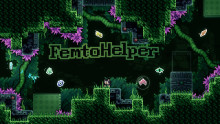
FemtoHelper

Objects as wacky as this helper's alternative name!

Легендарный1,2 млнХелперы

Collab Utils 2 — иконка

Collab Utils 2

A mod providing useful features for collabs

Легендарный1 млнХелперы

Communal Helper — иконка

Communal Helper

A collection of new mechanics, conceived of by the community, for everyone to use.

Легендарный987,2 тыс.Хелперы

Gravity Helper — иконка

Gravity Helper

A Celeste mod for controlling gravity in realtime.

Легендарный841 тыс.Хелперы