Начните вводить название — например, MoreHead, Sodium или PEAK

Jungle Helper — иконка
Обложка CelesteМод для Celeste

Jungle Helper

от Thegur90

This helper contains the code and assets for the [Celeste: Into The Jungle](https://gamebanana.com/mods/292719) mod. Both custom entities / triggers and assets can be used in other maps (with credit)

  • Легендарный
  • 801,8 тыс. скачиваний
  • Версия 1.4.11
  • Обновлён 5 октября 2026
  • Хелперы

О моде Jungle Helper

Jungle Helper — мод для Celeste (Селесту) от автора Thegur90. This helper contains the code and assets for the [Celeste: Into The Jungle](https://gamebanana.com/mods/292719) mod. Both custom entities / triggers and assets can be used in other maps (with credit)

Его скачали 801,8 тыс. раз: это 11-е место среди модов Celeste в нашем каталоге, редкость — «легендарный» (топ-5% по скачиваниям). Мод обновлялся в последние полгода, актуальная версия — 1.4.11.

Дополнительных модов для работы не требует.

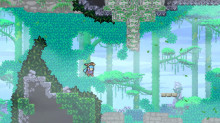
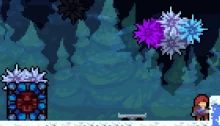
Скриншоты

3 шт · нажмите, чтобы открыть

Полное описание Jungle Helper

Текст автора на языке оригинала

Jungle Helper

This helper contains the code and assets for the Celeste: Into The Jungle mod. Both custom entities / triggers and assets can be used in other maps (with credit) by having this helper as a dependency.

Custom Entities

  • Attach Trigger Controller: a controller allowing to attach any trigger to any entity. Place the "T" on the trigger, and the "E" on the entity. If you need filters (because entities or triggers overlap), you can use the controller's properties.
  • Bouncy Shroom: a mushroom that bounces Madeline. Comes in up, up-left and up-right variants.
  • Breakable Pot: a pot you can throw on the ground or on a wall to get either a key to open doors, or... a rupee that does nothing.
  • Cassette with Custom Preview Music: works like a cassette, except you can pick which music event is played when you collect the cassette (if you have custom B-side music), or pick which of the vanilla B-side songs to use. Keep in mind that custom preview events have to be structured like the vanilla one.
  • Cheat Code Controller: allows the player to enter the vanilla cheat code (Left, Right, Journal, Grab, Up, Up, Down, Left, Grab, Confirm) to enable Cheat Mode and be kicked back to the overworld, like in vanilla Prologue.
  • Cockatiel: a decorative entity working much like vanilla flutter birds.
  • Climbable One-Way Platform: a platform you can grab on one side, but that you can also go through if you don't press Grab (contrary to sideways jumpthrus). This is useful to make ropes for example.
  • Cobweb: Madeline gets stuck in those if she hits them, and can only get out by dashing. Cobwebs are one-use: once Madeline dashed out, the cobweb disappears and does not respawn.
  • Delayed Auto-Falling Block: a falling block that falls automatically after a set delay. Also has customizable shake time before falling.
  • Dragonfly: a decorative entity with recolorable wings and randomized animation offset.
  • Falling Killbox: a killbox... except falling. Useful to prevent the player from going down too fast in a falling section.
  • Firefly: a flying dot that goes around and follows the player when touched, much like moon creatures.
  • Grabless Golden Berry: like the vanilla dashless golden berry, except it flies away when the player grabs on a wall.
  • Gecko: goes up and down on a set path. It can be made to kill the player, or to be purely decorative. It can also be used to show a tutorial similar to the Custom Tutorial Bird (with a Gecko Tutorial Trigger that allows showing or hiding the tutorial bubble).
  • Green Crystal: much like a Theo crystal, except it cannot be held. It can only be moved around by moving/removing the platform it is standing on.
  • Green Crystal Gate: a temple gate that only opens when a Green Crystal is nearby.
  • Hawk: when Madeline touches it, it will carry her to the right until she jumps or dashes out. It has customizable speed.
  • Lantern: a light the player can grab and keep without having to hold Grab. To drop it, the player can press Down + Grab. She will also lose the lantern when she touches water. When Madeline has the lantern, she cannot dash, but the lantern has effects on a few entities:
  • Mossy Wall: moss that sticks to a wall, preventing Madeline from grabbing it, like ice walls. When a lantern gets close, the moss fades away and allows Madeline to climb.
  • Snake: an enemy that starts chasing Madeline if she gets too close. When a lantern gets close to its spawn point, the snake gets scared and rushes away to a hiding spot, which is its node.
  • Spiny Plant: a vertical plant that kills on touch. When a lantern gets close, the plant retracts, allowing Madeline to pass through without getting hurt.
  • Noded Crumble Platform: a crumble platform that will move between different positions before respawning.
  • Predator Plant: a plant attacking Madeline when she gets close. Madeline can be killed by the plant, but can also jump on it to bounce.
  • Rolling Rock: a boulder that starts rolling when Madeline walks to the right of it, and goes right. It breaks dash blocks along the way, and shatters if it hits a wall.
  • Slide Block: a Kevin-looking block that moves in the direction Madeline is dashing. Once the block moved once, it needs to be refilled to move again. Comes in restrained (green) and restraintless (red) versions: restrained blocks stop after they moved by their own width/height; restraintless blocks move until they hit a wall or the edge of the screen.
  • Slide Block Refill: a refill that can be collected by the player to refill all slide blocks in the room, so that they can be moved again.
  • Spider Boss: a spider that falls down from the top of the screen, killing Madeline if she hits it. The spider color determines its difficulty: Blue, Purple and Red in this order, with Red being the one falling the most often, and tracking the player at the fastest speed.
  • Swing Cassette Block: cassette blocks that play their music in a 66-34-66-34... pattern instead of 50-50-50-50...

Has no effect on gameplay - it's only there to make your cassette music Swing-ified.

  • Torch: a torch that sets a session flag when Madeline lights it by touching it.
  • Treasure Chest: a chest that opens with a key, and spawns a crystal heart when open.
  • Zip Moving Platform: a moving platform behaving much like a zip mover.

Custom Triggers

  • Drop Lantern Trigger: a trigger that forces Madeline to drop her lantern. The lantern can either just fall on the ground, or be destroyed (in that case, it fades out on the ground and goes back to its spawn point).
  • Gecko Tutorial Trigger: much like the Custom Bird Tutorial Trigger from Everest, it allows to show/hide the tutorial bubble of a gecko (see previous section).
  • UI Image Trigger: a high-res image will be shown on-screen when Madeline enters

Описание длинное — здесь его начало. Читать целиком на странице автора

Как установить Jungle Helper

Файл скачивается с официального сервера GameBanana, без перезаливов и сторонних установщиков

Подробная инструкция для Celeste
  1. Скачайте Olympus с официального сайта Everest (everestapi.github.io) и запустите его.
  2. Нажмите «Install Everest» — Olympus найдёт Celeste и поставит загрузчик.
  3. Скачайте «Jungle Helper» кнопкой «Скачать» и положите .zip-архив, не распаковывая, в папку Mods внутри папки игры.
  4. Запустите игру через Olympus или как обычно — моды появятся в меню «Моды», а новые карты — в списке глав.
  5. Многим картам нужны хелперы (Maddie's Helping Hand и другие): Everest предложит скачать недостающие сам.
Вы автор мода? Поставьте ссылку на русское описание

Вставьте значок в описание на GameBanana, в README или в Discord — русскоязычные игроки сразу попадут на страницу с переводом и инструкцией.

Описание на русском — Модка
Markdown[![Описание на русском — Модка](https://modka.app/badge.png)](https://modka.app/celeste/jungle-helper/)
HTML<a href="https://modka.app/celeste/jungle-helper/"><img src="https://modka.app/badge.png" alt="Описание на русском — Модка" height="44"></a>
Steam (BBCode)[url=https://modka.app/celeste/jungle-helper/]Описание на русском — Модка[/url]

Частые вопросы о Jungle Helper

Как установить Jungle Helper?

Скачайте Olympus с официального сайта Everest (everestapi.github.io) и запустите его. Нажмите «Install Everest» — Olympus найдёт Celeste и поставит загрузчик. Скачайте «Jungle Helper» кнопкой «Скачать» и положите .zip-архив, не распаковывая, в папку Mods внутри папки игры. Запустите игру через Olympus или как обычно — моды появятся в меню «Моды», а новые карты — в списке глав. Многим картам нужны хелперы (Maddie's Helping Hand и другие): Everest предложит скачать недостающие сам.

Безопасен ли Jungle Helper?

Файл скачивается с официального сервера GameBanana, куда его загрузил Thegur90. Мы не перезаливаем и не изменяем моды.

Когда Jungle Helper обновлялся последний раз?

5 октября 2026, актуальная версия — 1.4.11. Дата берётся с официальной страницы мода при каждом обновлении каталога.

Похожие моды

Все моды на Celeste
Frost Helper — иконка

Frost Helper

You can see the source code & feature list at [https://github.com/JaThePlayer/FrostHelper](https://github.com/JaThePlayer/FrostHelper/tree/master)
Легендарный1,5 млнХелперы

FemtoHelper — иконка

FemtoHelper

Objects as wacky as this helper's alternative name!

Легендарный1,2 млнХелперы

Collab Utils 2 — иконка

Collab Utils 2

A mod providing useful features for collabs

Легендарный1 млнХелперы

Communal Helper — иконка

Communal Helper

A collection of new mechanics, conceived of by the community, for everyone to use.

Легендарный987,2 тыс.Хелперы

Gravity Helper — иконка

Gravity Helper

A Celeste mod for controlling gravity in realtime.

Легендарный841 тыс.Хелперы