Начните вводить название — например, MoreHead, Sodium или PEAK

ImGuiHelper — иконка
Обложка CelesteМод для Celeste

ImGuiHelper

от Samah

[GitHub Project](https://github.com/swoolcock/ImGuiHelper)

  • Обычный
  • 8,5 тыс. скачиваний
  • Версия 0.1.4
  • Обновлён 29 мая 2026
  • Хелперы

О моде ImGuiHelper

ImGuiHelper — мод для Celeste (Селесту) от автора Samah. [GitHub Project](https://github.com/swoolcock/ImGuiHelper)

Его скачали 8,5 тыс. раз: это 272-е место среди модов Celeste в нашем каталоге, редкость — «обычный» (нижняя половина по скачиваниям). Мод обновлялся в последние полгода, актуальная версия — 0.1.4.

Дополнительных модов для работы не требует.

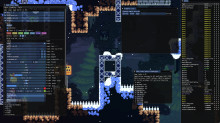
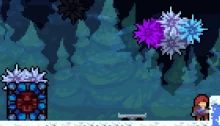
Скриншоты

2 шт · нажмите, чтобы открыть

Полное описание ImGuiHelper

Текст автора на языке оригинала

ImGuiHelper

GitHub Project

A Celeste helper mod that provides ImGui.NET bindings to other code helpers.

Dear ImGui is a library that provides an Immediate Mode Graphical User Interface API for coders to design and draw simple overlays very quickly. It's mostly used for tools and debugging, not for actual gameplay.

tl;dr: Fancy buttons and windows in Celeste.

For code modders:

This requires the Core build of Everest, it will not run on the .NET Framework or Mono builds.

  • Add a package reference to ImGui.NET:
  • Add an assembly reference to ImGuiHelper.dll (stripped, if you want).
  • Make one or more classes that inherit from ImGuiHandler.
  • In these classes, override the Render method.
  • Call ImGuiNET.ImGui.Begin("Some Window Name");
  • Make other calls to ImGui to create your interface.
  • Call ImGuiNET.ImGui.End();
  • Register the handler classes by calling ImGuiManager.Handlers.Add(someHandler);.
  • There is a simple mouse cursor that can be shown if desired (you probably do). Be warned that I am not an artist.
  • The entire GUI is drawn to a single render target before Engine.Render, and then that is drawn over the screen after Engine.Render.
  • You can make as many windows in a single handler as you like, as long as the Begin and End calls are balanced.
  • You should probably also ensure you never have more than one instance of a single handler registered.

(Check with ImGuiManager.Handlers.OfType().Any())

  • Windows don't have to be rendered; if you only want to display the window in certain situations then you can override the Update method in the handler to decide what to do. This is executed after Engine.Update
  • Docking is enabled by default.

For players:

You only need to install this if it's a dependency of something else.

Commands:

  • imguidemo : Opens the default Dear ImGui demo window.
  • imguiclear : Removes all handlers and their corresponding windows.
  • scene : Opens a work-in-progress scene viewer that shows all entities in the current scene.

Settings:

  • Show Mouse Cursor On Startup (On/Off) : Defines whether the mouse cursor should display when the game starts, defaults to Off.
  • Toggle Mouse Cursor (Binding) : Defines a hotkey to toggle the mouse cursor, unbound by default.

Как установить ImGuiHelper

Файл скачивается с официального сервера GameBanana, без перезаливов и сторонних установщиков

Подробная инструкция для Celeste
  1. Скачайте Olympus с официального сайта Everest (everestapi.github.io) и запустите его.
  2. Нажмите «Install Everest» — Olympus найдёт Celeste и поставит загрузчик.
  3. Скачайте «ImGuiHelper» кнопкой «Скачать» и положите .zip-архив, не распаковывая, в папку Mods внутри папки игры.
  4. Запустите игру через Olympus или как обычно — моды появятся в меню «Моды», а новые карты — в списке глав.
  5. Многим картам нужны хелперы (Maddie's Helping Hand и другие): Everest предложит скачать недостающие сам.
Вы автор мода? Поставьте ссылку на русское описание

Вставьте значок в описание на GameBanana, в README или в Discord — русскоязычные игроки сразу попадут на страницу с переводом и инструкцией.

Описание на русском — Модка
Markdown[![Описание на русском — Модка](https://modka.app/badge.png)](https://modka.app/celeste/imguihelper/)
HTML<a href="https://modka.app/celeste/imguihelper/"><img src="https://modka.app/badge.png" alt="Описание на русском — Модка" height="44"></a>
Steam (BBCode)[url=https://modka.app/celeste/imguihelper/]Описание на русском — Модка[/url]

Частые вопросы о ImGuiHelper

Как установить ImGuiHelper?

Скачайте Olympus с официального сайта Everest (everestapi.github.io) и запустите его. Нажмите «Install Everest» — Olympus найдёт Celeste и поставит загрузчик. Скачайте «ImGuiHelper» кнопкой «Скачать» и положите .zip-архив, не распаковывая, в папку Mods внутри папки игры. Запустите игру через Olympus или как обычно — моды появятся в меню «Моды», а новые карты — в списке глав. Многим картам нужны хелперы (Maddie's Helping Hand и другие): Everest предложит скачать недостающие сам.

Безопасен ли ImGuiHelper?

Файл скачивается с официального сервера GameBanana, куда его загрузил Samah. Мы не перезаливаем и не изменяем моды.

Когда ImGuiHelper обновлялся последний раз?

29 мая 2026, актуальная версия — 0.1.4. Дата берётся с официальной страницы мода при каждом обновлении каталога.

Похожие моды

Все моды на Celeste
Frost Helper — иконка

Frost Helper

You can see the source code & feature list at [https://github.com/JaThePlayer/FrostHelper](https://github.com/JaThePlayer/FrostHelper/tree/master)
Легендарный1,5 млнХелперы

FemtoHelper — иконка

FemtoHelper

Objects as wacky as this helper's alternative name!

Легендарный1,2 млнХелперы

Collab Utils 2 — иконка

Collab Utils 2

A mod providing useful features for collabs

Легендарный1 млнХелперы

Communal Helper — иконка

Communal Helper

A collection of new mechanics, conceived of by the community, for everyone to use.

Легендарный987,2 тыс.Хелперы

Gravity Helper — иконка

Gravity Helper

A Celeste mod for controlling gravity in realtime.

Легендарный841 тыс.Хелперы